


Participant
November 27, 2022

P: Updated to 12.1 & seeing "Failed to initialize pixel-mask storage' error after relaunch (Win)

  • November 27, 2022
  • 32 replies
  • 7476 views

Based on posted recommendations here, I updated my LR C to 12.1., however, I still do get the error message and am not able to open LR at all. 
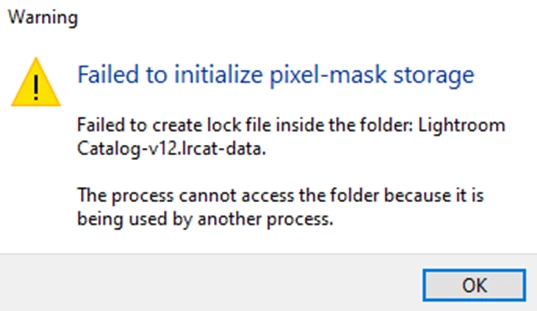
 

What shall I do?

Views


32 replies

Rikk Flohr_Photography
Community Manager
Community Manager
February 14, 2023

Greetings all,


Updates for Adobe Photography products have been released.  The February 2023  updates contain a fix for this issue. 

If you do not see the update in your Creative Cloud Application, you can refresh it by hitting [Ctrl/Cmd]+[Alt/Opt]+[ R ].

Note: It may take up to 24 hours for your update to be available in your Creative Cloud app.


Thank you for your patience.

Rikk Flohr: Adobe Photography Org
Community Expert
February 12, 2023

Have you tried rebooting the machine?

Participant
February 12, 2023

Hello everyone,

I was copying my Lightroom catalog from one external HD to another, and interrupted the process because the computer was frozen. I later tried to open my Lightroom catalog from the original external HD and the message "failed to initialize pixel-mask storage" comes up. It says the process cannot access the folder because it is being used by another process, even if I stopped the copying of my catalog to the other external HD.

Since then I haven't been able to open Lightroom Classic and I am afraid of losing my work. 

I am currently on the 12.1 Lightroom Version and MacOS Ventura 13.0.1

Please help 😞

Ian Lyons
Community Expert
Community Expert
February 12, 2023

It's a known issue discussed in this linked thread https://community.adobe.com/t5/lightroom-classic-bugs/p-updated-to-12-1-amp-seeing-quot-failed-to-initialize-pixel-mask-storage-error-after-relaunch-win/idi-p/13424943


Note that your post will likely be merged into above thread.

Participant
February 4, 2023

Guten Tag!

Nachdem ich dazu hier noch nichts gefunden habe und ich nicht mehr weiter weiß, melde ich mich auch mal hier. Hello World!


Leider habe ich gestern aus versehen eine SSD mit einem gespeicherten Katalog darauf aus versehen von meinem Macbook M1 Pro abgezogen (Standby-Modus, Katalog war offen). Jetzt komme ich nicht mehr rein (auch nicht in die auf den Desktop kopierte Version). Hat da jemand eine Idee, woran es liegen könnte? Folgende Fehlermeldung wird mir dabei angezeigt: 

Pixelmaskenspeicher konnte nicht initialisiert werden

Die Sperrdatei im Ordner HIERNAMEEINFÜGEN2023.lrcat-data konnte nicht erstellt werden.

Der Prozess kann nicht auf den Ordner zugreifen, da er von einem anderen Prozess verwendet wird.

Danke für die Hilfe und liebe Grüße!

Participant
February 4, 2023

Bonjour, 

J'ai exactement le même problème sur un catalogue ouvert hier, sur lequel j'ai beaucoup travaillé dans la nuit, et qui est impossible à ouvrir aujourd'hui


Message :

Échec de l'initialisation du stockage du masque de pixels

Échec de la création du fichier de verrouillage dans le dossier : Shoot 26 jan.lrcat-data.

Le processus ne peut pas accéder au dossier car il est utilisé par un autre processus.

Participant
February 3, 2023

@chuckc97610624 I'm literally crying in gratitude. Thank you so much for your help!!

remyh59711007
Known Participant
January 31, 2023

En lisant tous les commentaires j'ai pu résoudre mon problème:

1- copier le catalogue sous un autre nom

2-Lancer Lr avec Option appuyé(Ctrl en Windows) pour pouvoir choisir le catalogue avec lequel lancer Lr, j'ai donc choisi l'avant dernier

3- Ouvrir le catalogue renommé sous l'action n°1

et voila

Participant
January 30, 2023

We have an iMac with macOS Monterey 12.5.1 and the actual Lightroom 12.1.
On the iMac we have an administrator account an an user account.

Somme weeks ago, on starting Lightroom Classic in the administrator account, i got the error message

"Pixelmaskenspeicher konnte nicht initialisiert werden"

The Lockfile in the folder LR_Katalog_Classic-2023.lrcat-data coud not created.

I tried to give Lightroom Classic full HDD acces, same problem.
Then i removed that file ans start Lightroom again, now it starts.

So i close all applications, log of from the admin account and switch to the user account.
If i start Lightroom Classic, i get the same error message. I can delete that file and restart Lightroom.
It works. If i switch back to the admin account, same problem!!!
I have to delete that file manually before i can start Lightroom.


Can anybody help us?

Thank you and BR
Rainer
Fotoclub Nenzing

remyh59711007
Known Participant
January 30, 2023

Échec de l'initialisation du stockage du masque de pixels

Échec de la création du fichier de verrouillage dans le dossier : Lightroom Catalog-2-2-

v12-2.Ircat-data.

Le processus ne peut pas accéder au dossier car il est utilisé par un autre processus.


C'est la 2ème fois que cela arrive, pour contourner j'ouvre un catalogue plus ancien  mais je perds mes denières modifications.


Quelqu'un a eu ce problème? et a su le résoudre?

Merci de vos réponses


GoldingD
Legend
January 30, 2023

What version of LrC?

older than v12.0.1?


remyh59711007
Known Participant
January 30, 2023
No 12.1. and I got it also with the previous version

--
Rémy Hayo

+352 691 510 268
gradyphoto
Participant
January 19, 2023

Success, I think.

I made a copy of my folder and named it "Grady giga COPY V10-v12.lrcat".  I clicked on this folder and Lightroom Classic 12.1.0.8 has apparently opened up with my photos.  I have no idea why  "Grady giga V10-v12.lrcat" gives the "lock file" error message, but a copy of it does not.  Will the lock file issue come up again?    Will I always need to click on "Grady giga COPY V10-v12.lrcat" ?

Possibly more to come.

gradyphoto
Participant
January 18, 2023

fyi.  specific data file where CURRENT folder was found and renamed is "Grady giga V10-v12.lrcat-data"