
Participant
April 3, 2019
Beantwortet

Attempt to change Capture Time mm/dd/yyyy not working

  • April 3, 2019
  • 1 Antwort
  • 1210 Ansichten

I am using Lightroom Classic CC 8.2 on a Mac running Mojave 10.14.4 and can no longer change the Capture Time  correctly in the Metadata using the "Change Capture Time" function. Specifically, if you try to change the month, date, and year of Capture Time either for a single photo or for a group of photos, the month and day is accepted and changed correctly but you can only input three digits in YYYY field, not the full four digits. Moreover, if you try to enter the forth digit of the year, only that last digit is accepted and the date gets recorded incorrectly on the stored metadata.

For example,  if want to change the Capture Date to "06/15/1998", Lightroom accepts the 06/15 part of the date but will not accept the full 4-digits "1998 - only the first three digits "199". If you try to input the forth digit "8", Lightroom only accepts and stores the last (right-most) digit and the changed date gets erroneously set to 6/15/   8 – see screen shot.

  The metadata on the catalog is also screwed up - see the entries "0003" (should be "2003") and "0097" (should be "1997").
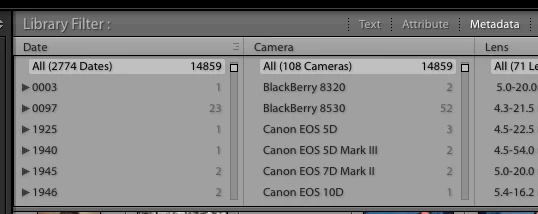
This problem has stopped my scanning project since all the photos I am scanning need to have the Capture Time reset.

Any help to this problem is appreciated.

    Dieses Thema wurde für Antworten geschlossen.
    Beste Antwort von johnrellis

    The year box has long been very fussy on Mac OS -- if you pause just a fraction of a second, any further typing will overwrite what came before. So try typing as fast as you can, with no pauses.  See this old bug report: Lightroom: Unable to set capture date to 1966 (Mac) | Photoshop Family Customer Community

    1 Antwort

    johnrellis
    johnrellisAntwort
    Legend
    April 4, 2019

    The year box has long been very fussy on Mac OS -- if you pause just a fraction of a second, any further typing will overwrite what came before. So try typing as fast as you can, with no pauses.  See this old bug report: Lightroom: Unable to set capture date to 1966 (Mac) | Photoshop Family Customer Community

    johnrellis
    Legend
    April 4, 2019

    Also, I can replicate your behavior if I pause a fraction of a heartbeat between each digit.  Depending on how slowly I type, I can get the fourth digit to overwrite the first three.  (I'm a very fast typist so I rarely see this issue.)

    bayheadAutor
    Participant
    April 5, 2019

    Thank you for your help with this. Typing fast worked and I was able to

    change the date as desired. Problem solved. I think I had slowed down my

    typing because I had encountered the problem and was trying to press each

    key carefully. Ha! Sometimes it's better to go fast than to go slow.

    I marked the answer "Correct" as requested. Thanks again.

    Tom