


Blue Baron II
Inspiring
October 21, 2017
Answered

Can't get Range Mask to turn on

  • October 21, 2017
  • 1 reply
  • 14715 views

I just installed the latest Lightroom Classic CC version 7.0.  I have followed the instructions to use the new Range Mask tools.  I created a mask using the graduated filter and selected the Brush option.  Range Mask is grayed out and clicking on it has not effect. So, I am not able to use it at all.  I tried updating my video driver, but that had no effect.  I am using Windows 10 with an Nvidia Quadro M4000 video card.  Anyone have any idea why I can't access the Range Mask?
    This topic has been closed for replies.
    Correct answer Rob_Cullen

    and selected the Brush option

    Are you selecting the Brush that is within the Gradient Adjustment Panel?  (And NOT the Local Adjustment Brush)

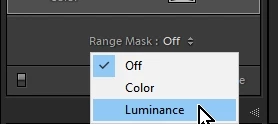
    With the Gradient Filter drawn, simply select the Range Mask  "Color" or "Luminance" options below the adjustment panel and work the sliders.

    And the Gradient Brush continues to work for me. (Hold [Alt] to brush erase the gradient.)

    1 reply

    Rob_Cullen
    Community Expert
    Rob_CullenCommunity ExpertCorrect answer
    Community Expert
    October 21, 2017

    and selected the Brush option

    Are you selecting the Brush that is within the Gradient Adjustment Panel?  (And NOT the Local Adjustment Brush)

    With the Gradient Filter drawn, simply select the Range Mask  "Color" or "Luminance" options below the adjustment panel and work the sliders.

    And the Gradient Brush continues to work for me. (Hold [Alt] to brush erase the gradient.)

    Regards. My System: Windows-11, Lightroom-Classic 15.0, Photoshop 27.0, ACR 18.0, Lightroom 9.0, Lr-iOS 10.4.0, Bridge 16.0 .
    Blue Baron II
    Inspiring
    October 21, 2017

    Updating the process took care of this and the Dehaze problem.  Before updating the process, I could not select "Color" or "Luminance" because the Range mask was grayed out.  Now it is selectable.

    bob490
    Participant
    November 1, 2017

    Has anyone managed to remedy this issue? I too am unable to open the Range mask option? looks to be off but fails to allow editing. any ideas?

    I have updated/reinstalled.

    Lightroom Classic version: 7.0.1 [ 1142117 ]

    License: Creative Cloud

    Operating system: Windows 10

    Version: 10.0