


Participant
September 9, 2023
Question

can't remove a folder

  • September 9, 2023
  • 7 replies
  • 1440 views

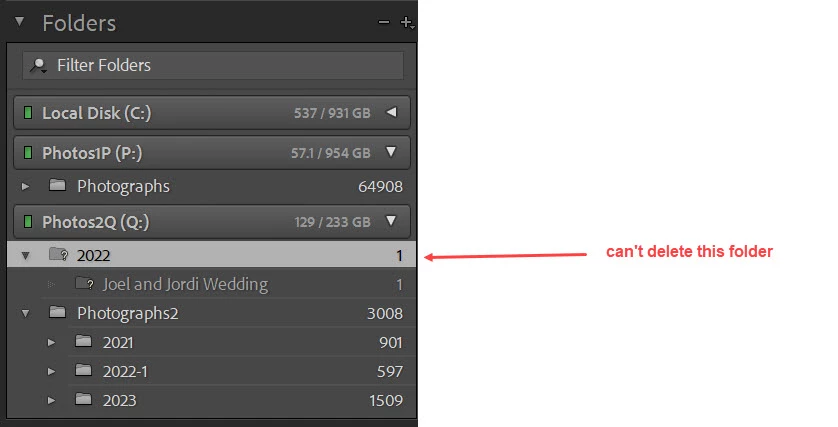
I am trying to remove a folder from my catalog and when I select that folder and clich remove nothing happens.  I even tried to delete the original folder on my physical drive and that did not work.  I subsequently created an new folder on my hard drive and selected find missing folder and nothing happend.

How do I delete this folder.   It is called 2022 and I am using windows.
7 replies

Participant
September 10, 2023

Thanks for all the replies.

I have physically deleted the folder and sub folder, including the files from my hard disk hence  the ? next to the folder name.

I also tied to remove the subfolder.  Nothing happens.   I tried to go to the parent folder and still nothing happens.

I also tried optimize catalog and that also did not work.  

JohanElzenga
Community Expert
Community Expert
September 10, 2023

Just to make sure that you tried this the correct way. Did you select the image in the Lightroom library grid, right clicked it and chose to remove it? Then did you right click on the subfolder in the Lightroom folder panel and chose to remove it? Same for the parent folder?


-- Johan W. Elzenga
Participant
September 12, 2023

I tried to do that and r click the folder and files and select remove it but nothing happend and the files and folders remained in the lightroom catalog.  So in the end I physically deleted the folder and files from my hard disk.  However they still remain in the lightroom catalog and I cant get rid of them.

JohanElzenga
Community Expert
Community Expert
September 10, 2023

Try removing the subfolder first. If that does not work either, then remove the image in that subfolder and try again.


-- Johan W. Elzenga
Rob_Cullen
Community Expert
Community Expert
September 10, 2023

You would normally see a warning message for this, but- Have you tried 'Removing' the one photo from the library first. ie. the file shown in the {Joel....} sub-folder, then remove the folders?


Regards. My System: Windows-11, Lightroom-Classic 15.1.1, Photoshop 27.3.1, ACR 18.1.1, Lightroom 9.0, Lr-iOS 10.4.0, Bridge 16.0.2 .
GoldingD
Legend
September 9, 2023

Right click on that folder and select to show parent folder. You might need to repeat that, to see the top level folder.

I suspect some folder duplication is occurring, and a capitalization issue might be occurring.

Participant
September 9, 2023

It initially had one file in it which I didn't care about. And I couldn't delete the folder so in order to troubleshoot the issue I actually deleted the physical folder and the file on my hard disk hence the ? Symbol.

I tried recreating The same folder which got rid of the ? But I was still unable to remove the folder.


Suzanne Mathia
Community Expert
Community Expert
September 9, 2023

Is the folder on your hard drive empty? 

.....Suzanne Mathia
GoldingD
Legend
September 9, 2023

Notice the ? mark. That indicates that LrC no longer has correct info on the folder location. Perhaps it got moved/renamed/deleted outside of LrC.


for that, see: https://www.computer-darkroom.com/lr2_find_folder/find-folder.htm


Participant
September 9, 2023

As I mentioned I tried that and the folder was found but I still couldn't delete it