


Question
Content of "Mobile Downloads.lrdata" not visible (shows "No photos in selected folder.")
LR Classic doesn't show properly synchonized files in folder structure for Mobile Downloads. Files are there.
Steps to reproduce:
- Add photos in Lightroom mobile (Android tablet or iPhone); Add them to a Collection (create new album if needed).
- Open LR Classic on Windows Desktop.
- Observe LR correctly syncing the Collection and downloading the files in sub-folder structure in the "Mobile Downloads.lrdata"; You can navigate to folder location from the Collection; You can see count next to the folder name; In Collections you will see the image:

- From the photo in the folder select "Go to folder in Library"; You will see an empty folder (but the tree shows content)

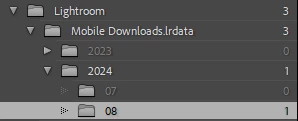
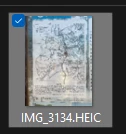
Files are indeed there (via "Show in Explorer"):
Expected:
Photos are properly listed in the view.
Note: You can also "Synchronize folder" and "Show missing photos" and get to the list of files in the folder. They are not missing; You can move/copy/edit them from the list.
[moved from bugs to discussions according to the community rules - Mod.]
 AdChoices