

Answered
Copy and paste IPTC metadata NOT working
All I need to do is copy and paste the Headline and Description for about 100 images. And maybe one or two will paste but the rest will not. Very frustrating. On M1Mac, Latest version of everything

All I need to do is copy and paste the Headline and Description for about 100 images. And maybe one or two will paste but the rest will not. Very frustrating. On M1Mac, Latest version of everything
Problem remains with LR 11.4. The data will ONLY paste to the image next to the one copied. Here I copied the Title from the middle image at the top. Note that 4 successive images are selected and pasted. (Screen Shot 2022-08-14 at 4.58.53 PM) Also note that only one image had metadata changed (the one in the top right corner). Thank you.
Ah, the screenshots clarify what's happening. You need to click Selected Photos in the Metadata panel:
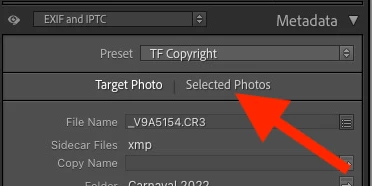
With Target Photo, only the most-selected photo is changed.
I should have asked about this earlier -- I misunderstood your previous descriptions. My bad.
The option controlling this has always been present in LR via the menu item Metadata > Show Metadata For Target Photo Only, but it defaulted off. LR 11 exposed the option in the Metadata panel (which is good) but bungled the implementation, making the default to be Target Photo, regardless of the user's previous setting. Large numbers of users have been confused by this bug.
Already have an account? Login
Enter your E-mail address. We'll send you an e-mail with instructions to reset your password.
 AdChoices