


Participating Frequently
November 27, 2022
Question

Corrupt files appearing when I open Lightroom

  • November 27, 2022
  • 3 replies
  • 2201 views

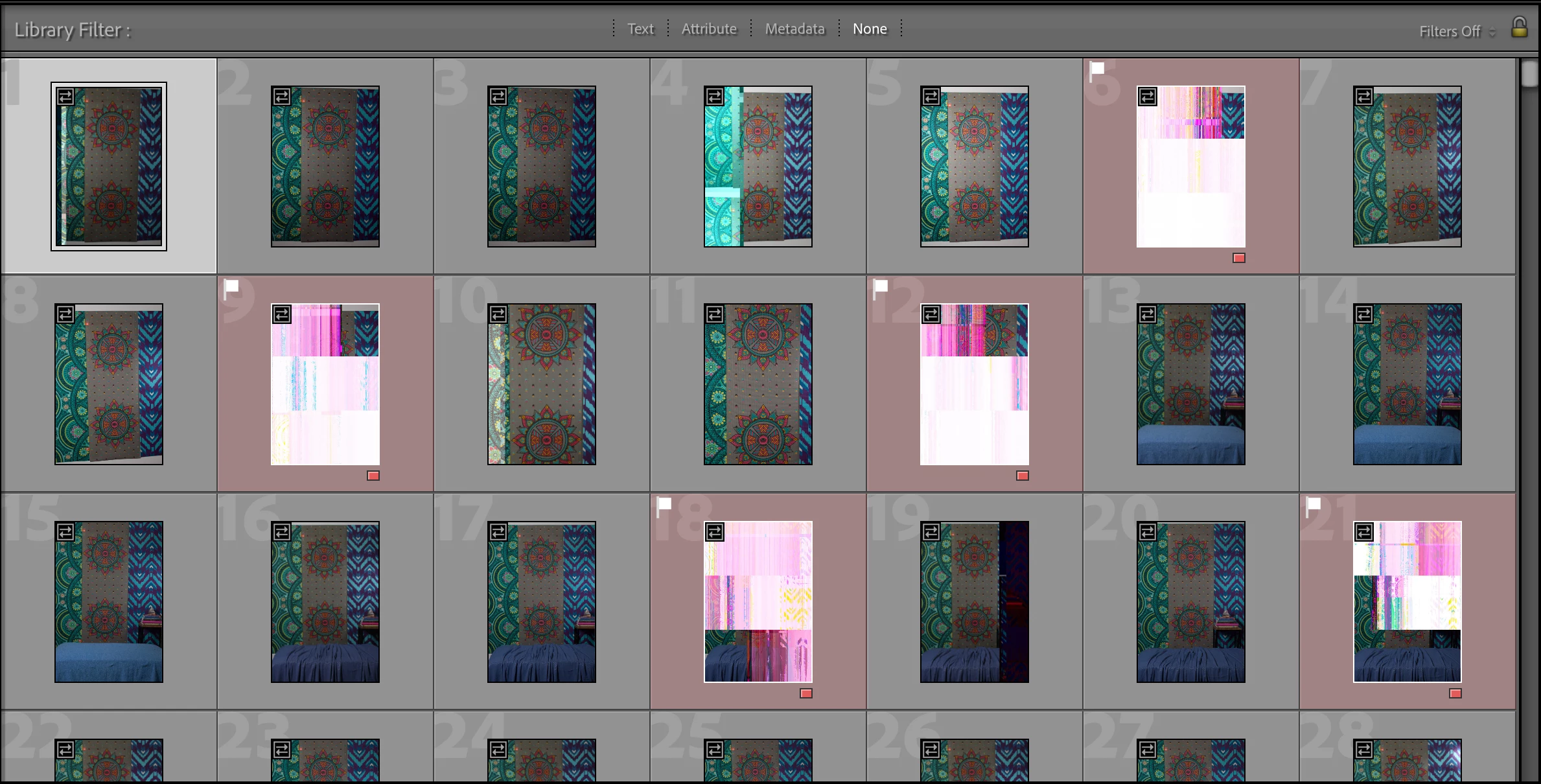
Hi everyone, I hope maybe someone can help me figure out this problem. I plugged in my hard drive to look for some specific photos, and as I was searching I had what looked to be newly corrupted files in some folders in Lightroom Classic. I flagged and red labeled these, and then closed the software and ejected the hard drive. I unplugged the hard drive and then plugged it back in, and then reopened Lightroom Classic. In the same file the corrupted images I had flagged before were still there, and newly corrupted images appared. I don't know what is causing this issue or if I can recover these images and I am heartbroken. From other posts I can only think it must be some hardware issue, and that there must be a problem with my hard drive, the cable from the hard drive to the external USB port, the external USB port, or the USB to USB-C (whatever Mac replaced USB ports with). Help?
This topic has been closed for replies.

3 replies

Participating Frequently
July 15, 2023

Hi, I don't know if anyone has any advice but this is on the new drive I had migrated everything to and it still looks like I'm losing images. Is the thought that somewhere along the say these images were courrupted and they're just decaying over time? These were shot on an older camera and and old card I no longer use so I hope that maybe my newer photos won't have the same issue but this really bites.

Legend
July 15, 2023

Is the thought that somewhere along the way these images were corrupted


YES


and they're just decaying over time


Probably not.


Do you have backup copies of these images?


Ian Lyons
Community Expert
Community Expert
November 27, 2022

As I indicated above, the thumbnails are based on the JPEG preview embedded in the original file by the camera when photos were captured. Unfortunately, this pretty much rules out a cable fault and instead points towards data degradation (bit rot) https://en.wikipedia.org/wiki/Data_degradation


No doubt more of the files are suspect. Nevertheless, if I was in your position I'd be moving the files from the suspect drive to a new disk asap!

Participating Frequently
November 27, 2022

Hi Ian, thank you for your response. That is so disappointing, these files aren't even two years old yet, and I think the drive itself is about two years old. If I understand you correctly, you think more than just the ones I can see now are corrupt, and that it's the drive itself, so you're recommending to transfer everything to a new drive correct? Thank you again for your input, your advice is appreciated.

Ian Lyons
Community Expert
Community Expert
November 27, 2022

Data degradation would normally take place over a much longer period of time than the life of either your particular disk or files. That's not to say that some other factor isn't at work (e.g environmental or storing disk close proximity to strong magnetic field). That being said, I'm by no means an expert disk drive life.


As a sanity check, you could copy the folder containing the files that are already showing signs of corruption to another disk AND cable, then import these into a 'new' catalog using the 'Embedded & Sidecar' preview option. If the files are indeed corrupt, then should immediately display same on the new disk drive. If they don't, then it's possible that the corruption is occurring during data transfer between the disk and you computer, which would suggest that the cable is the culprit.


Community Expert
November 27, 2022

Are the same files corrupted when you open them from finder by double clicking? They should open in preview which reads the actual raw files and renders them. Also, if you are connecting through some USB-hub like thing, try connecting directly to the drive. USB-c is an industry standard by the way. nothing to do with Apple but it is what all computers and portable devices are migraing to because it can maintain much higher speed connections. USB-c to USB-A converters can be bought for about $2.00 a piece at amazon that work great if you need old-style USB connectors to plug into a modern laptop.

Ian Lyons
Community Expert
Community Expert
November 27, 2022

@Jao vdL If you look at the top left corner of the thumbnails you'll see the badge that indicates that  it is based on the embedded JPEG preview rather than a preview created by LrC.  Therefore, it's almost certain to be the case that the files are indeed corrupt.


Community Expert
November 27, 2022

You are right. I hadn't actually zoomed into the image! Still possible that the corruption is happening in the transfer to the Mac though due to hardware issues and that the stored images are still OK. Not that likely but if these are only copies, would be good to figure out if they are salvageable.