


Custom filename uses the wrong date in File export/publish
I'm having trouble publishing photos through the Hard Drive publish service. (I have the same problem with File Export).
In the configuration I set a custom filename pattern:
Date (YYYY)-Date (MM)-Date (DD)-Sequence # (0001)
and then publish the collection to a folder on my hard drive.
The problem is this: LR-CC is using the wrong date when setting the YYYY-MM-DD fields in the filename. I want it to use the DateTimeCreated, and believe it has done so in the past. It now seems, though, that it is using the date the photo was digitized or imported into LR.
In the document about The Filename Template Editor and Text Template Editor, Adobe says
Sequence And Date
Specifies a text string option using sequential numbers and creation (capture) date and time. This element is available in the Filename Template Editor only when exporting photos.
Notice that it says "capture" date, which is what I want. In some cases, I've had to manually change the Creation Date of a file whose metadata was wrong, and it's those photos that are being exported incorrectly. Here's one example:
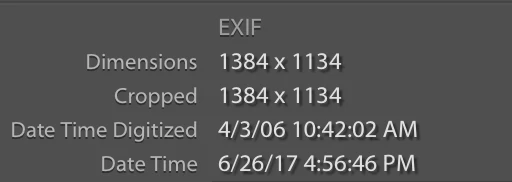
This is a photo that somehow had DateTime set to 6/26/17 when imported, and I changed the capture time (DateTimeCreated) using Lightroom's Metadata menu, to the correct date (4/3/06), which I know from other sources is the actual date the photo was taken.
The HardDrive Publish (or File Export) is exporting this photo as 2017-06-26-00001.jpg but it should be 2006-04-03-00001.jpg.
Question: how do I control which date LR-CC uses to create filenames during HardDrivePublish or FileExport? Or is this a bug in LR?
 AdChoices