Participant
May 13, 2023
Answered

Denoise AI not working with my .CR2 files

  • May 13, 2023
  • 3 replies
  • 6825 views

Hi, 


Camera: 5D Mk 4 

Adobe software: Lighroom Classic (updated to the latest version)


I was really exited to try this feature out but im getting the following message when trying to use this tool:

"Denoise is not currently compatible with this photo format" 


My understanding was that it would work with .CR2 files? is there any way i can fix this?


Things ive tried:

- Restarting my computer

- Re-importing images back into LR 


Please do let me know if there is a fix for this. I have attached my photo raw details.

This topic has been closed for replies.
Correct answer johnrellis

[This post contains formatting and embedded images that don't appear in email. View the post in your Web browser.]


The linked steps say, "Then go to the Metadata Panel and set the view mode to DNG, what does it say in the Mosaic Data field? If the field says "yes" Denoise should work. If it says "no" it means that your shooting format was not compatible."


Your screenshot shows:


When Mosaic Data says Yes, that means the file contains unprocessed sensor data (a "true" raw).


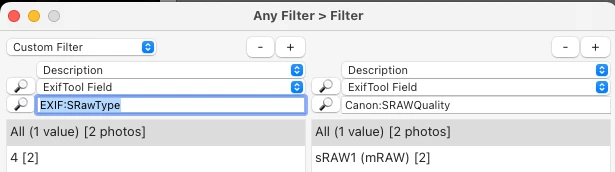
So the file is a processed raw, not a true raw.  The Exiftool utility confirms they're in sraw or mraw format:


[This post contains formatting and embedded images that don't appear in email. View the post in your Web browser.]


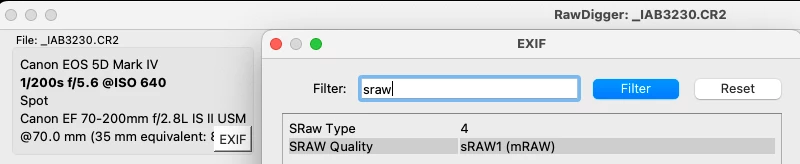
"I don't see anything in the EXIF data in RawDigger that explains this"


It's buried deep:


Looking at the reduced pixel dimensions also gives a clue, as @Sean McCormack pointed out, if you know the full dimensions of the camera.


LR makes this much harder on users than it needs to be:

https://community.adobe.com/t5/lightroom-classic-ideas/p-tell-the-user-why-denoise-and-raw-details-are-greyed-out/idi-p/13748744 


3 replies

johnrellis
Legend
May 13, 2023

Were the raw photos shot in mraw or sraw format?  These are partially processed raws (reduced size), and Denoise only handles unprocessed raws.  If you're not sure, see here for how to tell:

https://community.adobe.com/t5/lightroom-classic-discussions/denoise-doesn-t-like-my-files/m-p/13737034#M318577


See the camera manual for how to turn off mraw/sraw.

Participant
May 13, 2023

So i did the steps but cant figure out what it means - ive attached a photo for reference

TheDigitalDog
Inspiring
May 13, 2023

I can open them in, and they look pretty awful :


I can convert them to DNG. 

Neither allows the use of Denoise. I don't see anything in the EXIF data in RawDigger that explains this, but EXIF is often over my head. 

Can you reset your Canon so it certainly shoots a raw without any possible exotic setting and try again? 

Author “Color Management for Photographers" & "Photoshop CC Color Management/pluralsight"
TheDigitalDog
Inspiring
May 13, 2023

This is a true Canon CR2 raw, not a compressed or cRAW as they call it? 

Can you upload one of these raws to something like Dropbox so we can examine it?

Author “Color Management for Photographers" & "Photoshop CC Color Management/pluralsight"
Participant
May 13, 2023

Not sure how i can check, ive attached a google drive link as i dont have access to dropbox. Hope that helps! https://drive.google.com/drive/folders/1nFAgF1qYwEhCUYTN32aaOFs912NYOzTI?usp=share_link

Sean McCormack
Community Expert
Community Expert
May 13, 2023

What's the machine? More specifically the GPU memory? Denoise needs a lot of it. 


https://blog.adobe.com/en/publish/2023/04/18/denoise-demystified

Sean McCormack. Author of 'Essential Development 3'. Magazine Writer. Former Official Fuji X-Photographer.
Sean McCormack
Community Expert
Community Expert
May 13, 2023

More specifically here's the relevant section:


Need for speed. Denoise is by far the most advanced of the three Enhance features and makes very intensive use of the GPU. For best performance, use a GPU with a large amount of memory, ideally at least 8 GB. On macOS, prefer an Apple silicon machine with lots of memory. On Windows, use GPUs with ML acceleration hardware, such as NVIDIA RTX with TensorCores. A faster GPU means faster results.


Sean McCormack. Author of 'Essential Development 3'. Magazine Writer. Former Official Fuji X-Photographer.