


thierry_dehove
Known Participant
November 10, 2017
Answered

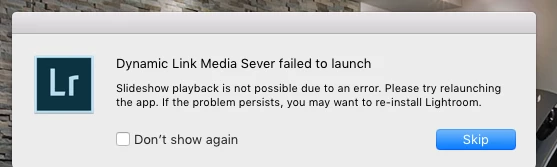
dynamic link media server failed to launch

  • November 10, 2017
  • 7 replies
  • 4604 views

Hi Guys

I wanted to build a slide with my images and got this message

any ideas ?

Many thanks, Thierry
This topic has been closed for replies.
Correct answer ManiacJoe

All your files will be preserved. However, it is good to have backups of them.

See this link for what files and where they are stored:

https://www.lightroomqueen.com/how-move-lightroom-to-new-computer/

7 replies

mprestie
New Participant
April 29, 2021

Same problem here.  Slideshow in LR Classic and export as Video fail.  I started calling Adobe Support on Jan 4th 2021 and have made no progress after about 12 calls.  Each call ended with a sincere promise that I will be contacted and a solution would be implemented.  I am sitting at my desk waiting for a call right now that was scheduled and confirmed and so far has not happened....again.

Has anyone any idea, even on a high level, about what could have happened to Lightroom Classic regarding: 1- create a slideshow and 2-export a slideshow as a video?  I used the slideshow module and video option for years and now it will not work on either my desktop or my laptop.

One comment I heard was that this problem typically happens when two apps are supposed to be linked but one or the other is not a matching version and therefore not compatible.  Is it some lind of media player app that is not compatible?  I did a De-Install and Re-install of LR Classic on my laptop to get a fresh version but it didn't solve the problem.

Two mysteries 1-what is broken and 2-why in the world can't Adobe fix it?

New Participant
February 5, 2018

The solution below worked for me.

I am running Lightroom Classic CC (latest version) on my Macbook Air

I had the same behaviour. A slideshow would either stall on preparing the preview or I would get the Dynamic Link Media Server not working message. I had earlier installed the new Lightroom CC as a test. I uninstalled Lightroom CC, restarted Lightroom Classic CC and the slideshow built and ran perfectly.

Update: I thought I had solved the problem but the next run, I got the DLMS error message again.

Update2: I restarted Lightroom holding down OPTION-SHIFT and reset the LR preferences.

I have run several slideshows with no issues if I keep Zoom to Fit Frame unchecked.

If I check Zoom to Fit Frame Lightroom stalls building the Previews.

However at least for the last half-hour I haven't had any Dynamic Link Media Server messages.

Tom

petrav72104551
New Participant
January 15, 2018

I have a solution after a chat with Adobe. I made another account as Administrator en LR works perfect on that account. Not the most brilliant solution but it works.

thierry_dehove
Known Participant
December 20, 2017

still the same bug and you Guys ?

petrav72104551
New Participant
December 21, 2017

I also have still the same bug ...

timothyo10353270
New Participant
January 14, 2018

I have a similar problem when I play a slideshow on Lightroom Classic CC using my MacBook Pro; if I close the program, re-launch, the slideshow plays; but then it may stop, and when I try to play it again I get the "Dynamic Link Media Server failed to launch" message; I have re-installed the program several times, and used the cleaning tool, but it still happens; it is quite an annoyance because I use this feature almost daily.

New Participant
November 20, 2017

I have the same problem.  LR Classic CC, MacOS 10.12.6. I have reinstalled LR several times and rebooted the computer.   I have found that LR logs a security error at the time it tries to open the DLS.

default    11:36:50.199115 -0500    Adobe Lightroom Classic    UNIX error exception: 17
private/var/db/mds/system/mdsDirectory.db: 50744 bytes

    default    11:36:50.199371 -0500    Adobe Lightroom Classic    UNIX error exception: 17

    default    11:36:50.199457 -0500    Adobe Lightroom Classic    0x610019474940 opened /Users/rscheibe/Library/Keychains/login.keychain-db: 769732 bytes
    default    11:36:50.202453 -0500    Adobe Lightroom Classic    0x60800dc6e1c0 opened /Library/Keychains/System.keychain: 93948 bytes

Sorry about the columns.

thierry_dehove
Known Participant
November 15, 2017

Guys

I need help for this topic, I need to build a slide for my client from my images

Please let me know, Thanks

Ian Lyons
Community Expert
November 10, 2017

Have you tried reinstalling Lightroom as suggested in the error message?

thierry_dehove
Known Participant
November 10, 2017

Hi Ian

not yet... I will so how can I save all my presets, prefs.... ?

Many thanks

ManiacJoe
ManiacJoeCorrect answer
Inspiring
November 10, 2017

All your files will be preserved. However, it is good to have backups of them.

See this link for what files and where they are stored:

https://www.lightroomqueen.com/how-move-lightroom-to-new-computer/
