


photofan731
Inspiring
May 31, 2017
Question

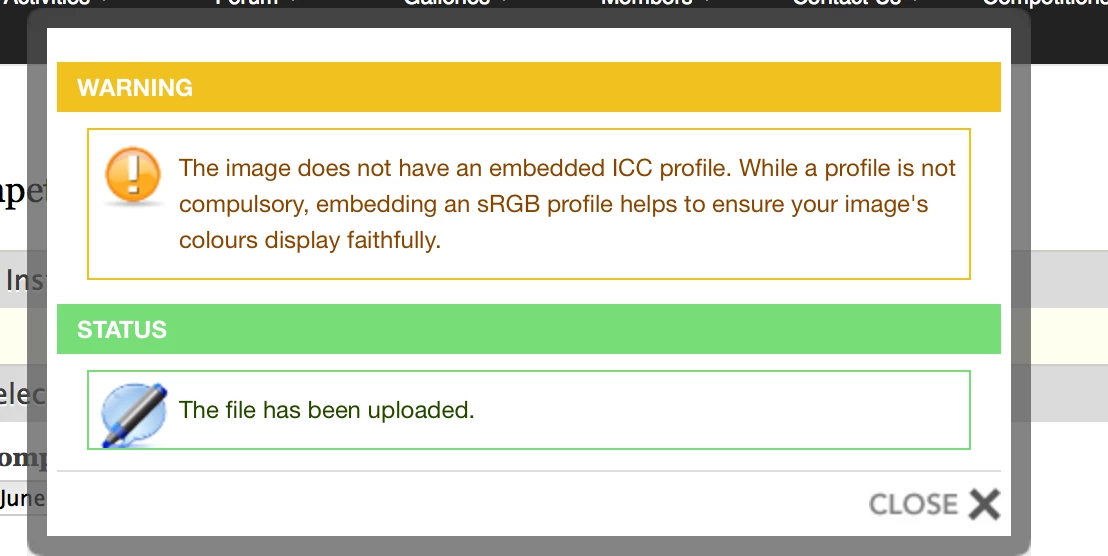
Embedded ICC PROFILE

  • May 31, 2017
  • 5 replies
  • 6472 views

Hi

Mac book retinal pro  Sierra all up to date

Using Photoshop/Lightroom cc subsription all up to date

On exporting a Jpeg and sRGB chosen in the export, I am getting the following prompt when trying to upload an photographic image to a photographic competition website, no one else on the particular website has this problem.

Nobody has been able to help me with this issue

Has anyone seen this before ??
    This topic has been closed for replies.

    5 replies

    Community Expert
    June 4, 2017

    It is impossible to create a jpeg with no embedded profile from Lightroom without running it through some other software afterwards. Are you by any chance using any post process plugin such as LR/mogrify or a photoshop export action? It will show up at the very bottom of the export panel. What do you see installed in plugin manager?

    photofan731
    Inspiring
    June 4, 2017

    Thanks for reply....I am only using LR then taking image to PS for edits,  SAVE as Tiff back into LR and export from LR as Jpeg sRGB

    here is a screen shot of LR plug in manager

    Community Expert
    June 4, 2017

    And nothing selected in the last item in the export panel?

    elie_dinur
    Participating Frequently
    June 1, 2017

    This is a case of not just the lack of an embedded profile, but rather - as John noted above - in the image posted here there is an almost total lack of metadata although the OP says that the Export dialog was set to include most metadata. Even such basic Exif information as camera maker and model or capture date has been stripped. This makes me wonder what happened to the file after it was written by LR. I have heard of ISPs that strip metadata to narrow bandwidth and shorten upload time.

    johnrellis
    Legend
    June 1, 2017

    Some ideas about what's going on:

    - LR's Export command did not generate the photo posted above -- it was generated by some other software.  (The photo above is in big-endian byte order, whereas LR writes JPEGs in little-endian byte order. The photo above has JFIF fields, whereas LR Export doesn't add JFIF fields. The photo above is missing an embedded ICC profile and the XMP fields that LR always adds. The photo above is missing an APP14 segment that LR always adds.)

    - It's possible this forum's software has modified the posted photo.  Older versions of the forum software did modify photos, but my current testing indicates it no longer does.  But maybe it does sometimes.  Uploading an exported photo to Dropbox, Google Drive, or similar would eliminate this possibility.

    - Much more likely is that an app other than LR somewhere in the workflow is modifying the photo, or photofan731 is accidentally picking up the wrong version of the photo.

    photofan731
    Inspiring
    June 2, 2017

    Thanks for helping everyone, would be lovely to get to the end of this issue

    Ok last try, here is an original image

    a screen shot of the metadata

    a screen shot from 'Mac Preview' of metadata

    Does this help?

    Would resetting the LR preferences help?

    elie_dinur
    Participating Frequently
    May 31, 2017

    Check your settings for the Metadata panel on the Export page:

    photofan731
    Inspiring
    May 31, 2017

    Thanks for reply

    It was sent with 'Metadata' ticked

    photofan731
    Inspiring
    May 31, 2017

    Two things:

    Even though the image WAS sent with the metadata ticked.... I still got the warning NO ICC PROFILE EMBEDDED

    Sometimes you dont want the metadata ticked only copyright ...will this result in NO ICC PROFILE EMBEDDED also??

    elie_dinur
    Participating Frequently
    May 31, 2017

    From Jeffrey Friedl's Online Metadata Reader:

    johnrellis
    Legend
    May 31, 2017

    Please upload a sample exported JPEG that has the problem to Dropbox or similar and post the sharing link here.  We can double-check that it contains an ICC profile.

    photofan731
    Inspiring
    May 31, 2017

    Thanks for comment, here is the image
