


New Participant
December 8, 2021
Answered

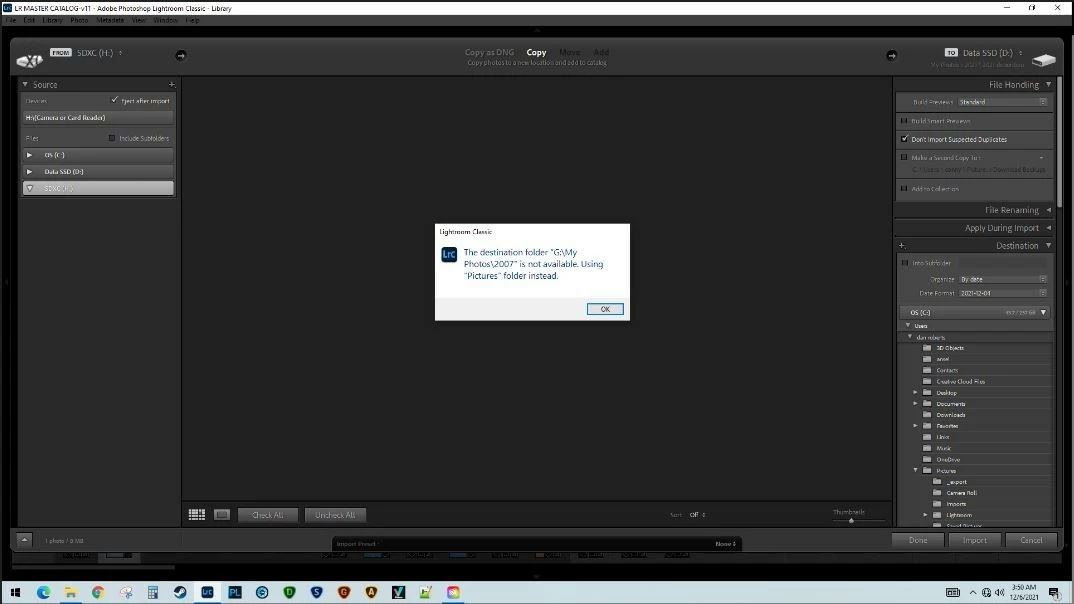
Error message every time I start import process

  • December 8, 2021
  • 4 replies
  • 465 views

Every time I initiate the import process I get a popup saying "the destination folder G\My photos\2007 is not available. Using Pictures folder instead". This happens immidiately and no matter how I initiate the import process. IOW if I right click on a specific folder and then select "import to this folder" I still get this popup/error message. In the past I stored my files on an external "G" drive but since upgrading my internal HDD migrated to that. Ever since then I've been getting this error. I can't find a way to specify a default folder. This is not a major problem but is annoying and adds a few seconds to every import that I do.
This topic has been closed for replies.
Correct answer drr1531

"Does that external hard drive, G, still exist?

Does that particular folder still exist on the G drive?

If G exists, but the folder does not, then recreate the folder, just to make LrC happy just one time.

In the LrC catalog, in the folders panel, make sure the empty G drive folder no longer shows up  (if empty)

If G does not exist, can it be recreated, reattached, or perhaps another drive can be named G for jut a bit"


This is on the right track. I still use the drive for backing up. So I plugged it in and then initiated an import. No error message. And when I looked in the destination panel the G:\2007 folder was highlighted. I changed the destination to a folder on my C drive, imported one image, and shut LR down. I then disconnected the G drive, started LR, and initiated an import. No error message and the destination that was automatically highlighted was the one on the C drive that I last imported to. So problem appears to be solved.


Apparently after importing files LR remembers the last location and defaults to that next time an import is initiated. This persistence must be stored at catalog level because deleting the LR preferences file did not stop the behavior.


Thanks to all who responded to my issue.

4 replies

GoldingD
Braniac
December 9, 2021

Does that external hard drive, G, still exist?

Does that particular folder still exist on the G drive?

If G exists, but the folder does not, then recreate the folder, just to make LrC happy just one time.

In the LrC catalog, in the folders panel, make sure the empty G drive folder no longer shows up  (if empty)

If G does not exist, can it be recreated, reattached, or perhaps another drive can be named G for jut a bit


drr1531AuthorCorrect answer
New Participant
December 9, 2021

"Does that external hard drive, G, still exist?

Does that particular folder still exist on the G drive?

If G exists, but the folder does not, then recreate the folder, just to make LrC happy just one time.

In the LrC catalog, in the folders panel, make sure the empty G drive folder no longer shows up  (if empty)

If G does not exist, can it be recreated, reattached, or perhaps another drive can be named G for jut a bit"


This is on the right track. I still use the drive for backing up. So I plugged it in and then initiated an import. No error message. And when I looked in the destination panel the G:\2007 folder was highlighted. I changed the destination to a folder on my C drive, imported one image, and shut LR down. I then disconnected the G drive, started LR, and initiated an import. No error message and the destination that was automatically highlighted was the one on the C drive that I last imported to. So problem appears to be solved.


Apparently after importing files LR remembers the last location and defaults to that next time an import is initiated. This persistence must be stored at catalog level because deleting the LR preferences file did not stop the behavior.


Thanks to all who responded to my issue.

GoldingD
Braniac
December 9, 2021

"Apparently after importing files LR remembers the last location and defaults to that next time an import is initiated. This persistence must be stored at catalog level because deleting the LR preferences file did not stop the behavior."


Yes it does remember last location, but when you changed the location after the error message, that change should have stuck, and you should have not received the error message upon the next attempt. Would have thought resetting the preference file would have fixed, but nope, Ok. If you removed the G drive from the equation outside of LrC, it could/would have caused issues, but now fixed.


Cross fingers, feed your in house gremlin some nice Bourbon, and hope he accepts the offering. (warning, do not substitute normal Whiskey for the Bourbon, they get even, but Scotch can substitute)


GoldingD
Braniac
December 9, 2021

deleted, my bad


Inspiring
December 8, 2021

"In the past I stored my files on an external "G" drive but since upgrading my internal HDD migrated to that. Ever since then I've been getting this error" Did you use LrC to move your files from the external hard drive to the new internal one? If not, then likely it's still looking for files there. In any event, it looks like you may still have a folder where LrC thinks there are some photos. Check all the drives showing under FOLDERS. If G: is still showing, then it still thinks you have photos there. 

drr1531Author
New Participant
December 9, 2021

"Did you use LrC to move your files from the external hard drive to the new internal one? If not, then likely it's still looking for files there. In any event, it looks like you may still have a folder where LrC thinks there are some photos. Check all the drives showing under FOLDERS. If G: is still showing, then it still thinks you have photos there."


I did not use LR to transfer the files. At one time the non-existant G: drive(but no folders) was showing up in the Navigation list but I removed it long ago.


drr1531Author
New Participant
December 8, 2021

By the way this message pops up BEFORE there is an opportunity to specify a destination folder. So on every import I DO specify a destination folder but next time I import the same message pops up again.

Braniac
December 8, 2021
drr1531Author
New Participant
December 8, 2021
No joy after resetting the preferences.