


Participating Frequently
February 7, 2020
Question

Exported pictures is way darker then in LR?

  • February 7, 2020
  • 7 replies
  • 13750 views

After I export an image where I'm happy with the edit it comes out much darker then it is in Lightroom? Not sure what I'm doing wrong, might be a rookiemisstake, I'm new to it.

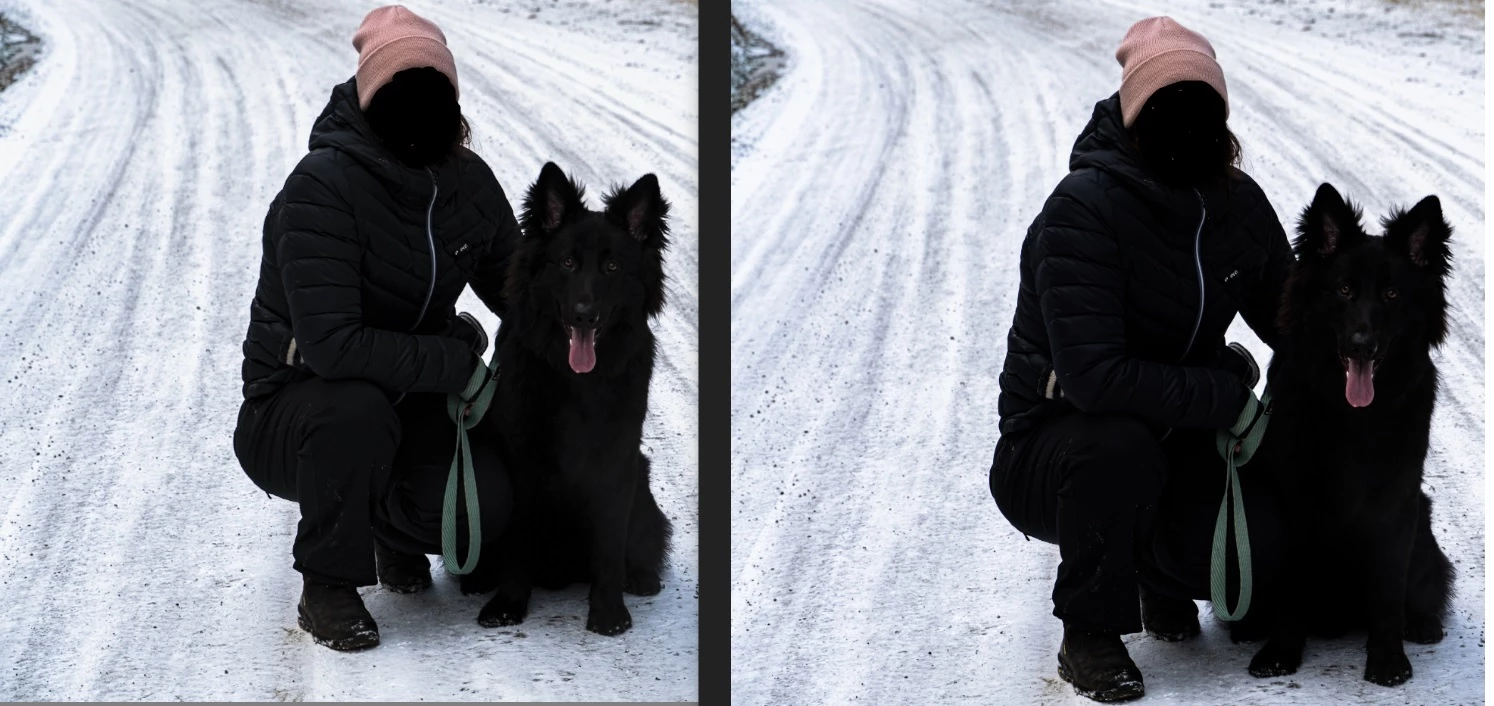
Left is the image in Lightroom before export and right is after export..? I dont make any changes before exporting the image & I've tried to re-Install Lightroom aswell... Do I need to format my PC aswell? Feels a bit overkill..?
This topic has been closed for replies.

7 replies

Per Berntsen
Community Expert
Community Expert
March 15, 2020
Sooo, I should get another app to open the immages after export?

As I mentioned in a previous post, you should use a color managed image viewer, like FastStone.

You have to enable color management under Settings > CMS, both boxes must be checked.

Restart FastStone after changing these settings.


I'm uploading my photos to platforms like Instagram after the export & the images is much darker in there aswell... 

Don't use the Edge browser (or Internet Explorer), it's not color managed. Use Chrome or Opera, both are fully color managed.

Note that phones are not color managed, and can not be expected to display correct colors.


If I export an image I'd like it to look like in LR, otherwise, what's the point in editing them a certain way?

how do I fix this "monitor profile" that u speak of? 

Throughout this thread, we've bee trying to tell you that you have to use color managed software.

Try that first, and then we can get back to the monitor profile if necessary.

Participating Frequently
June 21, 2021

Same issue here: Monitor is calibrated (darks appear in lightroom with shades perfectly visible. When viewing elsewhere, the shades are merged to black. It doesn't matter in what software I view (be that Win 10 photo viewer or any browser, yes also Chrome and Opera) or for that matter on what device (other not well calibrated monitors, mobiles, pads, etc.) the shades are gone. For me this means LR displays too brightly. In this context it does not matter that LR might be the only software that displays correctly. If browsers on the same monitor display darker, for me then LR is off.

What is the benefit of creating perfectly calibrated pictures that are too dark when viewed by my clients on their devices which I can't control?

I frankly have no clue how to fix this other than by raising the darks in LR by a percentage.

F. McLion
Community Expert
Community Expert
June 21, 2021

With what and to which brightness did you calibrate your monitor?

--- Got your issue resolved? Please label the response as 'Correct Answer' to help your fellow community members find a solution to similar problems. ---
D Fosse
Community Expert
Community Expert
February 10, 2020

Without color management you normally get darker shadows lacking in separation. The reason is that all LCDs have a native tone curve dip in the dark shadow values. This is corrected in the monitor profile, along with everything else - if the application uses it.


So all this is perfectly expected if the OP uses a viewer without color management.

Doba91Author
Participating Frequently
February 15, 2020

I'm using regular Windows 10 to open the picture, no added software.


Feels wierd that the images comes out darker after export, IF it's that way should'nt they be dark insider LR aswell? 


Is there anyway to fix it? How do I change the monitor profile? 

D Fosse
Community Expert
Community Expert
February 15, 2020

You're missing the point.


Color managed applications use your monitor profile to correct for the inaccuracies of your display. It's a standard profile conversion from the document profile into your monitor profile. These corrected numbers are sent to screen.


This way the file is correctly represented on screen.


Applications without color management, like Windows "Photos", don't do any of that. They just send the original numbers straight to screen, without any correction for the screen's own characteristics.


Windows "Photos" is not Windows. It's a photo viewer installed with Windows. It's an application like all other applications. An application can be color managed or not; "Photos" is not.

Per Berntsen
Community Expert
Community Expert
February 9, 2020

You still haven't told us what application you are using to view the exported image.

The Photos app is not color managed, and can not be expected to display correctly.

Phones are not color managed either.

Lightroom is color managed, and uses the monitor profile to display correct colors, provided that you have a correct and sound monitor profile.


Since no native Windows applications are color managed, you can either use Bridge to view exported images, or a third party color managed image viewer like  FastStone, free for personal use. You have to turn on color management in Settings, both check boxes must be checked.

Participant
February 9, 2020

I see what you mean, the dogs nose details is darker on the exported image.  I've beeen getting this a lot myself and wanted to ask the same question.  To be honest, the difference I'm having is a lot more severe.  My PC is calibrated, I export SRGB and side by side, the Lightroom image is a lot lighter than the resulting Jpeg

Doba91Author
Participating Frequently
February 9, 2020

Yea man, the darker details disappears and it's superannoying 😞 


Sad to hear u have the same issue! Hopefully we'll get some answers in this thread 🙂 please let me/is know of u have a fix for this 🙂

F. McLion
Community Expert
Community Expert
February 8, 2020

Also, let us know the type of your monitor and whether you have it calibrated or not.

Is the export to jpg?

--- Got your issue resolved? Please label the response as 'Correct Answer' to help your fellow community members find a solution to similar problems. ---
Doba91Author
Participating Frequently
February 9, 2020

It's a Benq monitor, not sure if calibrated, & the export is to JPG.


If the difference is in the exported picture.. 

Tony_See
Inspiring
February 8, 2020

Are you working from a calibrated PC?

Could you post a Histogram of the file in question Lightroom Classic?

Or are you using LRMobile?

Doba91Author
Participating Frequently
February 9, 2020
  • Hmh not sure if it's calibrated, but I van spot the difference both on PC & smartphone.. The tone is slightly darker in the darker details on the right one. I'm using LR Classic. How do I create a histogram? 
Per Berntsen
Community Expert
Community Expert
February 7, 2020

It's possible that you see a difference on your computer, but the images you posted display identically on my monitor.

Are you on Windows 10?

And are you using the Photos app to view the exported image? If not, what application are you using?

Reinstalling Lightroom or formatting your computer will not solve the problem.


Doba91Author
Participating Frequently
February 7, 2020

As I see, both on my PC & smartphone the left one is slightly darker?


For example, details on her jacket becomes black in the center where the zip is.