


Participant
March 5, 2018
Answered

Exporting Correct Date Taken Metadata

  • March 5, 2018
  • 2 replies
  • 2644 views

I'm not sure if this is an issue with the latest 7.2 release but I noticed that my last batch of photos to Disneyland did not export the metadata correctly. Here is my process:

  1. I import using Lightroom Classic CC (7.2 release) into a designated folder called "Photo Import".
  2. I edit the photos in Lightroom then export them to a different folder called "Add to Photos." Include "All Metadata" is selected with no check mark on "Remove Person Info" or "Remove Location Info" while a check mark on "Write Keywords as Lightroom Hierarchy."
  3. I upload the exported photos from my "Add to Photos" folder to iCloud Photos. This allows all the photos to be available to all my Mac devices.

The problem with this latest import is that the Camera info, location info, and date info metadata is all wrong. I have not had any issues with my process and I have been so impressed with how it keeps this information. I take the time to input "Keywords" into each batch of photos that I import and I like how I can search on my iPhone through my 42K photos to find a particular event/photo. In that last batch I noticed that Lightroom keeps "Capture Time" and "Capture Date" and so I had to manually "Adjust Date and Time" in Photos while looking at "Capture Time" and "Capture Date" in Lightroom for the correct date and time. Also I had to change the location to Disneyland as well. Sadly Camera info was not imported in Photos.

Something in the Export is happening that this information is missing or changed in Photos.

Any leads would be appreciated. Thanks in advance.

- David T.
This topic has been closed for replies.
Correct answer Just Shoot Me

If you are looking at these image with Finder then it will display only the File Create Date and not the Image Capture Date.

The Capture date is in the EXIF of the image file.

If I took shots 3 weeks ago and didn't import them into LR until today they would have the Capture date as 3 weeks ago but the File Create date, the date the file was created, placed, on my hard drive would show as Today.

Two totally different things.

Could be iCloud only see the date they were uploaded to iCloud and not the Capture date.

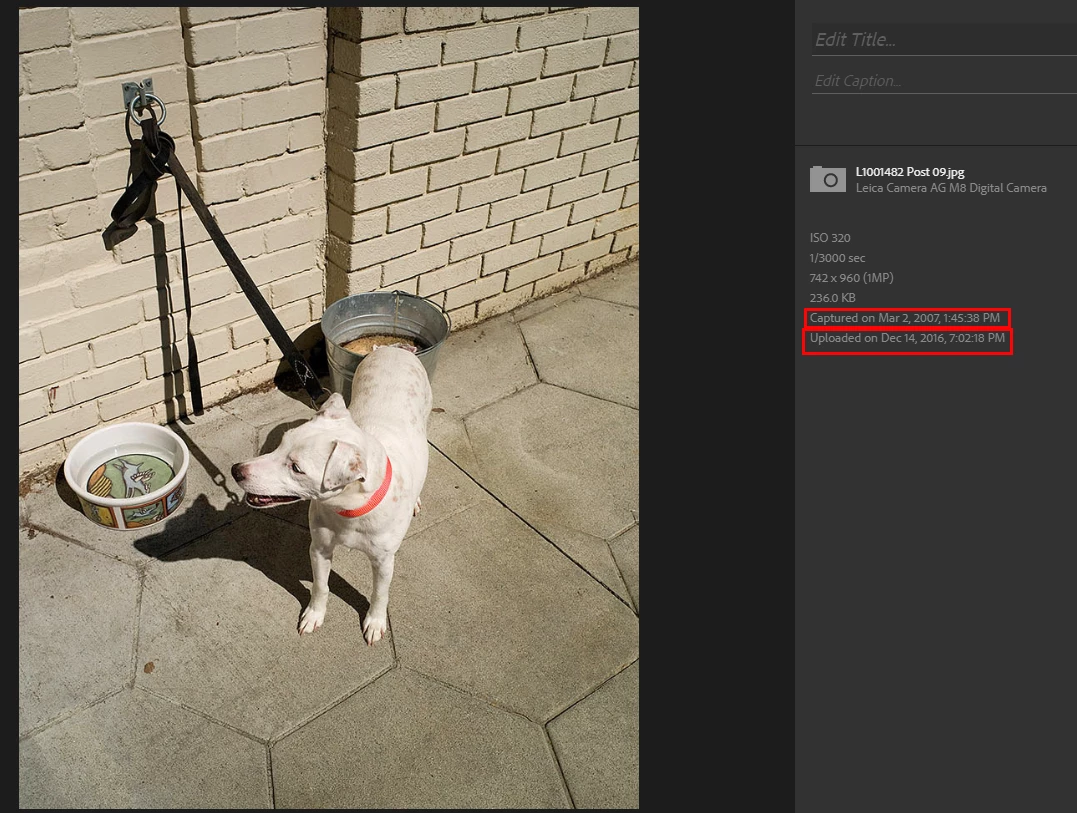
Here is one from my LR Web gallery.

See the Capture date is from 2007 and the upload is from 2016.

2 replies

johnrellis
Genius
March 6, 2018

I upload the exported photos from my "Add to Photos" folder to iCloud Photos. This allows all the photos to be available to all my Mac devices... The problem with this latest import is that the Camera info, location info, and date info metadata is all wrong.

Upload a sample problem photo from the "Add to Photos" folder to Dropbox or similar, and post the sharing link here.  We can then verify whether the problem is with the photo itself or somewhere else.

Just Shoot Me
Just Shoot MeCorrect answer
Legend
March 5, 2018

If you are looking at these image with Finder then it will display only the File Create Date and not the Image Capture Date.

The Capture date is in the EXIF of the image file.

If I took shots 3 weeks ago and didn't import them into LR until today they would have the Capture date as 3 weeks ago but the File Create date, the date the file was created, placed, on my hard drive would show as Today.

Two totally different things.

Could be iCloud only see the date they were uploaded to iCloud and not the Capture date.

Here is one from my LR Web gallery.

See the Capture date is from 2007 and the upload is from 2016.