
m90583877
Known Participant
June 19, 2018
Answered

Exporting in the wrong size

  • June 19, 2018
  • 6 replies
  • 5142 views

Hi,

I am using Lightroom 7.3.1 on MacOs Sierra.

From time to time I have the following issue - when resizing RAW images during export into smaller format jpg files the resulting size is not the one that I set up during export.

For example I have a folder with 5472 × 3648 RAW files and I am exporting 1920x1280 jpg files. In the end half of the files are the size I have set to export and half are 1918x1280 (or all of them). I use the option "Resize to fit" and put both dimensions into the export dialogue. I do not change the proportions of the photos or cut them, just do basic lens and colour correction (although isn't this dialogue supposed to resize the photos into the size I need even if I do?).
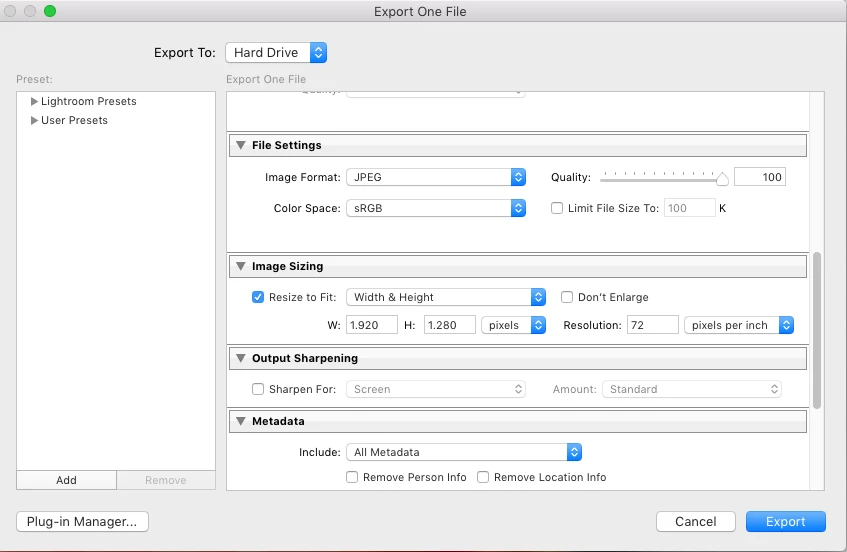
This happens pretty often and destroys my workflow as after each exportI need to check each picture in case it is not the size the client needs and them manually resize them again. How can I fix it?

Thank you!
This topic has been closed for replies.
Correct answer JohanElzenga

m90583877  wrote

Hi,

I am using Lightroom 7.3.1 on MacOs Sierra.

From time to time I have the following issue - when resizing RAW images during export into smaller format jpg files the resulting size is not the one that I set up during export.

For example I have a folder with 5472 × 3648 RAW files and I am exporting 1920x1280 jpg files. In the end half of the files are the size I have set to export and half are 1918x1280 (or all of them). I use the option "Resize to fit" and put both dimensions into the export dialogue. I do not change the proportions of the photos or cut them, just do basic lens and colour correction (although isn't this dialogue supposed to resize the photos into the size I need even if I do?).

This happens pretty often and destroys my workflow as after each exportI need to check each picture in case it is not the size the client needs and them manually resize them again. How can I fix it?

Thank you!

Lens corrections can cause a slight crop, and so your original aspect ratio may have changed slightly. Applying a small crop yourself, with a 16:9 aspect ratio preset, should solve the issue.

6 replies

m90583877
m90583877Author
Known Participant
June 29, 2018

Thank you vey much for the feedback! So basically Lightroom can not resize images with different ration, seems it always works as "make the long side xxx pixels"? Then what is the difference between "Resize to fit" long edge and resize to fit "Width and height"?

I guess my problems do come from one or two pixels that get cropped from the lens correction, I see no other explanation..

Then the only fix is do the cropping to a certain ratio of all the photos before exporting them I guess?

JohanElzenga
Community Expert
Community Expert
June 29, 2018

Yes, that is the only option. Lightroom will only resize on export, not crop or distort.

-- Johan W. Elzenga
Todd Shaner
Legend
June 20, 2018

Try resetting the LR Preferences file, which often corrects unexplained issues such as you are experiencing. Close Lightroom and move the below Preferences file to your desktop. When Lightroom is restarted a new Preferences file will be created.

Mac OS X

MacintoshHD/Users/[UserName]/Library/ApplicationSupport/Adobe/Lightroom/Preferences/

com.adobe.LightroomVERSION.LSSharedFileList.plist

Windows 7, 8 & 10

C:\Users\[UserName]\AppData\Roaming\Adobe\Lightroom\Preferences\

LightroomVERSIONPreferences.agprefs

If this resolves the issue you will need to restore any custom Preferences settings and plugins you may have installed.

If it doesn't resolve the issue you can replace the original LR Preferences file from your desktop. Please post one of the original files that produces 1918x1280 export files to Dropbox or other file sharing site. Also confirm that this file consistently creates 1918x1280 export files by exporting it separately yourself.

DdeGannes
Community Expert
Community Expert
June 20, 2018

When I view the screen capture of the export dialog I am seeing 1.920 x 1.280 pixels which is not a valid selection it should be 1920 x 1280 there should be no “point” . Just saying.

Regards, Denis: iMac 27” mid-2015, macOS 11.7.10 Big Sur; 2TB SSD, 24 GB Ram, GPU 2 GB; LrC 12.5,; Lr 6.5, PS 24.7,; ACR 15.5,; (also Laptop Win 11, ver 24H2, LrC 15.0.1, PS 27.0; ) Camera Oly OM-D E-M1.
JohanElzenga
Community Expert
Community Expert
June 20, 2018

DdeGannes  wrote

When I view the screen capture of the export dialog I am seeing 1.920 x 1.280 pixels which is not a valid selection it should be 1920 x 1280 there should be no “point” . Just saying.

Nope. That depends on the language settings of the computer, and is certainly not the problem here. In the English language the point is the decimal sign. In some other languages the comma is the decimal sign and the point is used as thousands separator. My computer language is set to English but my number format and date format settings are Dutch. As a result I see the same thing.

-- Johan W. Elzenga
DdeGannes
Community Expert
Community Expert
June 20, 2018

Ok.

Regards, Denis: iMac 27” mid-2015, macOS 11.7.10 Big Sur; 2TB SSD, 24 GB Ram, GPU 2 GB; LrC 12.5,; Lr 6.5, PS 24.7,; ACR 15.5,; (also Laptop Win 11, ver 24H2, LrC 15.0.1, PS 27.0; ) Camera Oly OM-D E-M1.
JohanElzenga
Community Expert
JohanElzengaCommunity ExpertCorrect answer
Community Expert
June 20, 2018

m90583877  wrote

Hi,

I am using Lightroom 7.3.1 on MacOs Sierra.

From time to time I have the following issue - when resizing RAW images during export into smaller format jpg files the resulting size is not the one that I set up during export.

For example I have a folder with 5472 × 3648 RAW files and I am exporting 1920x1280 jpg files. In the end half of the files are the size I have set to export and half are 1918x1280 (or all of them). I use the option "Resize to fit" and put both dimensions into the export dialogue. I do not change the proportions of the photos or cut them, just do basic lens and colour correction (although isn't this dialogue supposed to resize the photos into the size I need even if I do?).

This happens pretty often and destroys my workflow as after each exportI need to check each picture in case it is not the size the client needs and them manually resize them again. How can I fix it?

Thank you!

Lens corrections can cause a slight crop, and so your original aspect ratio may have changed slightly. Applying a small crop yourself, with a 16:9 aspect ratio preset, should solve the issue.

-- Johan W. Elzenga
dj_paige
Legend
June 20, 2018

JohanEl54  wrote

m90583877   wrote

Hi,

I am using Lightroom 7.3.1 on MacOs Sierra.

From time to time I have the following issue - when resizing RAW images during export into smaller format jpg files the resulting size is not the one that I set up during export.

For example I have a folder with 5472 × 3648 RAW files and I am exporting 1920x1280 jpg files. In the end half of the files are the size I have set to export and half are 1918x1280 (or all of them). I use the option "Resize to fit" and put both dimensions into the export dialogue. I do not change the proportions of the photos or cut them, just do basic lens and colour correction (although isn't this dialogue supposed to resize the photos into the size I need even if I do?).

This happens pretty often and destroys my workflow as after each exportI need to check each picture in case it is not the size the client needs and them manually resize them again. How can I fix it?

Thank you!

Lens corrections can cause a slight crop, and so your original aspect ratio may have changed slightly. Applying a small crop yourself, with a 16:9 aspect ratio preset, should solve the issue.

Good point! However, the aspect ratio is 3:2 in this example.

JohanElzenga
Community Expert
Community Expert
June 20, 2018

Right. I thought it was 1920 x 1080 (Full HD).

-- Johan W. Elzenga
m90583877
m90583877Author
Known Participant
June 19, 2018

I tried doing it to the same batch of images, specifying the long side only, but the same issue happens.

Also would be great to know as sometimes in fact I do change the ration as well, but mostly not, and the issue happens in both cases.

Rob_Cullen
Community Expert
Community Expert
June 20, 2018

The LR Export "Resize" feature is not an "exact" science. It may not always crop an image to the exact W & H stated in the Resize dialog.

As I understand Resize when stating BOTH Width and Height (eg. 1920 x 1080), you are defining the 'Outer Boundaries' of a "box" that will hold your image for the resize function.  Thinking in this way explains why-

A Square crop image exports at 1080 x 1080  (with w1920 x h1080)  ie. maximum Height in the "box"

A panorama crop might export at  1920 x 720  ie. maximum Width within the "box"

A vertical crop might export at  720 x 1080     ie. maximum Height in the "box"

When your original file (5472 × 3648) is not an exact equivalent ratio, a "two pixel" difference in the exported file dimensions (1918x1280) is totally acceptable IMO from Lightroom!!!!  (why "half or all of them"- a total mystery )

If you want EXACT 1920x1080 pixels you will need to crop and save in Photoshop.

Regards. My System: Windows-11, Lightroom-Classic 15.1.1, Photoshop 27.3.1, ACR 18.1.1, Lightroom 9.0, Lr-iOS 10.4.0, Bridge 16.0.2 .
dj_paige
Legend
June 20, 2018

WobertC  wrote

When your original file (5472 × 3648) is not an exact equivalent ratio

It's not?

My calculator says it is.

In this case, the determination of what size in pixels the exported photo ought to be is essentially very trivial math. It's hard to imagine writing code that screws this up. I can't even see this two pixels difference as being round-off error. So I do not accept this explanation at this time.

But to be honest, I have never really dug into a two pixel difference, as I don't think I have ever experienced this.

JP Hess
Inspiring
June 19, 2018

The aspect ratio for your two sizes is exactly the same. As an experiment, try specifying just the long edge being 1920 pixels and forget about specifying both dimensions and compare the results. That's the way I usually export resized images, and the usually come out the way they should.