


New Participant
March 20, 2020
Question

First day and problem with Win 32 API error 193

  • March 20, 2020
  • 3 replies
  • 810 views
I uninstalled the Lightroom 6 box version, today I installed Adobe Clauds 
for photographers and when importing a library
I have it ... Win 7 operating system
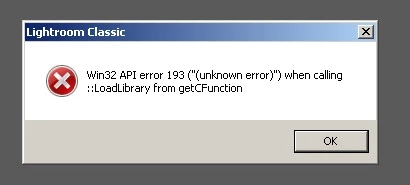


and
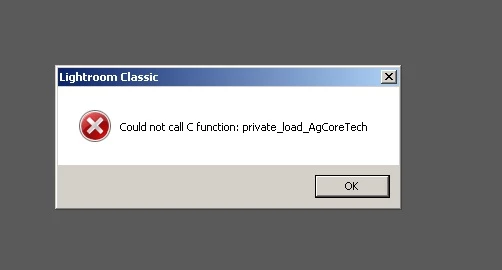
 Can somebody help me to fix this ??

This topic has been closed for replies.

3 replies

GoldingD
Brainiac
March 21, 2020

1. As you are getting errors concerning 32bit, I question if your OS is in fact 32bit instead if 64bit


2. As tou are installing Lightroom Classic, meaning not standalone, I am wondering how are you installing.


Did you download and install the required Adobe Creative Cloud Desktop App fitst?


https://www.adobe.com/creativecloud/desktop-app.html


And, now you are installing Lightroom Classic using it?


AxelMatt
Adobe Expert
March 21, 2020

Which version of Win 7 do you use? Is it a 32-bit or 64-bit? The error message indicates that you are using a 32bit Windows.

You definitely need a 64bit Windows.


My System: Intel i7-8700K - 64GB RAM - NVidia Geforce RTX 3060 - Windows 11 Pro 25H2 -- LR-Classic 15 - Photoshop 27 - Nik Collection 8 - PureRAW 5 - Topaz Photo
Rob_Cullen
Adobe Expert
March 21, 2020

I cannot answer the Errors!

Did you Install Lightroom-CLASSIC?

Do you have Service Pack 1  installed with Windows-7?

Not sure what you mean by- "importing a library "-

The usual procedure after upgrading from v6 to LR-Classic v9.2 is to simply find the Lightroom Catalog (.LRCAT) file that v6 was using in Windows File-Explorer and [Double-Click] on it. It is copied and the copy modified to work with Classic. There is NO importing involved.

Regards. My System: Windows-11, Lightroom-Classic 15.0, Photoshop 27.0, ACR 18.0, Lightroom 9.0, Lr-iOS 10.4.0, Bridge 16.0 .