


Participating Frequently
August 22, 2021
Answered

Font size, especially in grid view

  • August 22, 2021
  • 2 replies
  • 968 views

I'm on a PC using LR Classic 10.3


Is there a setting somewhere that I'm not finding where I can control the font size when in the Library Mode using the Grid view? My eyes are getting older! Just my eyes...I wish.


Thanks!
Correct answer Per Berntsen

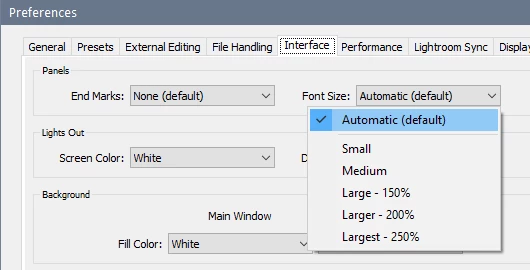
You can change the font size in Preferences, and you need to restart Lightroom for the change to take effect.

Edit > Preferences > Interface.


2 replies

riskypotato
Known Participant
December 2, 2021

I only get the option of small and large. Mac Big Sur 11.6. Been this way for years. Near-unreadable fonts in Grid View. Gray font on a gray background. It's bad design if some people can't read it. We're not all 30-somethings. Somebody please fix this.

Per Berntsen
Per BerntsenCorrect answer
Community Expert
August 22, 2021

You can change the font size in Preferences, and you need to restart Lightroom for the change to take effect.

Edit > Preferences > Interface.


westlightAuthor
Participating Frequently
August 22, 2021

Thank you! I knew it had to be something simple that I just could not find. Guess I was hoping it might be something where I could just have the file numbers and other info on the "slide mounts" in Grid View be larger but I took the setting off Automatic and set it for 150%. I can live with that!