


Participating Frequently
June 9, 2022
Answered

How can I export nested keywords without them also being added to the Keyword List?

  • June 9, 2022
  • 1 reply
  • 1969 views

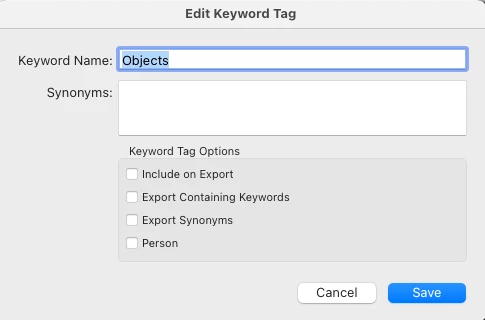
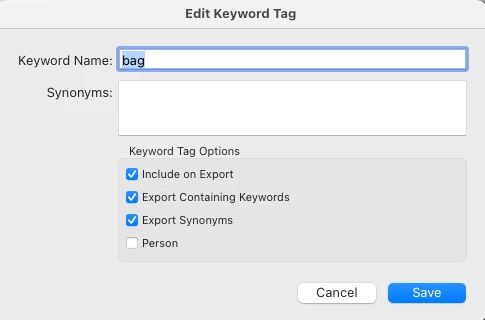
I have an ongoing problem related to keywords when I am exporting photos. I have my Keyword List organized where many are nested under other keywords. For example, under "Objects" I have "bag" and under "Architecture" I have "boathouse." When I export a RAW photo to JPEG in a different folder, I want those keywords and any synonyms I've created to continue to be associated with the JPEG, but what keeps happening is that if Objects isn't checked (which is intentional) Lighroom adds the nested keywords to the top level list. In other words, in the screenshot attached, I exported photographs at different times, one of which was of a boathouse and one was of a bag. At another time I exported a photo of a plant where the Latin name Taxodium distichum is a synonym within the keyword tag for "bald cypress".  After the exports, those three terms suddenly appeared in the top level of the Keyword List, too. They're still under Objects, Architecture, and bald cypress, so now I have these duplicates that I don't want. Now I have the tedious job of deleting all those duplicate keywords and purging the list. I cannot find any information anywhere about how to prevent those duplicate keywords from being created.


This is an issue that has been annoying me for at least a couple of years. I am currently using Mac OS 12.3.1 Monterey, and Lightroom Classic 11.3.1. But it does not have anything to do with the OS, as it's been going on in prior versions of the Mac OS and of Lightroom. If you can tell me how to fix this I will be grateful!
This topic has been closed for replies.
Correct answer johnrellis

[This post contains formatting and embedded images that don't appear in email. View the post in your Web browser.]


As you've observed, when you uncheck Include On Export for a parent keyword and reimport an exported photo into the catalog, child keywords are treated as top-level keywords.


Worse, synonyms are always exported as top-level keywords and reimported as such.


A lot of people have complained about this over the years:

https://community.adobe.com/t5/lightroom-classic-ideas/lightroom-better-handling-of-exporting-and-reimporting-keyword-synonyms/idi-p/12249145 


but Adobe has shown no interest.  For synonyms, there is no workaround other than to uncheck Export Synonyms. For parent keywords like Objects, you'll have to keep Include On Export checked.

1 reply

johnrellis
Legend
June 10, 2022

I take it that you are setting the Export option Add To This Catalog, so the export photos get reimported?


LR doesn't handle keywords  and synonyms in this situation in a way that people want. But before discussing it further, let's get the precise options you've set for your keywords. In the Keyword List, please right-click Object, do Edit Keyword Tag, and post a screenshot of the Edit Keyword Tag window. Do the same thing with the "bag" keyword.

Community Expert
June 10, 2022

I also guessed that exports were being added to Catalog. It's certainly not my, or anyone's, place to say "don't do that" - but I will suggest: "if you haven't done so, why not reconsider whether this is really what you need or want".


LrC's job IMO does not include itemising every single digital image file you have got. Bridge is probably the better tool for doing that, or just your OS's file browser.


LrC's job is IMO to maintain a purposive and selective image library in the service of your workflow goals. Towards that, I prefer to draw a very firm line - including distinct storage location - between the explicitly LrC imported and managed master image files, vs everything else. Exports from LrC, as I see it, belong logically in "everything else".


As a side benefit of this separation, there is then nothing that can happen to / with keywords during export, which can have any unwanted effects for the Catalog. Also you are free to later manually delete, or alter, the exported files without impact for the Catalog. Which is handy if you regard these as ephemeral.

Participating Frequently
June 10, 2022

I appreciate your taking the time to respond, but honestly, I am having trouble understanding much what you are saying. I don't know what you mean by "purposive and selective image library in the service of your workflow goals." I know what the words purposive and selective mean but I don't understand what you're getting at. Or maybe it's that my workflow needs are different than yours?


I have my reasons for wanting exports to be added to the catalog and searchable by keyword, namely that I am an artist who has to keep several derivative versions of images available because unfortunately there is no one standard format for submitting to different funders, exhibitors and publications, and then I have edited TIFFs that are the final versions I have refined in Photoshop to print from. This saves me a lot of time if I am able to reuse derivatives; often I can. Being able to instantly bring them up in a grid in Lightroom by keyword has been a godsend. I originally went through the massive process of data entry and keywording my work into Lightroom 11 years ago because Bridge was inadequate, even though it was free and Lightroom was an additional expense at the time. Lightroom has saved my sanity, because if I want to locate a picture on my hard drive but don't remember exactly when I took it, I can find it. Or if someone asks me what images I have on a particular theme or subject, I can find them quickly. I name my photos by date taken + sequence within the shoot so searching my OS's file hierarchy is no help. Essentially Lightroom is my data management system for my image files.


I still use Bridge occasionally, but mainly for jobs where I also have a Word document I am editing in conjunction with the images so I can easily flip back and forth.


I also don't know what you are getting at in the last paragraph. Or maybe it's that I don't regard exported files as ephemeral for the reasons above.