

Inspiring
July 25, 2017
Answered

How can I find the source file for a virtual copy?

  • July 25, 2017
  • 4 replies
  • 521 views

How can I find the name of the source file from which a virtual copy was derived? Thanks.

    This topic has been closed for replies.
    Correct answer johnrellis

    You can click the arrow button to the right of Copy Name in the Metadata panel:
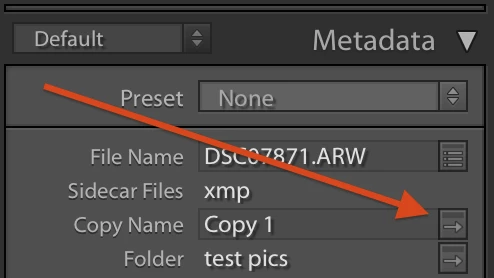
    That will select the virtual copy's master.

    4 replies

    johnrellis
    johnrellisCorrect answer
    Legend
    July 28, 2017

    You can click the arrow button to the right of Copy Name in the Metadata panel:

    That will select the virtual copy's master.

    Just Shoot Me
    Legend
    July 25, 2017

    It is usually right next to the VC when you have All Photographs selected in the Catalog area and you don't have any filters set. Like the filter option that only shows Virtual Copies.

    Bob Somrak
    Legend
    July 25, 2017

    Hover your mouse over a thumbnail in the films strip and the name will appear on the "info bar" or whatever it is called above the filmstrip.  This works for virtual copies too with the copy name appended to the file name.  You can also right click the photo and chose "show in finder" or the Windows equivalent.

    M4 Pro Mac Mini. 48GB
    JP Hess
    Inspiring
    July 25, 2017

    My virtual copies are always named the same as the master file with a "Copy 1", "Copy 2", etc. appended to the end of the name. How does your Lightroom behave?