


Participant
July 27, 2021
Answered

How to Adjust Thumbnail Size in Web Gallery

  • July 27, 2021
  • 2 replies
  • 778 views

I cannot seem to find a way to adjust the size of the thumbnails when I create a web gallery. I've searchd for answers but I'm coming up empty. The default size is too small and the overall grid looks really small on the web page. I need it to fill the page or at least close to it. 


In past versions of LR I recall being able to adjust the size but I don't see that option in the current version.


Can someone please enlighten me?


Thanks!
This topic has been closed for replies.
Correct answer TheDigitalDog

AFAIK, this depends on the gallery used, IF I'm understanding your question. 

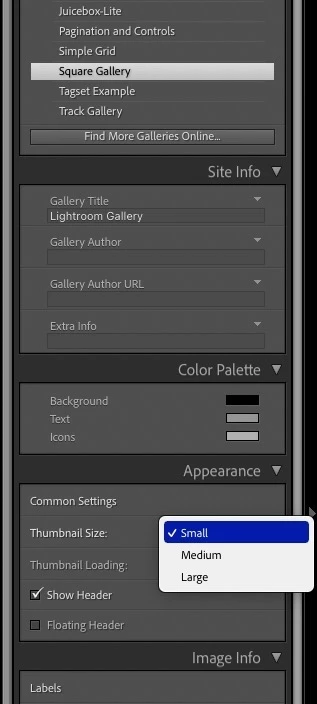
Some galleries allow you to alter thumbnail size, some don't. For example, Square Gallery does, with the settings seen below. 

2 replies

TheDigitalDog
TheDigitalDogCorrect answer
Inspiring
July 27, 2021

AFAIK, this depends on the gallery used, IF I'm understanding your question. 

Some galleries allow you to alter thumbnail size, some don't. For example, Square Gallery does, with the settings seen below. 

Author “Color Management for Photographers" & "Photoshop CC Color Management/pluralsight"
Participant
July 27, 2021

Thanks for the info!


Im using the Classic Gallery choice and definitely don't see the option for thumbnail size so I guess I will have to use another Layout Style.  I used the Basic gallery in previous versions and customized it with my loge etc. and I was hoping to do so with this LR version.


Not a real problem to switch to another Layout but I was hoping I was just missing something in the Classic Gallery layout choices.


Thanks again for your help!

Legend
July 27, 2021

Are you talking about

  • Lightroom Classic
  • Lightroom
  • Lightroom Mobile
  • something else

???

Participant
July 27, 2021

My apologies for not being more specific as to which version I am using.


It is LR Classic 10.2 - Creative Cloud


Under Layout Style I am using the Classic Gallery


I hope this helps. 


Thanks!

TheDigitalDog
Inspiring
July 27, 2021

Classic does not have that option. Use a different template that support different thumb sizes.

Author “Color Management for Photographers" & "Photoshop CC Color Management/pluralsight"