



How to export image sequence from lightroom classic in format 001.jpg 002.jpg 003.jpg ~ 999.jpg
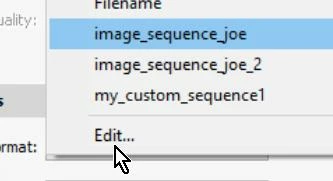
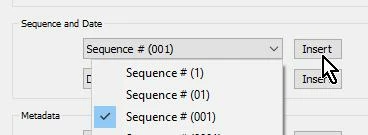
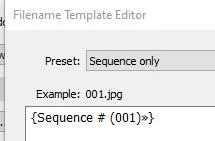
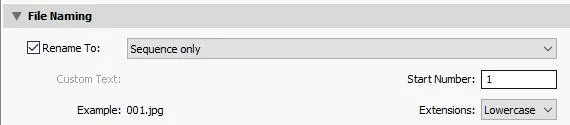
How do you set Lightroom's export so that the exported images are in the sequence 001.jpg, 002.jpg, 003.jpg ~ 999.jpg? I don't want a filename or anything else in front of the 001.jpg or any of the rest of them, just the number sequence. I had it set that way, and I can't remmeber how I did it. Lighroom updated or something because I was using it one day and everything was fine, the the next day I opened it and adobe had 'updated' it and every thing was reset. And I can't figure out how I did that before.
Now all exports start with 001.jpg then go to 001-1.jpg, 001-2.jpg, 001-3.jpg ~ on up to 001-999.jpg. I don't want that crap! All of the settings include putting a "custom" file name of some sort, and if I delete that, it inserts an underscore before the number like _1.jpg, or if I don't delete it but don't put a filename, it exports them like untitled-001.jpg.
ADOBE, STOP CHANGING SETTINGS JUST LEAVE THEM THE HECK ALONE. IF YOU CAN'T DO AN UPDATE WITHOUT CHANGING SOMETHING, THEN DON"T DO THE DAMNED UPDATE! JUST STOP CHANGING PEOPLES STUFF.
 AdChoices