


January 22, 2018
Answered

How to "Export Book to PDF" with "bleed"

  • January 22, 2018
  • 3 replies
  • 4425 views

Product: "Lightroom Class CC 7.1" on "macOS High Sierra"

Relevant Book Module Settings: "Book" set to "PDF"

                               "Size" set to "Standard Portrait 8x10in (20x25cm)"

Function: Export Book to PDF

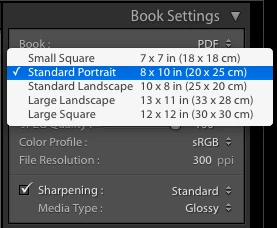
I'm trying to use the Book Module to create a PDF for an 8"x10" book (the "trim" size). The printer (Amazon's CreateSpace) requires a 0.125" bleed on the top, bottom and outside-edge (no bleed in the gutter) so the page size must be 8.125"x10.25". However, I can only find the five fixed Size settings (see screen shot below) and the "Standard Portrait 8x10in" size is close but too small. Lightroom "knows" about bleed because if you set "Book" to Blurb, there is a "bleed" guideline. I can't find any useful info on the Adobe or CreateSpace documentation, forums, YouTube videos, etc. I certainly can't be the first/only one to print a photo book using Lightroom and CreateSpace so someone out there must know how to do this. Any help or pointers would be most appreciated.
This topic has been closed for replies.
Correct answer Todd Shaner

I just checked the Blurb and Amazon Create Space 8" x 10" Portrait PDF requirements and they appear identical.

Distribute Your Book through Amazon.com, Bookstores, and Online Stores

PDF to Book Specifications | Blurb Books

Blurb 8"x10" Portrait

Page SpecificationsInches
Final, exported PDF should measure (w x h)8.125 x 10.25
Page size / trim line (w x h)8.0 x 10.0
Bleed (top, bottom, and outside edges)0.125
Inset for Margins / Safe boundary (Top, Bottom, Outside Edge)0.25
Inset for Margins / Safe boundary (Binding Edge)0.5

However, the LR Book 'Export to PDF' file produces a different page size of 7.875" x 10.0" and has no bleed or trim lines showing. I checked the same 8" x 10" Portrait book size that I created using InDesign with the Blurb plugin and the output PDF shows as 8.125" x 10.25" and has bleed and trim lines. This may be a bug because with the LR 'Book Settings' set to Book = Blurb it should output the same PDF file as 'Send Book to Blurb.'

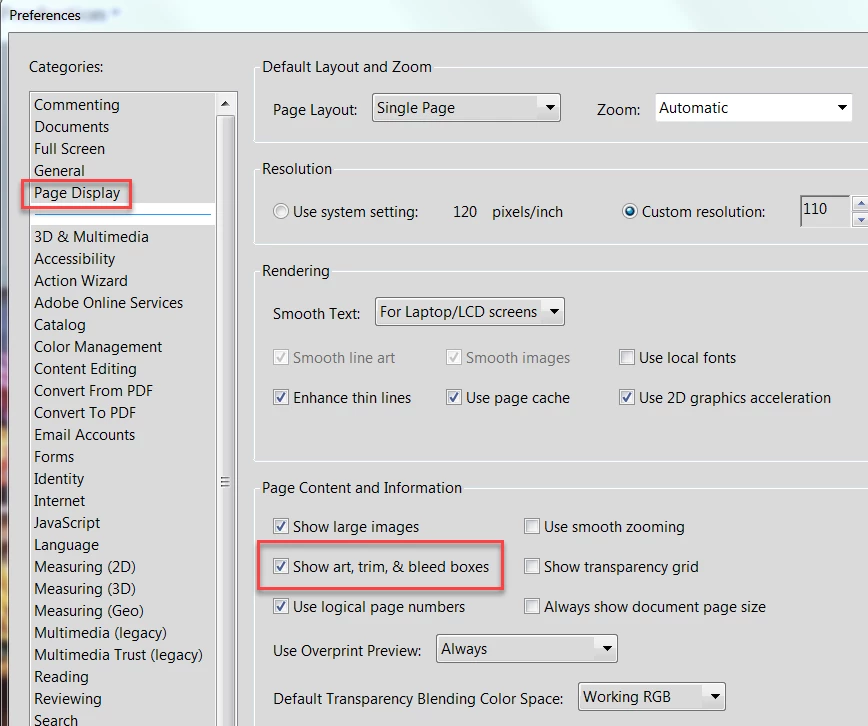
Please do me a favor and open your original LR 8" x 10" Portrait book PDF file in Acrobat and go to File> Properties and tell me the 'Page Size' that is showing. Next open Acrobat Preferences and check 'Show art, trim, & bleed boxes' and see if the appear in the pages. Set View> Page Display to 'Two Page View' to see the spread.

3 replies

Todd Shaner
Todd ShanerCorrect answer
Legend
January 31, 2018

I just checked the Blurb and Amazon Create Space 8" x 10" Portrait PDF requirements and they appear identical.

Distribute Your Book through Amazon.com, Bookstores, and Online Stores

PDF to Book Specifications | Blurb Books

Blurb 8"x10" Portrait

Page SpecificationsInches
Final, exported PDF should measure (w x h)8.125 x 10.25
Page size / trim line (w x h)8.0 x 10.0
Bleed (top, bottom, and outside edges)0.125
Inset for Margins / Safe boundary (Top, Bottom, Outside Edge)0.25
Inset for Margins / Safe boundary (Binding Edge)0.5

However, the LR Book 'Export to PDF' file produces a different page size of 7.875" x 10.0" and has no bleed or trim lines showing. I checked the same 8" x 10" Portrait book size that I created using InDesign with the Blurb plugin and the output PDF shows as 8.125" x 10.25" and has bleed and trim lines. This may be a bug because with the LR 'Book Settings' set to Book = Blurb it should output the same PDF file as 'Send Book to Blurb.'

Please do me a favor and open your original LR 8" x 10" Portrait book PDF file in Acrobat and go to File> Properties and tell me the 'Page Size' that is showing. Next open Acrobat Preferences and check 'Show art, trim, & bleed boxes' and see if the appear in the pages. Set View> Page Display to 'Two Page View' to see the spread.

February 1, 2018

Same for me. Acrobat shows the PDF page size as 7.88" x 10.0" and does NOT show trim or bleed lines.

IngramSpark also requires 0.125" bleed on the top, bottom and outside edges.

Todd Shaner
Legend
February 2, 2018

I had a chance to check this using the Book module in LR 5.7.1 and it also outputs the same 'Export to PDF' page dimensions of 7.88" x 10.0". So it appears there never was a way to to use 'Export to PDF' in the Book module to create a PDF with the same file format that is output using the 'Send Book to Blub' button. I also found this post with the same confirmation: Re: PDF vs. Direct to Blurb? {upload errors}

It appears both Amazon CreateSpace and IngramSpark use the same page layout dimensions as Blurb. If Adobe can "add" the capability to output the Blurb formatted PDF files locally with 'Export to PDF' it would allow using these other print services. This would also allow users with upload issues to output the cover and pages files locally and then upload them manually to Blurbs 'PDF to Book' site: Custom Photo Book. PDF book printing gives you full control | Blurb. Does that sound like something that would be useful?

January 31, 2018

Well, apparently I am the first & only person trying to use Amazon's CreateSpace (IMHO, the fastest, easiest and least expensive way to print a book) with a PDF exported from Adobe's Lightroom. No one on the CreateSpace forum has heard of anyone trying to do this and no one on either forum clicked "I have this question too". FWIW, I worked with Doug Heatherly at Lighthouse24 to "fix" the Lightroom PDF to meet CreateSpace's specifications. Doug was fantastic to work with -- consistently honest, responsive, clear, helpful, informative, patient and reasonable.

Todd Shaner
Legend
January 31, 2018

Thanks for reporting back and good to hear you found a solution. Can share some of the details on how Doug Heatherly fixed the LR Book PDFs to meet the CreateSpace spec? That would be helpful to others landing here with the same issue.

January 31, 2018

The "fix" was to increase the page size from 8"x10" to 8.125"x10.25". He also suggested some aesthetic, color space and layout enhancements that were helpful. Lightroom Book provides dozens (hundreds?) of page layouts but, inexplicably, one and only one portrait/vertical page size.

It's like the Henry Ford quote about the Model T "Any customer can have a car painted any color that he wants so long as it is black."

Todd Shaner
Legend
January 23, 2018

Try also posting your question at the CreateSpace forum for Formatting.

CreateSpace Community: Community: Formatting

January 23, 2018

Done! Thanks for the suggestion.