



Big_Lynx
Known Participant
February 8, 2023
Answered

How to remove duplicates form LrC

  • February 8, 2023
  • 1 reply
  • 4061 views

I have read some posts related to my problem. I've done the tests but still can't get what I want.


My task is very simple: I want to search for duplicates based only on these criteria: file name, creation date, and camera name. Full stop. Without any extra analysis of Exif, IPTC, pixels, similarities, ... The closest to solving the problem is the "Find Duplicates" plugin, but unfortunately, it can't cope with, for example, keywords and editing. With some files it is working - with others not. It can't focus completely on just these three search keys.


Does anyone know a solution to this problem?
This topic has been closed for replies.
Correct answer Rob_Cullen

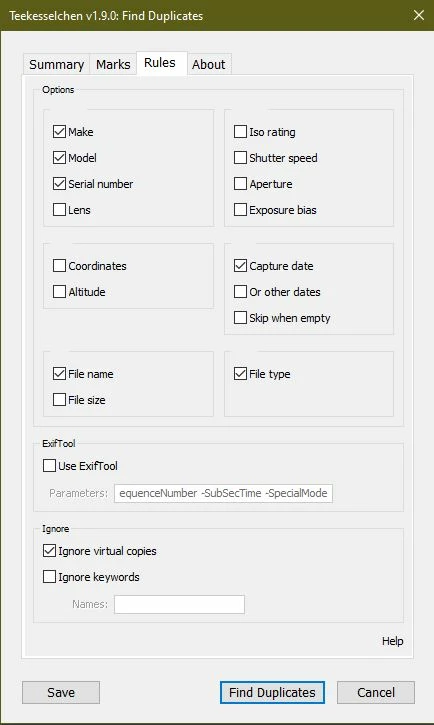
The Teekesselchen Plugin has an option screen where you can set the criteria you want. Suspected duplicates are keyworded as "duplicate" and a Smart Collection can filter for the KW.

DUPLICATE FINDER Teekesselchen: Home

Duplicate Photos (Lightroom Queen)


1 reply

Rob_Cullen
Community Expert
Rob_CullenCommunity ExpertCorrect answer
Community Expert
February 8, 2023

The Teekesselchen Plugin has an option screen where you can set the criteria you want. Suspected duplicates are keyworded as "duplicate" and a Smart Collection can filter for the KW.

DUPLICATE FINDER Teekesselchen: Home

Duplicate Photos (Lightroom Queen)


Regards. My System: Windows-11, Lightroom-Classic 15.0, Photoshop 27.0, ACR 18.0, Lightroom 9.0, Lr-iOS 10.4.0, Bridge 16.0 .
Big_Lynx
Big_LynxAuthor
Known Participant
February 9, 2023

Yes - that is what I am using, either. I don't know why, but switching off "Skip when empty" brings better results even though I don't have empty files in my library. What also surprises me a lot is the "File size" option. Unfortunately, the edited file has a different size than the original, even LrC is working on a non-destructive way - what generates troubles in my case.