


Known Participant
May 16, 2024
Question

How to search by file path in Lightroom Classic?

  • May 16, 2024
  • 2 replies
  • 814 views

If I'm reading this Adobe Help page correctly, when I want to restrict an image search to look just at the file path, I should be able to select File Path as one of the options under Any Searchable Field in a text search.


No such luck on my Any Searchable Field menu:
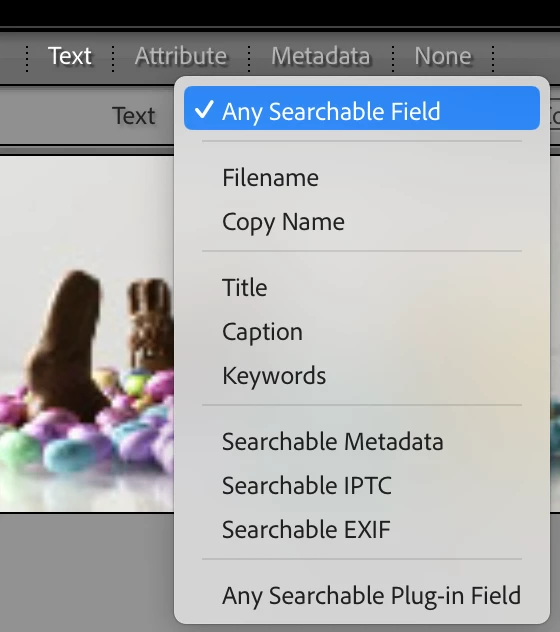
What am I missing? Do I need to add a plug in to add the option?

BTW, I'm on Mac OS 14.4.1 and LRC 13.2

Thanks much!

Gary


This topic has been closed for replies.

2 replies

john beardsworth
Community Expert
Community Expert
May 16, 2024

Any Searchable Field bundles together a few fields, as documented. So you can't search for path independently, or precisely. 

gbebermanAuthor
Known Participant
May 16, 2024

Hi John


Thanks much for your explanation. I'm still confused based on that Adobe help page I linked. Here is what it says:


You'll note that all of the fields it lists show up in my menu except for File Path. And that the instructions seem to indicate that I should be able to pick any of those options individually. For reasons I explained to Conrad, it would be very helpful if File Path appeared in the menu as a source to restrict the search. But, that help page seems to be at odds with the copy of Lightroom that I'm runing.


I'm new to LRC. Did it ever behave the way that 2022 help page describes?


Thanks,

Gary

johnrellis
Legend
May 16, 2024


[This post contains formatting and embedded images that don't appear in email. View the post in your Web browser.]


@gbeberman, "You'll note that all of the fields it lists show up in my menu except for File Path. "


Most of fields enumerated in that section don't appear individually. Only the names shown in bold appear in the menu:

"And that the instructions seem to indicate that I should be able to pick any of those options individually."


I think you're being misled by the first sentence in that section, "Choose fields to search from the Any Searchable Field pop-up menu." [My emphasis] It would be more precise to call it "the Text pop-up menu".  I think the tech writer used "Any Searchable Field" because that's the menu item that appears by default when you open the Text filter:


Conrad_C
Community Expert
Community Expert
May 16, 2024

The filters, including search, apply to the current source (folder, collection…). That makes this pretty simple, because in Lightroom Classic one thing that is defined exactly by the file path is the source selected in the Folders panel.


So to do a search constrained to a path, do these two things, and it doesn’t matter which one you do first:

  • In the Library module filter bar, set up the search. 
  • In the Library module Folders panel, select the folder at the end of the path you want to constrain the search to. You can select a folder at any level of the folder hierarchy. 


“Source” doesn’t have to be a folder, so if you consider all types of sources, you can easily set the scope of a search to:

Any folder

Any collection, including Publish Services

All images in the catalog, if you expand the Catalog panel and select All Photographs


In short, a source can be anything in the different lists in the left column of the Library module.

gbebermanAuthor
Known Participant
May 16, 2024

Hi Conrad:


Thanks for responding. I'm not sure we're in sync on this. Let me explain.


I'm trying to rebuild in LIghtroom our index over very large collection of images spread across 100+ drives.  We do no editing in it. We only want to be able to find images. Our file paths always have the client name in them. So, if looking for images for, say, CHASE, I would like to restrict the search to the folder hierarchy. That way I can avoid getting lots of irrelevant results from images which might have the word "purchase" in them.


So, in our case, I don't have a starting folder to which the search should be constrained. I'm looking for the relevant drive and folders.


Thanks again,


Gary

Conrad_C
Community Expert
Community Expert
May 16, 2024

Oh, OK. Then I misinterpreted the question. Hope you get the right answer then, John Beardsworth does know more about this subject that most people.