AN_Studio
Participant
July 5, 2022
Question

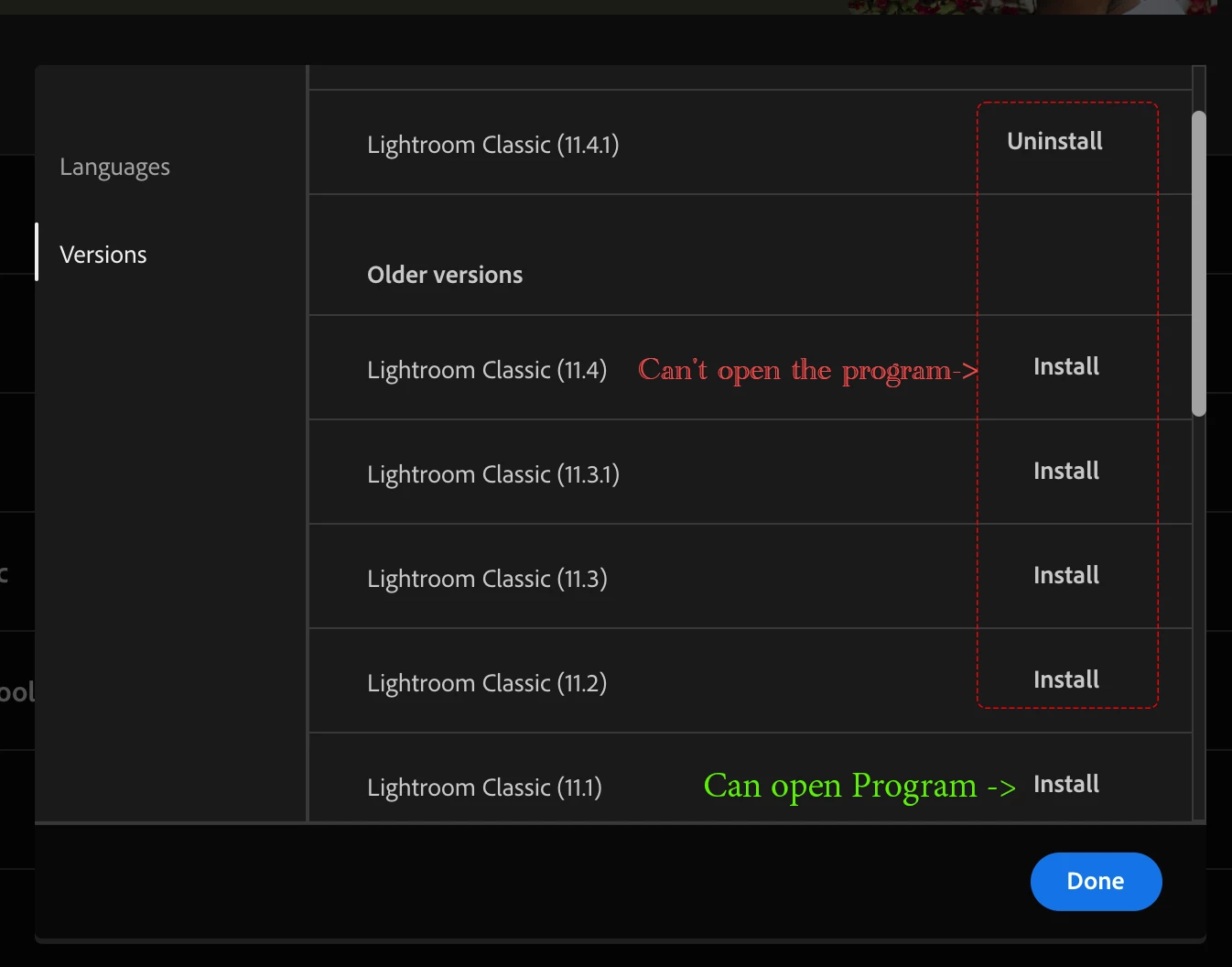
I can't install LR since version 11.2 or later.
  • July 5, 2022
  • 9 replies
  • 2666 views


The program will hang on the logo.


This topic has been closed for replies.

9 replies

hneryi
Participating Frequently
December 22, 2022

Finally. I managed to fix this - for me. The problem is clearly in adobes implimantation of license checking through the hardware on LRC 11.2+. This doesn't happen on other software (or even on other adobe software). 

I have a hunch that LRC checks intels vt-d tables and Mac uses it's own AppleVTD in between and there can be mismatches. So in my case the mismatch was in original ethernet - original nic had been disabled for years but still populated the table. LRC tries to check only from hardware table and sees no internet and thus no licensing information. And bc no licensing info -> no develop menu or import.

For me the solution was to simply to add the original unpopulated eth NIC to OS level and do a SMC+PRAM reset. But that doesn't necesarally work for everyone - bc there can be mismatches between the two tables on active connections. You only need to have a usb nic or a broken nic still connected to mb to have a mismatch (what I understand). And reseting network settings/permissions on OS level doesn't fix the tables - so it seems like a hw problem real fast. But its not. It's a LRC problem.

hneryi
Participating Frequently
December 13, 2022

just released 12.1 doesn't fix the problem. No develop module and changing prefs hangs the process.

hneryi
Participating Frequently
November 5, 2022

Is there anything I can do here? I've troubleshooted this now for 3 days now and just giving up.

I've had two different computers and installed LRC and swapped the SSD from one to another. On my iMac Pro it doesn't open the develop menu no matter where it's installed originally. Tried to take prefs from other computers doesn't work either. Multiple times tried to open from a just installed Ventura with a new user and straight installed CC and LRC. No luck.

Have run every hardware diagnosis I can find and everything seems to be working. My RAM works in a dual channel w 2x32GB - CPU package speed seems fine and temps stay in line. EVERYTHING else seems to be working - including intense AVX-512 workloads or GPU loads. LRC 11.1 works fine.

So like I originally ticketed this as a bug - and have been merged with THIS thread instead of a bug - I don't know what I'm supposed to do anymore?

hneryi
Participating Frequently
August 18, 2022

Got things working with a full reinstall of OS (Mavericks) on top of the old one. No data was lost that way and every old adobe pref worked out of the box.

11.5 fully working after that.

hneryi
Participating Frequently
November 2, 2022

A follow up on this,
https://community.adobe.com/t5/lightroom-classic-discussions/i-can-t-install-lr-since-version-11-2-or-later/m-p/13142745#M286143

TL;DR Can't get Lightroom to work on a iMac Pro and have tried everything from permissions to reinstalling the whole os from scratch (empty ssd). Opening the daemon straight from terminal gives a lot of permission issues and while LRC 12 does open (LRC 11.2 onward does not open) you just can't open develop module at all. Last fully working version is 11.1.

Got this to work on first try of OS reinstall, but after updating to 11.5 the problem started again.

Tried with Monterey and Ventura. Accessibilty and Full disk access granted. With or without GPU enabled on LRC. On completely newly installed OS or old. Permissions granted and fixed and even added -755 to wheel (just to try something). Any changes to preferences in LRC hangs the process and any quit results in "LRC has unexpectedly quit"


Doesn't matter if its a new or old catalog. I use LRC in a professional enviroment and have started to think that I have to change my process bc this is exhausting.

Fast glance on other people with this exact problem,
https://community.adobe.com/t5/lightroom-classic-discussions/reading-preferences/m-p/13090014
https://community.adobe.com/t5/lightroom-classic-discussions/recently-imported-catalog-onto-new-mac-and-lrc-11-5-not-opening-quot-an-error-occurred-when-attempt/m-p/13201521
https://community.adobe.com/t5/lightroom-classic-discussions/lightroom-classic-quot-an-error-occurred-when-attempting-to-change-modules-quot-on-macos-monterey/m-p/13292333
https://community.adobe.com/t5/lightroom-classic-discussions/develop-quot-quot-an-error-occurred-when-attempting-to-change-modules-quot-quot/m-p/13306688

hneryi
Participating Frequently
November 2, 2022

Do you see the problem with 12.0.1?


Yes. The problem persits on 12.0.1

dj_paige
Legend
July 9, 2022

@Rikk Flohr: Photography

there have been probably a half dozen such reports, two in this thread. Perhaps this qualifies as a bug?

hneryi
Participating Frequently
August 17, 2022

Tried to install today 11.5 - still the problem presists

hneryi
Participating Frequently
August 17, 2022

... and after this update - can't get back to 11.1 either. Will start troubleshooting on either.

A sh*tty problem that now has me troubleshooting AGAIN instead of working with clients.

AxelMatt
Community Expert
Community Expert
July 5, 2022

Please try is to switch off the GPU support from the Lightroom preferences and check if that helps to fix the issue.

Go to Lightroom > Preferences > Performance tab > Uncheck "Use Graphics Processor" > Restart Lightroom.

https://helpx.adobe.com/lightroom-classic/kb/lightroom-gpu-faq.html#troubleshooting

https://helpx.adobe.com/lightroom-classic/kb/troubleshoot-gpu.html


If Lightroom doesn't start correctly the please see "Solution 2" in the document behind the second link.

Troubleshoot GPU issues | Lightroom Classic (adobe.com)


My System: Intel i7-8700K - 64GB RAM - NVidia Geforce RTX 3060 - Windows 11 Pro 25H2 -- LR-Classic 15 - Photoshop 27 - Nik Collection 8 - PureRAW 6 - Topaz Photo AI
hneryi
Participating Frequently
July 8, 2022

I'm having this Exact problem as well. Last working Lightroom Classic version is 11.1. After that every version hangs on "reading preferences" on splash screen.

I can manually open catalogs from there going to file - open catalog, but after opening any/or new catalog normally, I can't use develop module "An error occurred when attempting to change modules." Changing any settings crashes Lightroom. Even normally quitting crashes LRC

Tried with no avail. On this order and with multiple reboots (on last tries rebuilt kextcache just in case - lol)
-Resetting settings (with cmd+sfht open and manually)(duh)

-Disabling/Re-adding system preference accessabilty/full disk priveledges to LRC

-Turned off GPU from settings (useAutoBahn=0) 

-Resetting permissions on any and all Adobe related Library folders that I can find from internet. Obviosly tried the LightroomCorrectPermission.sh as well.
-Ran onyx full suite on OS and rebuilt the whole SSD priveledges on OS
-Different user account with system admin priveledges.
-Uninstalled all of adobe apps and used all of the Adobe Creative Cloud Cleaner Tools. Deleted all prefs *lightroom and renamed Adobe folder structures - as to start lightroom from a virgin state.
-Disabled all plugins in virgin state on LR and autobahn=0 on virgin state. With brand new catalog or old catalogs.


Nothing. Just splash screen. With opening daemon from terminal gives (removed timestamps)

AdobeCrashReporterInitialize: executionTime = 0.015871 seconds
Adobe Lightroom Classic[1917:64681] ApplePersistence=YES
Adobe Lightroom Classic[1917:64681] Unable to obtain mac address.

Lightroom might have encountered user permission issues due to bad installation.   bad argument #1 to 'update' (string expected, got nil)
Lightroom might not work correctly if you continue without correcting the issues.
Visit   http://www.adobe.com/go/lr_user_permission_issue

The permission issue x5

Only issue with 11.1 (and down) is
Class ProxyManager is implemented in both /Library/Application Support/Adobe/AdobeGCClient/AdobeGCClient.app/Contents/MacOS/AdobeGCClient (0x102c808e8) and /Library/Application Support/Adobe/AdobeGCClient/HDPIM.dylib (0x105a06270). One of the two will be used. Which one is undefined.


Bc mac address problem also tried to disable all networking except (eth0 wifi) on virgin state.


Using Mac OS 12.4 - iMac pro 8-core, 64gb RAM - 10GB tb NIC (maybe important bc error log unaible to get mac address from LRC- idk)

Also have a Mac Pro on my studio - There everything works like a charm.

hneryi
Participating Frequently
July 8, 2022

*en0 - not eth0

TheDigitalDog
Inspiring
July 5, 2022

Try resetting your Lightroom preferences:
https://helpx.adobe.com/lightroom-classic/help/setting-preferences-lightroom.html
Also see: https://community.adobe.com/t5/lightroom-classic-discussions/important-steps-for-manually-resetting-preferences-omitted-from-help-article/td-p/12972518

Quit Lightroom Classic.
MacOS: Press and hold the Shift + Option keys.
Windows: Press and hold the Shift + Alt keys.
While holding down the keys, launch Lightroom Classic.
When asked, select "Yes".

Still crashing?

Author “Color Management for Photographers" & "Photoshop CC Color Management/pluralsight"
DdeGannes
Community Expert
Community Expert
July 5, 2022

The first screen capture indicates that LrC 11.4.1 is installed. You may need to insure that you have set the preferences in your OS to allow "full disk access" for LrC to open the application.

See the link for more info.

https://community.adobe.com/t5/lightroom-classic-discussions/quick-tips-how-to-give-full-disk-access-to-lightroom-classic-on-macos/td-p/12913413


Regards, Denis: iMac 27” mid-2015, macOS 11.7.10 Big Sur; 2TB SSD, 24 GB Ram, GPU 2 GB; LrC 12.5,; Lr 6.5, PS 24.7,; ACR 15.5,; (also Laptop Win 11, ver 24H2, LrC 15.0.1, PS 27.0; ) Camera Oly OM-D E-M1.
GoldingD
Legend
July 5, 2022

First oddity to inquire upon.


It appears you have modified the CC settings for installs for LrC to not delete the old version, as a result you still have several old versions. Why?


Second an observation, it appears LrC does not complete the process of reading the preferences file at startup, Have you considered resetting it?


The preference file can get corrupted leading to buggy behavior. A corrupt preference file will survive uninstalls, updates, and upgrades. By renaming or moving or deleting the preference file you create a situation where LrC will recreate a fresh new one upon startup of LrC. Be aware various settings will revert to defaults.


see:

https://helpx.adobe.com/lightroom-classic/help/setting-preferences-lightroom.html