New Participant
September 10, 2017
Answered

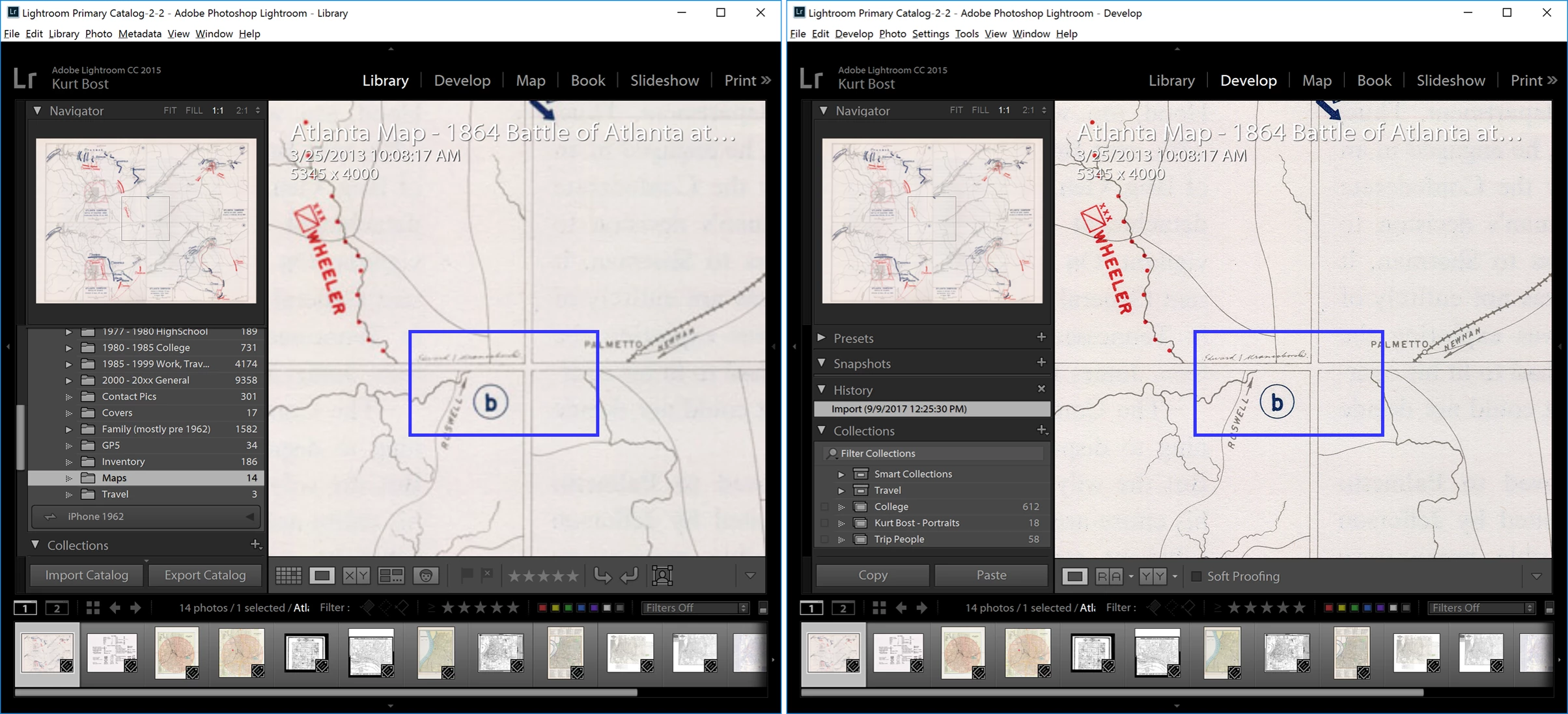
Image Blurry in Library but sharp in Develop (both at 1:1)

  • September 10, 2017
  • 2 replies
  • 3285 views

I have seen similar posts but no firm answer / solution.  I have rebuilt the 1:1 preview in Library already.  Attached is a screen shot clearly showing the difference in image quality between Library and Develop at 1:1.

Version:  2015.12 [1125239]

Windows 10.0 version 10.0

Screen: 3840x2160

Has anyone found a solution - or root cause of the problem?
This topic has been closed for replies.
Correct answer johnrellis

1`. Do you have a smart preview for that photo?  Try deleting it: Select the photo and do Library > Previews > Discard Smart Previews.

2. Try deleting the entire preview cache: Optimize Lightroom performance . (See the section Delete The Lightroom Previews Cache.) This could be moderately painful, since previews (thumbnails) will have to be rebuilt for your entire catalog.  Be very careful to follow the directions carefully, since you don't want to delete your catalog, which is in the same folder.

2 replies

New Participant
December 18, 2023

I had the same issue. I tried optimizing the cache and all that. Didn't work.

What I did was minimized the size of the thumbnails along the scrollbar in Dev mode. The image became sharper. Not sure how or why but it worked and I just need to get some work done. Might try to figure something else out later.

johnrellis
Brainiac
September 10, 2017

This infrequently happens to me, and when it does, the following works for me: In Library, go to Loupe view, then click in the image to zoom to 1:1, wait for the 1:1 image to finish loading, then click again to zoom back to Fit. 

kwbostAuthor
New Participant
September 10, 2017

Thanks - no change in the image though.

johnrellis
johnrellisCorrect answer
Brainiac
September 10, 2017

1`. Do you have a smart preview for that photo?  Try deleting it: Select the photo and do Library > Previews > Discard Smart Previews.

2. Try deleting the entire preview cache: Optimize Lightroom performance . (See the section Delete The Lightroom Previews Cache.) This could be moderately painful, since previews (thumbnails) will have to be rebuilt for your entire catalog.  Be very careful to follow the directions carefully, since you don't want to delete your catalog, which is in the same folder.