


Exit
  • Global community
    • Language:
      • Deutsch
      • English
      • Español
      • Français
      • Português
  • 日本語コミュニティ
  • 한국 커뮤니티
1

Import does not work with cfexpress card reader.

Community Beginner ,
Jun 06, 2023 Jun 06, 2023

Lighroom import dialogue detects the cfexpress card reader but cannot see any photos in the main direcotry nor in any subfolders.  Import of photos is therefore impossible.   However, Adobe Bridge can see the cfexpress card in the reader and see all the sub folders and photos.  So can the Finder (I am using Mac).  It is possible to import photos by dragging and droppring the thumbnails from Bridge to the Lightroom import dialogue.  I cannot understand why Bridge can see the photos but Lightroom cannot because they are both Adobe products.  Hope Adobe can resolve this issue.  BTW the Import Dailogue works normally with a direct USB connection from camera to the computer (a Mac Mini).  Thank you in advance to anyone who has an answer to this issue. 
TOPICS
macOS
1.5K
Translate
Report
Community guidelines
Be kind and respectful, give credit to the original source of content, and search for duplicates before posting. Learn more
community guidelines

correct answers 1 Correct answer

Community Expert , Jun 06, 2023 Jun 06, 2023

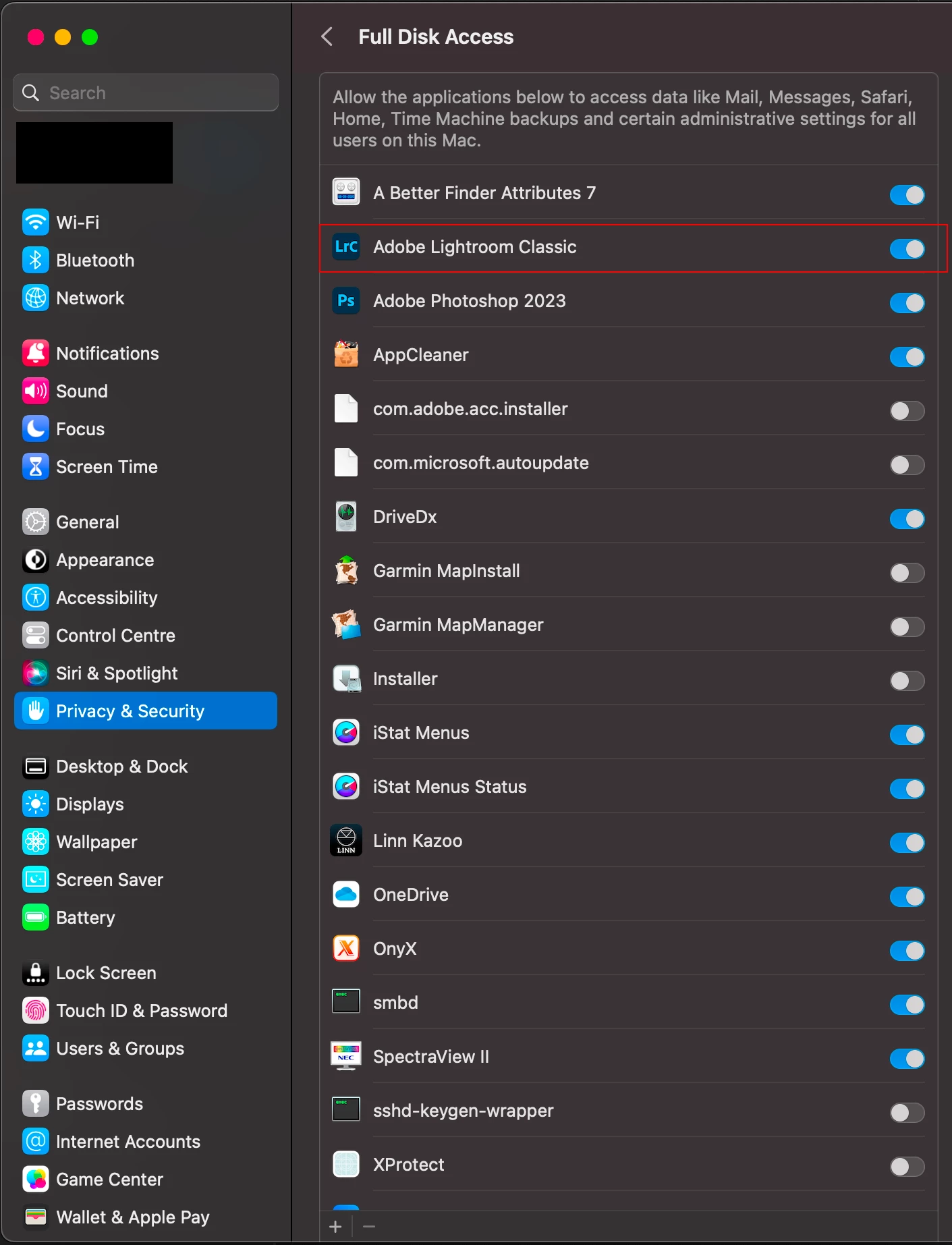
Make sure that LrC has 'Full Disk Access' in macOS Privacy & Security Settings. The link provide below describes the procedure. I've also atatched a screenshot is for Ventura as the screesnhots in the link are for Monterey.


https://community.adobe.com/t5/lightroom-classic-discussions/quick-tips-how-to-give-full-disk-access-to-lightroom-classic-on-macos/td-p/12913413


full_disk_access.png

Translate
Community Expert ,
Jun 06, 2023 Jun 06, 2023

Make sure that LrC has 'Full Disk Access' in macOS Privacy & Security Settings. The link provide below describes the procedure. I've also atatched a screenshot is for Ventura as the screesnhots in the link are for Monterey.


https://community.adobe.com/t5/lightroom-classic-discussions/quick-tips-how-to-give-full-disk-access...


full_disk_access.png

Translate
Report
Community guidelines
Be kind and respectful, give credit to the original source of content, and search for duplicates before posting. Learn more
community guidelines
Community Beginner ,
Jun 06, 2023 Jun 06, 2023
Hi Ian
Thank you very much. Wonderful. This solves the problem.

--
Best regards
CL
Translate
Report
Community guidelines
Be kind and respectful, give credit to the original source of content, and search for duplicates before posting. Learn more
community guidelines
Community Expert ,
Jun 06, 2023 Jun 06, 2023

Great news, thanks for confirming that giving LrC 'Full Disk Access' resolved your issue.


Translate
Report
Community guidelines
Be kind and respectful, give credit to the original source of content, and search for duplicates before posting. Learn more
community guidelines
Community Beginner ,
Jul 16, 2024 Jul 16, 2024

Im having a very similar thing buy in windows and I dont see that option. 

my issue is slightly different. When I use CF Express to import the first set of photos, its able to detect the photos and I can see tbem and import them but when I grab the second card to import more photos, the screen reads "no photos found". This is the sexond time that this has happened out of two times that Ive done this. Im a new cf express card and nikon z8 user. I have checked off tbe box that says, "dont import suspected dublicates" so thats not the issue. 

need help. 

Translate
Report
Community guidelines
Be kind and respectful, give credit to the original source of content, and search for duplicates before posting. Learn more
community guidelines
LEGEND ,
Jul 16, 2024 Jul 16, 2024

my issue is slightly different


Please do us a favor. Please start a new thread and describe your problem in detail, from the beginning. Please include the version NUMBER of your software and the version NUMBER of your operating system.

Translate
Report
Community guidelines
Be kind and respectful, give credit to the original source of content, and search for duplicates before posting. Learn more
community guidelines
Community Beginner ,
Jul 16, 2024 Jul 16, 2024
LATEST

Update: I closed the Lightroom. Tried to get back into it and it wouldn't so I restarted my computer and it can now see my images. It works and this method worked but this is clearly a glitch. 

Translate
Report
Community guidelines
Be kind and respectful, give credit to the original source of content, and search for duplicates before posting. Learn more
community guidelines