


Inspiring
December 11, 2020
Answered

Import Raw files from Olympus O-MD E-M1 Mark III in Lightroom Classic

  • December 11, 2020
  • 2 replies
  • 2407 views

At the moment I have installed an old Lightroom Classic Desktop App v6.14 with a perpetual license. This worked fine with my old camera, but not with the new Olympus camera. From the compatibility list on the Adobe support sites I see that I need the following versions:
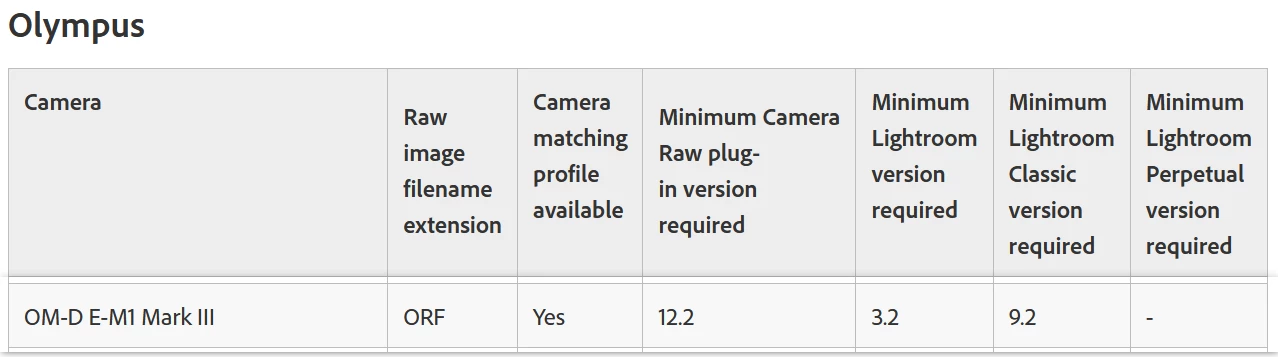
Can I upgrade my current Lightroom App with the existing license to the required versions and where do I get the installation files from? If a new license is needed, can I still buy a perpetual license for the required Lightroom Classic version, or is there no way around the Lightroom CC abo license? Thank you for your support.
This topic has been closed for replies.
Correct answer fili38828149

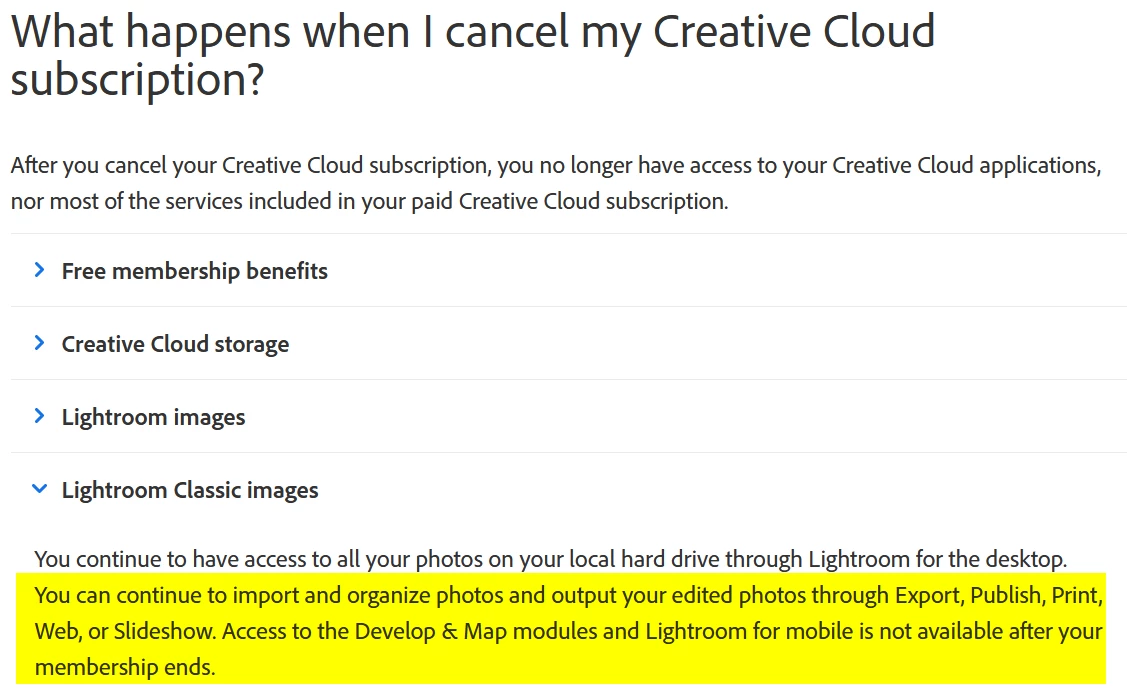
When the subscription ends, the Develop Module will stop working, and the Map module will stop working. Everything else will work, so you can still import your photos and organize them in the Library Module.


Thank you dj_paige for answering this as well. When surfing on Adobes website I accidently came on this web site, where it is clearly said what happens after the cancelation of the cloud abo.


2 replies

F. McLion
Community Expert
Community Expert
December 12, 2020

I suggest to take a look at the Photography (20GB) plan: https://www.adobe.com/creativecloud/photography/compare-plans.html#


--- Got your issue resolved? Please label the response as 'Correct Answer' to help your fellow community members find a solution to similar problems. ---
Inspiring
December 15, 2020

Thank you for your suggestion. I have seen this already and it sounds interesting for me, but not as a "lifetime" purchase. So I would use the license for one year, which corresponds to the price that I have paid for the perpetual license, but then I would cancel the abo. The question would be then, what will be the functions available also after the cancellation of the abo. Will I still be able to import RAWs from my camera and to use all the functions in Lightroom except the new ones that will appear in the upgrades after my cancellation?

F. McLion
Community Expert
Community Expert
December 15, 2020

I'm not sure about the import. However, I'm sure that the develop module will cease its operation entirely, not only for the new additions.

--- Got your issue resolved? Please label the response as 'Correct Answer' to help your fellow community members find a solution to similar problems. ---
Legend
December 11, 2020

You can purchase a subscription to the current Lightroom Classic. There are no more perpetual licenses. Or, you can download the free Adobe DNG Converter, which will allow raw photos from this camera to be converted to DNG and then imported into your Lightroom 6.


Also, you do not have Lightroom Classic, you have Lightroom 6.

Inspiring
December 14, 2020

Thank you for your answer and correcting me in the version name. I always have problems to see the differences in the version names like "Lightroom", "Lightroom Classic" and "Lightroom CC".

As to the DNG Converter I wanted to ask if there are some drawbacks regarding the quality of the photos. Furthermore is the working with DNGs similar to RAW, i.e. that all the changes are stored in a xmp file and all the changes done to the pictures are lossless?

Legend
December 14, 2020

There is no difference in quality. There is no difference in the way you work with the photos in Lightroom. DNG and RAW do not, by default, use xmp files, the edits are always stored in the catalog. However optionally you can store the edits in the xmp portion of a DNG file or a sidecar .xmp file in the case of RAW images, in addition to having the edits stored in the catalog file.