


Importing PNG files with metadata doesn't parse keywords correctly
I am trying to import PNG files that already have intact metadata fields. I have been using the ExifTool (a standard tool for reading, writing, and editing EXIF metadata) to inject all the metadata I need into the PNG files, and most fields import correctly into Lightroom such as Title, Caption, and Copyright. The only field I'm struggling with is the keyword tags.
If I have keywords such as "tag1, tag2, tag3" in the PNG metadata (located in the Subject, Keywords, or Weighted Flat Subject fields), when this is imported into Lightroom it gets assigned as a single keyword called "tag1, tag2, tag3" instead of separating them as individual keywords "tag1," "tag2," "tag3," (even though commas in keyword names are supposedly disallowed in Lightroom, since they are used to delimit keyword lists). Here is how it looks in the keyword list after import:
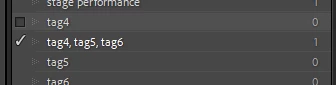
The same happens if I delimit the keywords with semicolons in the PNG metadata, they are imported as a single keyword "tag1; tag2; tag3". If I edit the keywords in the keywording panel, such as adding a keyword, it will then split out all the keywords into individual keywords, leaving behind an unassigned "tag1, tag2, tag3" keyword in the keyword list.
If I wanted to edit the keywords for every photo I import, this could work, but would leave behind a lot of unassigned keywords that I would also have to purge. It's a lot of unnecessary work. I want Lightroom to recognize the keywords individually when importing the PNG file. Anyone know how to format the keywords in the PNG metadata so they are imported individually in Lightroom, or is this a bug in Lightroom import that should be separating keywords when imported and is not doing it correctly?
Thank you.
Lightroom Classic: v13.3.1
Windows 11 Pro 23H2
 AdChoices