


Participant
May 25, 2018
Answered

Issue changing time on batch photos - No change all button

  • May 25, 2018
  • 2 replies
  • 824 views

I am wanting to select a batch of photos from a wedding and change the time (one of my cameras was set to the wrong date)

However when I select the batch of photos then in LIBARY mode I go to METADATA  - Edit Capture time  (change the times to required)

However instead of showing up a button saying "Change all"  it is only allowing me to change one file at a time - see screen shot.


Anyone have an idea on what I am doing incorrectly? Thanks so much for your help
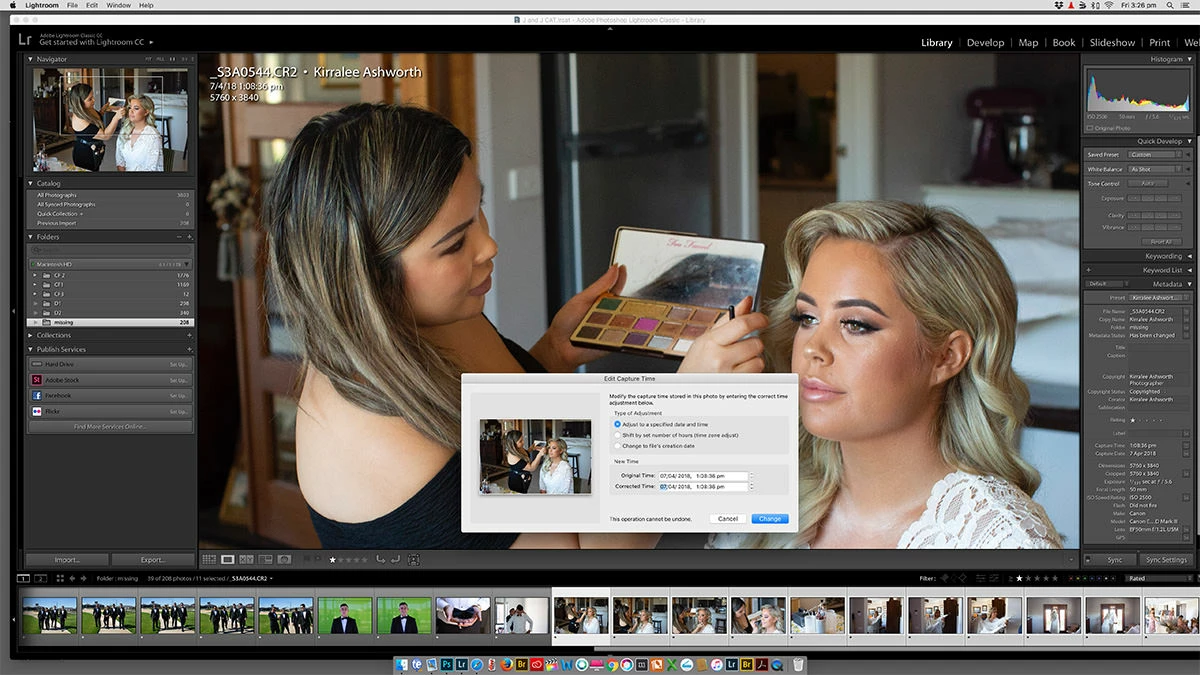
    This topic has been closed for replies.
    Correct answer johnrellis

    Toggle the main viewing area to Grid View and make sure all the photo you want changed are selected in the Grid View.

    LR some times doesn't apply changes to multiple images if only selected in the Film Strip section. It then only applies the change to the primary selected image.

    To to be more precise for future readers: When you're in Loupe view in Library or in Develop, then most LR commands only work on the "most selected" photo (the one showing in the large Loupe view), rather than on all the selected photos.  When you're in Library grid view, the commands operate on all the selected photos, regardless of whether you made the selection in the grid or the filmstrip.

    2 replies

    Just Shoot Me
    Legend
    May 25, 2018

    Toggle the main viewing area to Grid View and make sure all the photo you want changed are selected in the Grid View.

    LR some times doesn't apply changes to multiple images if only selected in the Film Strip section. It then only applies the change to the primary selected image.

    johnrellis
    johnrellisCorrect answer
    Legend
    May 25, 2018

    Toggle the main viewing area to Grid View and make sure all the photo you want changed are selected in the Grid View.

    LR some times doesn't apply changes to multiple images if only selected in the Film Strip section. It then only applies the change to the primary selected image.

    To to be more precise for future readers: When you're in Loupe view in Library or in Develop, then most LR commands only work on the "most selected" photo (the one showing in the large Loupe view), rather than on all the selected photos.  When you're in Library grid view, the commands operate on all the selected photos, regardless of whether you made the selection in the grid or the filmstrip.

    Kiz101Author
    Participant
    May 25, 2018

    Thanks all for being super helpful! Yes you are all correct I just needed to go into the grid view. So silly i couldn't work this out. Many thanks for your help with this!!

    F. McLion
    Community Expert
    Community Expert
    May 25, 2018

    Just tried on my system ... works as expected.

    Did you try a reboot and to start over?

    If it does not work, I'd first try to reset the preferences: Resetting Preferences in Lightroom CC/6

    --- Got your issue resolved? Please label the response as 'Correct Answer' to help your fellow community members find a solution to similar problems. ---