


Question
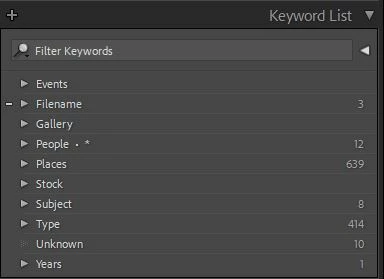
Keyword List Panel
I'm trying to understand some of the functionality of the Keyword List.
What do the numbers on the right mean? They don't seem to have any correlation to what is inside the keyword set. For example, inside of People there is no keyword named People and there are a lot more keywords in People than 12.
What does the . * mean on the People set?
When dragging an individual top level keyword into a set, sometimes it lets you do it and sometimes not. I presume it is because that keyword is alread in the set. Does it also check to see that the images linked to the top level keyword is also linked to the same keyword in the set. If so, then I should just be able to delete the top level keyword, yes?
Thanks
 AdChoices