


Known Participant
February 23, 2019
Question

Lightroom 6 Book Module Issue

  • February 23, 2019
  • 1 reply
  • 936 views

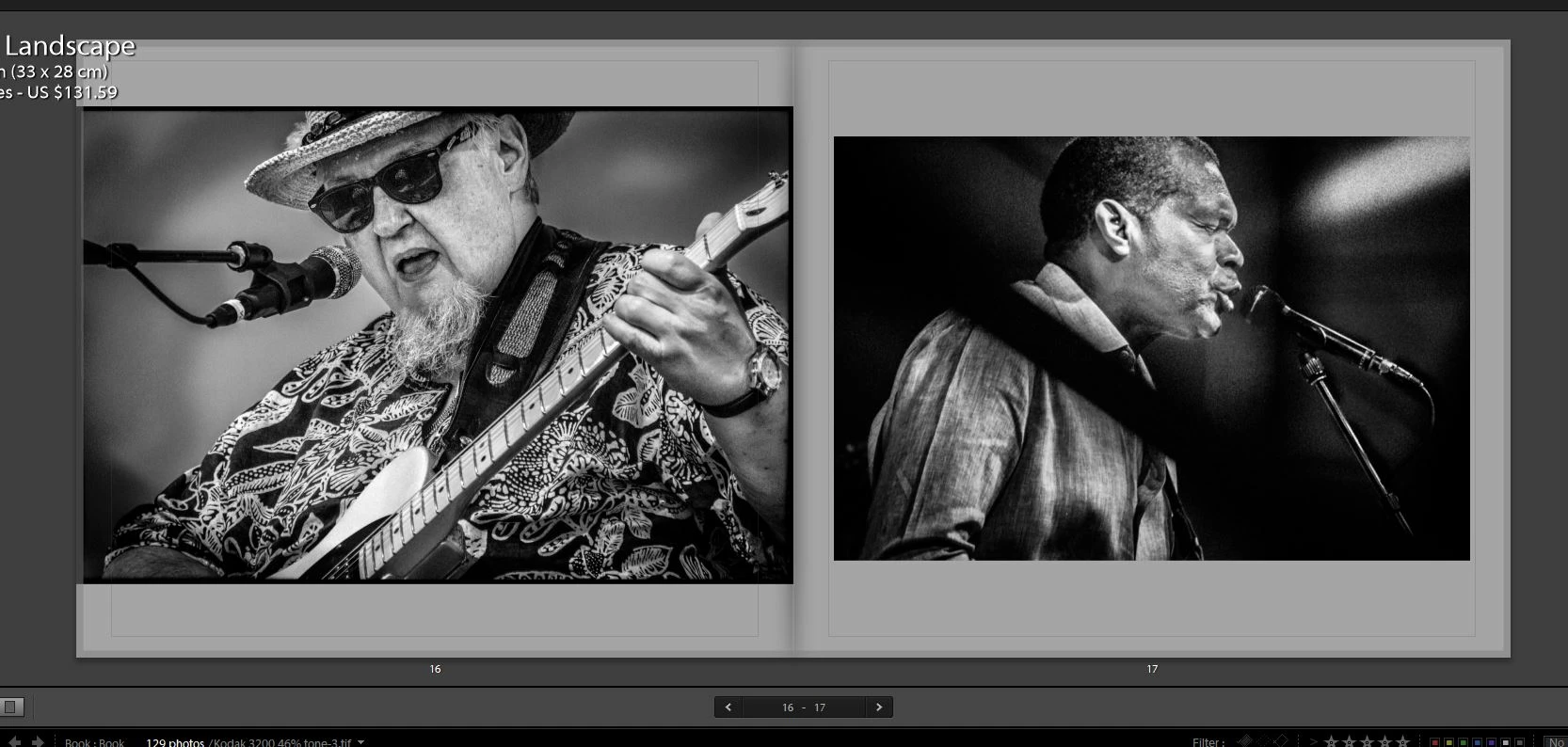
I'm working Lightroom 6, Windows 10.  Every time I add a new photo to a book I'm working on and set zoom at 0%, the photo is still too large and does not fit within the guidelines.  See image on the left below, which is actually slightly cut off on the left side.  This happen with tifs and dngs.  I've tried launching a new book - same issue.  Tried reinstalling Lightroom - no luck. 
This topic has been closed for replies.

1 reply

Brainiac
February 23, 2019

Your photo on the left extends into the page bleed area (this gets cut off when book is printed)

If you look closely the image is there but has a dark grey overlay on it. It shows this better with colour images.

Known Participant
February 23, 2019

That's the issue.  The left photo cannot be made any smaller on the page. zoom is at 0%, checking or unchecking Zoom to Fill Cell does not help.

Brainiac
February 23, 2019

The photo aspect ratio does not match the page aspect ratio.

So your only choices are:

- Use a smaller cell size so that you can get this photo to better match the right side page

- experiment with larger zoom size/repositioning photo

- choose another photo that has more cropping headroom when zoomed.

Any other way requires you to either stretch/shrink the photo across one dimension using photoshop or another editor OR add some content aware content to the canvas size to give you the cropping headroom.