Inspiring
June 17, 2025
해결됨

Lightroom 6 dows not recognise Canon 5d Mark IV raw files

  • June 17, 2025
  • 1 답변
  • 1388 조회

Hello,

I have the last iteration of the "perpetual license" Lightroom 6 with Camera Raw 9.

When trying to import files by Canon 5D Mark IV the preview thumbnails appear grey with a message "Preview unavailable for this file" (screenshot).

The files are the regular type, not dual-pixel and are in both sRGB and Adobe RGB colour spaces.


My PC runs on Windows 10.


I am aware that this issue has been around since around 2017 at least but I could not find a working solution so please help with advice. Thanks.


Simeon

최고의 답변: AxelMatt

This time it worked from your link - thanks a lot for helping. Mut be I had an older installer.
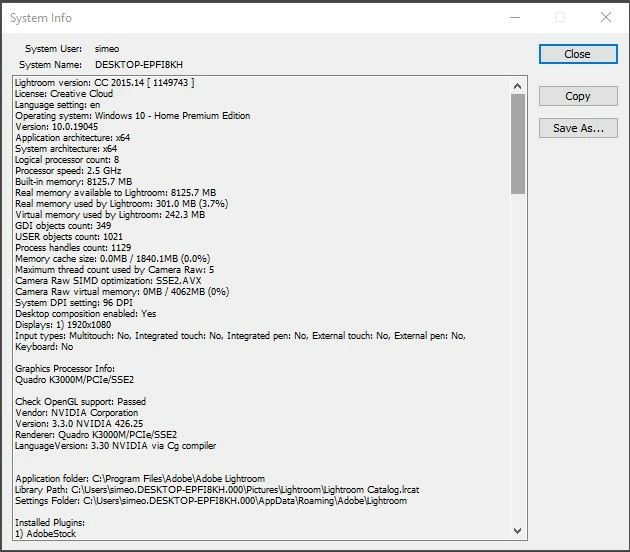


quote

This time it worked from your link - thanks a lot for helping. Mut be I had an older installer.

By @sigo


This seems not from the links that @Per Berntsen and I posted. In the posted links are installation files for the latest version of the perpetual Lightroom 6 version (6.14).

I don't know which link you've used, you installed a subscription based version, as @Rob_Cullen wrote.


Do you ask for an upgrading your catalog file after you start Lightroom?


The only way to fix it is a complete clean reinstallation of Lightroom 6. But beaware and deactivate your recent installation. Lightroom (Legacy v6.14) does not work if you have the Creative Cloud Desktop App installed. The desktop App converts Lr6 to Lr CC1025 which requires a paid subscription.

I can only suggest the following clena reinstallation without the CC client


This is now the only way known to install, activate and use Lr6.14


Check in your Adobe account if you have a subscription; login with your Adobe ID. If there's a subscription listed you must cancel it. Please take a look here:

https://helpx.adobe.com/manage-account/using/cancel-subscription.html

and here:

https://helpx.adobe.com/manage-account/using/creative-cloud-subscription-terms.html

If this isn't help, try to enable popups and cookies in your browser or use another browser.

 

1 답변

AxelMatt
Community Expert
Community Expert
June 17, 2025

Which exact version of Lightroom do you have installed?

For managing RAW files from the Canon 5D Mark IV you'll need Lightroom 6.7 or higher.

https://helpx.adobe.com/camera-raw/kb/camera-raw-plug-supported-cameras.html


My System: Intel i7-8700K - 64GB RAM - NVidia Geforce RTX 3060 - Windows 11 Pro 25H2 -- LR-Classic 15 - Photoshop 27 - Nik Collection 8 - PureRAW 6 - Topaz Photo AI
sigo작성자
Inspiring
June 17, 2025
I have the last version 6.14.
I have checked the compatibility tables and it seems I have what is
required but it just does not function.
Per Berntsen
Community Expert
Community Expert
June 18, 2025
Hi,
Thanks for not giving up on this 🙂
DNG: I keep this as the final fall-back solution.

I'll try another CF card and see if that, however I don't believe this is
the issue - a couple of shots were in JPG and LR reads them but will try
regardless with the next shoot.

Re. system info: here it is:

Lightroom version: 6.0 [1014445]
License: Perpetual
Operating system: Windows 8.1 Home Premium Edition
Version: 6.3 [9600]
Application architecture: x64
System architecture: x64
Logical processor count: 8
Processor speed: 2.5 GHz
Built-in memory: 8125.7 MB
Real memory available to Lightroom: 8125.7 MB
Real memory used by Lightroom: 418.2 MB (5.1%)
Virtual memory used by Lightroom: 374.7 MB
Memory cache size: 249.4 MB
Maximum thread count used by Camera Raw: 4
Camera Raw SIMD optimization: SSE2,AVX
System DPI setting: 96 DPI
Desktop composition enabled: Yes
Displays: 1) 1920x1080
Input types: Multitouch: No, Integrated touch: No, Integrated pen: No,
External touch: No, External pen: No, Keyboard: No

Graphics Processor Info:
Quadro K3000M/PCIe/SSE2

Check OpenGL support: Passed
Vendor: NVIDIA Corporation
Version: 3.3.0 NVIDIA 426.25
Renderer: Quadro K3000M/PCIe/SSE2
LanguageVersion: 3.30 NVIDIA via Cg compiler


Application folder: C:\Program Files\Adobe\Adobe Lightroom
Library Path: C:\Users\Simeon Goranov\Pictures\Lightroom\Lightroom
Catalog.lrcat
Settings Folder: C:\Users\Simeon Goranov\AppData\Roaming\Adobe\Lightroom

Installed Plugins:
1) Behance
2) Canon Tether Plugin
3) Facebook
4) Flickr
5) Leica Tether Plugin
6) Nikon Tether Plugin

Config.lua flags: None

Adapter #1: Vendor : 10de
Device : 11be
Subsystem : 176c103c
Revision : a1
Video Memory : 2007
Adapter #2: Vendor : 1414
Device : 8c
Subsystem : 0
Revision : 0
Video Memory : 0
AudioDeviceIOBlockSize: 1024
AudioDeviceName: Speakers (High Definition Audio Device)
AudioDeviceNumberOfChannels: 2
AudioDeviceSampleRate: 44100
Build: Uninitialized
Direct2DEnabled: false
GPUDevice: not available
OGLEnabled: true

I downloaded this installer in the dark ages in anticipation of the end of
life of the perpetual license version. This installer btw is the one that
circulates on the Internet and is available on a couple of places in the
Web Archive.

Hope this helps - and thanks!

According to the system info you have version 6.0, not 6.14.

Use the link below to download the installer for 6.14.

The page loads very slowly, so be patient.

https://web.archive.org/web/20231127160507mp_/https://prdl-download.adobe.com/Lightroom/60BA1251F1BC48B8B82B1B63AE8E620E/1552643270580/Lightroom_6_LS11.exe

