


Lightroom Classic 14.5.1 freezes while applying Denoise
Lightroom Classic crashes now over the last 6 Days very often (most of the time) when i try to apply Denoise, then the progress Bar shows up and at some point of the process ( at different % of progress) it freezes my whole System mostly with a black screen, which then follows by a Automatic Restart of my Notebook.... ( Asus ROG Strix G15 Advantage with AMD 5900HX and AMD 6800 AMD Driver is Adrenalin 25.9.1 )
there were only 1 or 2 exceptions of this error when it freezed with a randomly colorful pixelated pattern with a parttime black screen saying: Your System ran into a Problem and needs to Restart, Stop code: Clock Watchdog Timeout (0x101)
I had no Problems over a long time with this system.
What I tried so far : a Inplace repair install of Windows 11, uninstalled and reinstalled the latest AMD GPU, CPU and Chipset Drivers the normal Way, but also with DDU.....uninstalled Asus Armoury Crate, i have latest BIOS and Bios Defaults,.... then sfc/ scannow, DISM , Windows Memory Tests, still the same......Also my Windows doesnt produce a Minidump, although it should because i checked and adjusted the Expanded System settings for doing it..... Disabled GPU Acceleration in Lightroom, it still happend,.... slowly im beginning to run out of Ideas...
Whatelse can i try now!!???
DX Diag Screenshot:
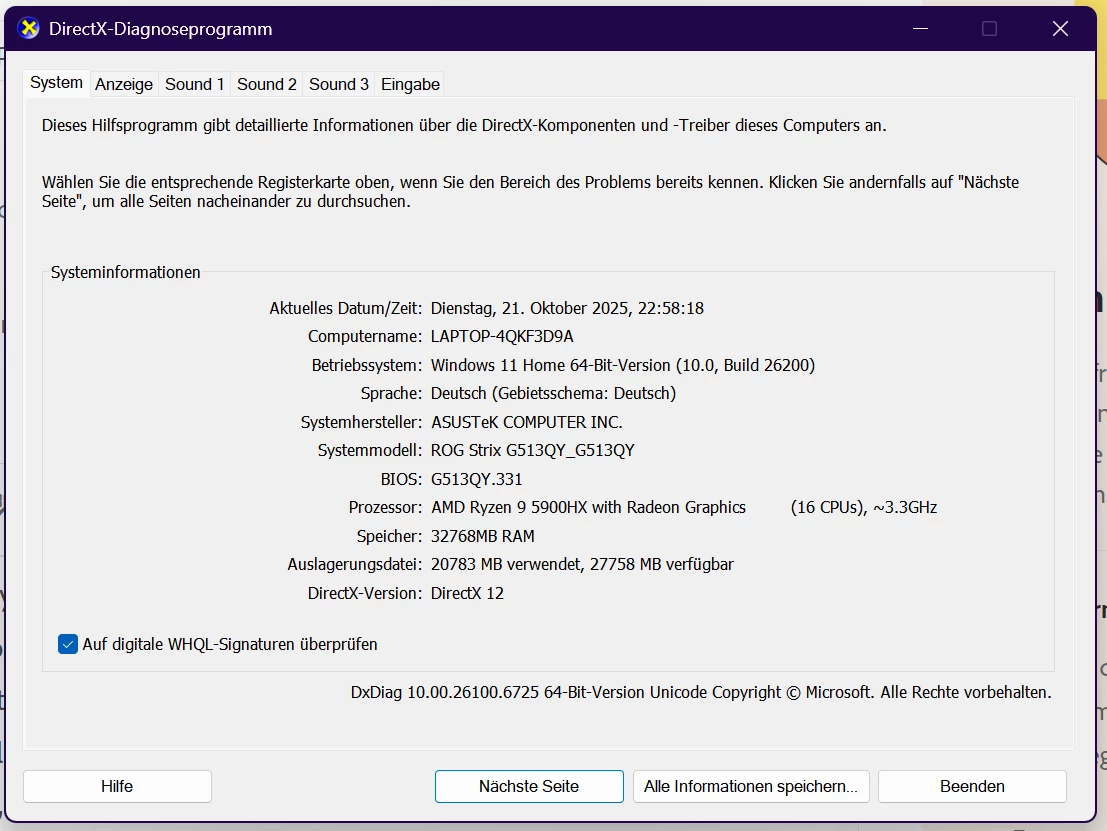
Here is the System info File from lightroom Classic:
Lightroom Classic-Version: 14.5.1 [ 202508231203-c2638d01 ]
Lizenz: Creative Cloud
Spracheinstellung: de
Betriebssystem: Windows 11 - Home Premium Edition
Version: 11.0.26200
Anwendungsarchitektur: x64
Systemarchitektur: x64
Anzahl logischer Prozessoren: 16
Prozessorgeschwindigkeit: 3.2GHz
SQLite-Version: 3.36.0
CPU-Auslastung: 6.0%
Stromquelle: Angeschlossen
Integrierter Speicher: 32158.6 MB
Dedizierter GPU-Speicher, der von Lightroom verwendet wird: 4226.4MB / 12242.8MB (34%)
Für Lightroom verfügbarer phys. Speicher: 32158.6 MB
Von Lightroom verwendeter phys. Speicher: 2635.0 MB (8.1%)
Von Lightroom verwendeter virtueller Speicher: 7218.7 MB
Anzahl GDI-Objekte: 930
Anzahl BENUTZER-Objekte: 3126
Anzahl Prozess-Handles: 3036
Cache-Speichergröße: 0.0MB
Interne Camera Raw-Version: 17.5 [ 2318 ]
Maximale Anzahl Threads, die Camera Raw verwendet: 5
Camera Raw SIMD-Optimierung: SSE2,AVX,AVX2
Virtueller Speicher in Camera Raw: 627MB / 16079MB (3%)
Physischer Speicher in Camera Raw: 746MB / 32158MB (2%)
Cache1:
NT- RAM:0.0MB, VRAM:0.0MB, Combined:0.0MB
Cache2:
m:0.0MB, n:0.0MB
U-main: 90.0MB
DPI-Einstellung des Systems: 144 DPI (High-DPI-Modus)
Desktop-Komposition aktiviert: Ja
Standardvorschaugröße: 3840 Pixel
Monitore/Anzeigegeräte: 1) 3840x2160
Eingabetypen: Multitouch: Nein, integrierte Toucheingabe: Nein, integrierter Stift: Nein, externe Toucheingabe: Nein, externer Stift: Nein, Tastatur: Nein
Informationen zum Grafikprozessor:
DirectX: AMD Radeon RX 6800M (32.0.21025.10016)
Anfangsstatus: GPU zum Exportieren wird standardmäßig unterstützt
Benutzerpräferenz: Automatisch
HDR in Bibliothek aktivieren: AUS
GPU zur Vorschauerstellung: Auto (S5_11)
Anwendungsordner: C:\Program Files\Adobe\Adobe Lightroom Classic
Bibliothekspfad: C:\Users\HpW\Pictures\Lightroom\Lightroom Catalog-v13-3.lrcat
Einstellungen-Ordner: C:\Users\HpW\AppData\Roaming\Adobe\Lightroom
Installierte Zusatzmodule:
1) AdobeStock
2) Flickr
3) Helicon Focus Export
4) Zerene Stacker Plugin
Config.lua-Flags:
Adapter Nr. 1: Anbieter : 1002
Gerät : 73df
Subsystem : 16c21043
Version : c3
Grafikspeicher : 12242
Adapter Nr. 2: Anbieter : 1002
Gerät : 1638
Subsystem : 16c21043
Version : c4
Grafikspeicher : 1ef
Adapter Nr. 3: Anbieter : 1414
Gerät : 8c
Subsystem : 0
Version : 0
Grafikspeicher : 0
AudioDeviceIOBlockSize: 2048
AudioDeviceName: System Default - Lautsprecher (Focusrite USB Audio)
AudioDeviceNumberOfChannels: 2
AudioDeviceSampleRate: 96000
Build: LR5x26
Direct2DEnabled: false
GL_ACCUM_ALPHA_BITS: 8
GL_ACCUM_BLUE_BITS: 8
GL_ACCUM_GREEN_BITS: 8
GL_ACCUM_RED_BITS: 8
GL_ALPHA_BITS: 8
GL_BLUE_BITS: 8
GL_DEPTH_BITS: 32
GL_GREEN_BITS: 8
GL_MAX_3D_TEXTURE_SIZE: 8192
GL_MAX_TEXTURE_SIZE: 16384
GL_MAX_TEXTURE_UNITS: 8
GL_MAX_VIEWPORT_DIMS: 16384,16384
GL_RED_BITS: 8
GL_RENDERER: AMD Radeon RX 6800M
GL_SHADING_LANGUAGE_VERSION: 4.60
GL_STENCIL_BITS: 8
GL_VENDOR: ATI Technologies Inc.
GL_VERSION: 4.6.0 Compatibility Profile Context 25.9.1.250822
GPUDeviceEnabled: false
OGLEnabled: true
GL_EXTENSIONS: GL_EXT_abgr GL_EXT_blend_color GL_EXT_blend_minmax GL_EXT_blend_subtract GL_EXT_copy_texture GL_EXT_texture GL_EXT_texture_object GL_EXT_vertex_array GL_EXT_compiled_vertex_array GL_EXT_subtexture GL_EXT_texture3D GL_EXT_bgra GL_EXT_draw_range_elements GL_EXT_packed_pixels GL_EXT_point_parameters GL_EXT_rescale_normal GL_EXT_separate_specular_color GL_EXT_texture_edge_clamp GL_SGIS_generate_mipmap GL_SGIS_texture_edge_clamp GL_SGIS_texture_lod GL_ARB_multitexture GL_IBM_texture_mirrored_repeat GL_AMD_debug_output GL_ARB_multisample GL_ARB_texture_cube_map GL_ARB_texture_env_add GL_ARB_transpose_matrix GL_EXT_blend_func_separate GL_EXT_fog_coord GL_EXT_multi_draw_arrays GL_EXT_secondary_color GL_EXT_texture_cube_map GL_EXT_texture_env_add GL_EXT_texture_filter_anisotropic GL_EXT_texture_lod GL_EXT_texture_lod_bias GL_NV_blend_square GL_NV_texgen_reflection GL_SUN_multi_draw_arrays WGL_EXT_swap_control GL_ARB_point_parameters GL_ARB_texture_border_clamp GL_ARB_texture_compression GL_ARB_texture_env_crossbar GL_EXT_texture_compression_s3tc GL_EXT_texture_env_combine GL_EXT_texture_env_dot3 GL_ARB_shadow GL_ARB_shadow_ambient GL_ARB_texture_env_combine GL_ARB_texture_env_dot3 GL_ARB_texture_mirrored_repeat GL_NV_half_float GL_ARB_depth_texture GL_ARB_fragment_program GL_ARB_vertex_program GL_ARB_window_pos GL_ATI_draw_buffers GL_ATI_texture_env_combine3 GL_ATI_texture_float GL_EXT_shadow_funcs GL_EXT_stencil_wrap GL_EXT_texture_rectangle GL_NV_primitive_restart GL_S3_s3tc GL_ARB_fragment_program_shadow GL_ARB_fragment_shader GL_ARB_occlusion_query GL_ARB_point_sprite GL_ARB_shader_objects GL_ARB_shading_language_100 GL_ARB_texture_non_power_of_two GL_ARB_vertex_buffer_object GL_ARB_vertex_shader GL_EXT_blend_equation_separate GL_EXT_depth_bounds_test GL_ARB_color_buffer_float GL_ARB_draw_buffers GL_ARB_half_float_pixel GL_ARB_pixel_buffer_object GL_ARB_texture_float GL_ARB_texture_rectangle GL_EXT_framebuffer_object GL_EXT_pixel_buffer_object GL_EXT_texture_mirror_clamp GL_NV_float_buffer GL_EXT_framebuffer_blit GL_EXT_framebuffer_multisample GL_EXT_packed_depth_stencil GL_ATI_separate_stencil GL_ATI_shader_texture_lod GL_ATI_texture_mirror_once GL_EXT_bindable_uniform GL_EXT_draw_buffers2 GL_EXT_draw_instanced GL_EXT_framebuffer_sRGB GL_EXT_geometry_shader4 GL_EXT_gpu_program_parameters GL_EXT_gpu_shader4 GL_EXT_packed_float GL_EXT_texture_array GL_EXT_texture_buffer_object GL_EXT_texture_compression_latc GL_EXT_texture_compression_rgtc GL_EXT_texture_integer GL_EXT_transform_feedback GL_NV_depth_buffer_float GL_OES_EGL_image GL_EXT_provoking_vertex GL_EXT_texture_sRGB GL_EXT_texture_shared_exponent GL_EXT_vertex_array_bgra GL_NV_conditional_render GL_ARB_depth_buffer_float GL_ARB_draw_instanced GL_ARB_framebuffer_object GL_ARB_framebuffer_sRGB GL_ARB_geometry_shader4 GL_ARB_half_float_vertex GL_ARB_instanced_arrays GL_ARB_map_buffer_range GL_ARB_texture_buffer_object GL_ARB_texture_compression_rgtc GL_ARB_texture_rg GL_ARB_transform_feedback GL_ARB_vertex_array_object GL_EXT_direct_state_access GL_EXT_texture_snorm GL_EXT_texture_swizzle GL_AMD_conservative_depth GL_AMD_seamless_cubemap_per_texture GL_AMD_texture_cube_map_array GL_ARB_compatibility GL_ARB_copy_buffer GL_ARB_depth_clamp GL_ARB_draw_buffers_blend GL_ARB_draw_elements_base_vertex GL_ARB_fragment_coord_conventions GL_ARB_provoking_vertex GL_ARB_sample_shading GL_ARB_seamless_cube_map GL_ARB_shader_texture_lod GL_ARB_sync GL_ARB_texture_buffer_object_rgb32 GL_ARB_texture_cube_map_array GL_ARB_texture_gather GL_ARB_texture_multisample GL_ARB_texture_multisample_no_array GL_ARB_texture_query_lod GL_ARB_uniform_buffer_object GL_ARB_vertex_array_bgra GL_ATI_meminfo GL_EXT_texture_storage GL_NV_copy_image GL_NV_texture_barrier GL_AMD_blend_minmax_factor GL_AMD_depth_clamp_separate GL_AMD_sample_positions GL_ARB_ES2_compatibility GL_ARB_base_instance GL_ARB_blend_func_extended GL_ARB_compressed_texture_pixel_storage GL_ARB_debug_output GL_ARB_draw_indirect GL_ARB_explicit_attrib_location GL_ARB_get_program_binary GL_ARB_gpu_shader5 GL_ARB_gpu_shader_fp64 GL_ARB_occlusion_query2 GL_ARB_robustness GL_ARB_sampler_objects GL_ARB_separate_shader_objects GL_ARB_shader_bit_encoding GL_ARB_shader_precision GL_ARB_shader_stencil_export GL_ARB_shader_subroutine GL_ARB_shading_language_packing GL_ARB_tessellation_shader GL_ARB_texture_compression_bptc GL_ARB_texture_rgb10_a2ui GL_ARB_texture_swizzle GL_ARB_timer_query GL_ARB_transform_feedback2 GL_ARB_transform_feedback3 GL_ARB_vertex_attrib_64bit GL_ARB_vertex_type_2_10_10_10_rev GL_ARB_viewport_array GL_EXT_shader_image_load_store GL_EXT_texture_sRGB_decode GL_EXT_vertex_attrib_64bit GL_AMD_multi_draw_indirect GL_AMD_pinned_memory GL_AMD_vertex_shader_layer GL_AMD_vertex_shader_viewport_index GL_ARB_conservative_depth GL_ARB_internalformat_query GL_ARB_shader_atomic_counters GL_ARB_shader_image_load_store GL_ARB_shading_language_420pack GL_ARB_texture_storage GL_ARB_transform_feedback_instanced GL_EXT_debug_label GL_AMD_query_buffer_object GL_AMD_shader_trinary_minmax GL_ARB_ES3_compatibility GL_ARB_arrays_of_arrays GL_ARB_clear_buffer_object GL_ARB_compute_shader GL_ARB_copy_image GL_ARB_explicit_uniform_location GL_ARB_fragment_layer_viewport GL_ARB_framebuffer_no_attachments GL_ARB_internalformat_query2 GL_ARB_invalidate_subdata GL_ARB_multi_draw_indirect GL_ARB_program_interface_query GL_ARB_shader_image_size GL_ARB_shader_storage_buffer_object GL_ARB_stencil_texturing GL_ARB_texture_buffer_range GL_ARB_texture_query_levels GL_ARB_texture_storage_multisample GL_ARB_texture_view GL_ARB_vertex_attrib_binding GL_EXT_copy_buffer GL_KHR_debug GL_KHR_texture_compression_astc_ldr GL_AMD_gpu_shader_half_float GL_AMD_gpu_shader_int64 GL_ARB_ES3_1_compatibility GL_ARB_bindless_texture GL_ARB_buffer_storage GL_ARB_clear_texture GL_ARB_enhanced_layouts GL_ARB_indirect_parameters GL_ARB_multi_bind GL_ARB_query_buffer_object GL_ARB_seamless_cubemap_per_texture GL_ARB_shader_draw_parameters GL_ARB_shader_group_vote GL_ARB_sparse_texture GL_ARB_texture_mirror_clamp_to_edge GL_ARB_texture_stencil8 GL_ARB_vertex_type_10f_11f_11f_rev GL_EXT_shader_integer_mix GL_EXT_timer_query GL_KHR_blend_equation_advanced GL_KHR_blend_equation_advanced_coherent GL_NV_shader_atomic_int64 GL_ARB_clip_control GL_ARB_conditional_render_inverted GL_ARB_cull_distance GL_ARB_derivative_control GL_ARB_direct_state_access GL_ARB_get_texture_sub_image GL_ARB_pipeline_statistics_query GL_ARB_shader_texture_image_samples GL_ARB_sparse_buffer GL_ARB_texture_barrier GL_ARB_transform_feedback_overflow_query GL_EXT_polygon_offset_clamp GL_EXT_shader_image_load_formatted GL_KHR_context_flush_control GL_KHR_robust_buffer_access_behavior GL_KHR_robustness GL_OVR_multiview GL_ARB_ES3_2_compatibility GL_ARB_fragment_shader_interlock GL_ARB_gpu_shader_int64 GL_ARB_parallel_shader_compile GL_ARB_post_depth_coverage GL_ARB_sample_locations GL_ARB_shader_atomic_counter_ops GL_ARB_shader_ballot GL_ARB_shader_clock GL_ARB_shader_viewport_layer_array GL_ARB_texture_filter_minmax GL_EXT_texture_sRGB_R8 GL_EXT_texture_sRGB_RG8 GL_EXT_texture_shadow_lod GL_KHR_no_error GL_OVR_multiview2 GL_ARB_gl_spirv GL_EXT_memory_object GL_EXT_memory_object_win32 GL_EXT_semaphore GL_EXT_semaphore_win32 GL_AMD_gpu_shader_int16 GL_ARB_polygon_offset_clamp GL_ARB_spirv_extensions GL_ARB_texture_filter_anisotropic GL_EXT_texture_compression_bptc GL_KHR_parallel_shader_compile GL_KHR_shader_subgroup GL_EXT_nonuniform_qualifier GL_NV_mesh_shader GL_NV_timeline_semaphore
 AdChoices