This topic has been closed for replies.
Correct answer richardondrovic

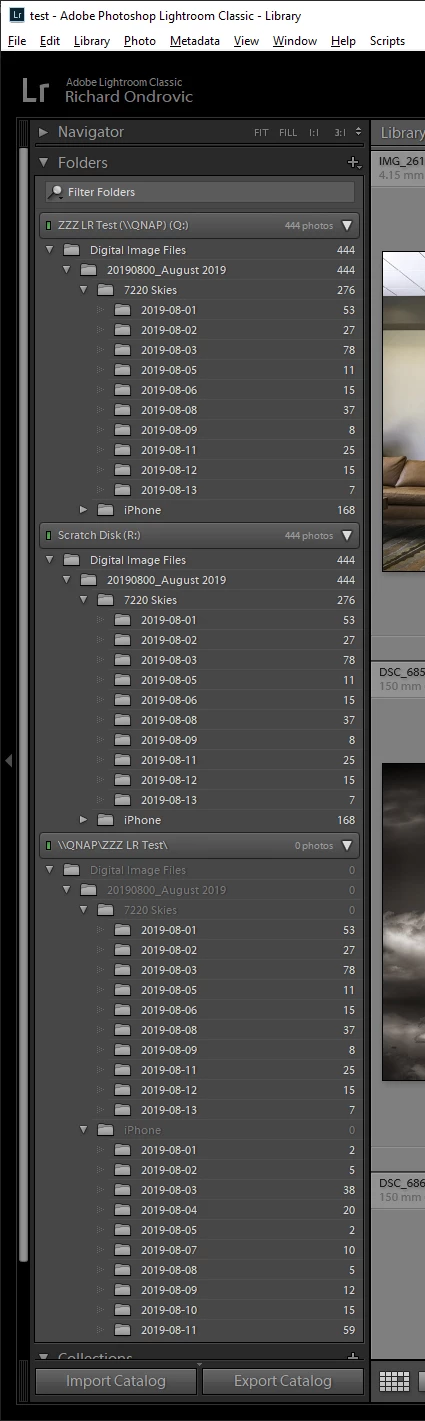
Hey Viscott - it is a UNC name vs mapped drive letter issue! Here is what I did:

1) Under LR 8.3.1 I created a new test catalog and imported some folders and files from a local drive

2) Created the same folders and files on my NAS

3) Imported the local drive folder structure as well as the NAS folder structure using its UNC name

4) Imported the NAS folder structure again using a mapped drive letter

5) All counts were correct

6) Upgraded to LR 8.4

7) Counts were correct for the local drive folder structure, counts were wrong for the NAS UNC folder structure, counts were correct for the NAS mapped as a drive letter.

Give it a try and see if that works the same for you.
13 replies

99jon
Genius
September 19, 2019

LR September update is now available. Check for updates in Creative Cloud Apps and install LR 8.4.1

johnrellis
Legend
September 18, 2019

"I know it's only been a few weeks since this was reported up the food chain, but has there been any development on this problem? I'm not going to update my LR CC until I know the problem has been resolved."


Adobe has acknowledged the bug with folder counts of folders with UNC paths and assigned it an internal tracking number. But they very rarely say publicly when bugs might be fixed. The best you can do is add your constructive opinion to the bug report in the official Adobe feedback forum: 

https://feedback.photoshop.com/photoshop_family/topics/lightroom-classic-8-4-breaks-unc-paths?topic-reply-list%5Bsettings%5D%5Bfilter_by%5D=all


Be sure to click Me Too and Follow in the upper-right corner. This will make it a little more likely Adobe will prioritize a fix, and you'll be notified when the bug's status changes. (This forum is primarily user-to-user and Adobe doesn't monitor it closely.)


Meanwhile, a workaround is to use a drive letter rather than a UNC path.  Once you've assigned a drive letter, in LR you can right-click a root folder in the Folders panel and do Update Folder Location to change its path to one using the drive letter.

Alfa156Melb
Participant
August 21, 2019

I'm having exactly the same problem.  360,000 images in my library on a NAS.

I reverted back to the previous Lr version and problem solved... reinstalled the current version, problem back.

I guess this means that my catalogue is not corrupt, but just a bug in this version.

GoldingD
Legend
August 16, 2019

Each of the customers that see this as a problem should communicate with Adobe at Lightroom Classic | Photoshop Family Customer Community

Add a new problem.

If someone already has, share the link, and others can add to it.

Adobe techs are active at that site, and are getting hit right and left with 8.4 foul ups, looking at, inquiring at, answering, and admitting that Adobe has fouled up.

richardondrovic
richardondrovicCorrect answer
Inspiring
August 14, 2019

Hey Viscott - it is a UNC name vs mapped drive letter issue! Here is what I did:

1) Under LR 8.3.1 I created a new test catalog and imported some folders and files from a local drive

2) Created the same folders and files on my NAS

3) Imported the local drive folder structure as well as the NAS folder structure using its UNC name

4) Imported the NAS folder structure again using a mapped drive letter

5) All counts were correct

6) Upgraded to LR 8.4

7) Counts were correct for the local drive folder structure, counts were wrong for the NAS UNC folder structure, counts were correct for the NAS mapped as a drive letter.

Give it a try and see if that works the same for you.

Ian Lyons
Community Expert
Community Expert
August 14, 2019

Thanks for detective work and update, Richard. I will submit a bug report along with your solution.

BTW, I had asked Viscott the simple question. Unfortunately, the answer did not address the question.

> Are you using a NAS drive for photo storage?

> Note that I'm not suggesting that it's the cause, but might be a medium that engineering didn't check during testing

Since I know next to nothing about NAS I was unable to offer any help. However, the folder tree header suggested it was on a NAS drive.

richardondrovic
Inspiring
August 14, 2019

Ian Lyons- thanks! I suspect this isn't just specific to NAS devices, but to any network resource (such as a Linux box etc) being cataloged in LR with a UNC name rather than a mapped drive letter. That probably wouldn't be common but there could be some people out there doing that too.

GoldingD
Legend
August 14, 2019

So, this time on my 15" MacBook Pro Retina 2015,

And this time, first in LR v8.3.1

With Show Photos in SubFolders Off, no count at root

With Show Photos in SubFolders on, count in root

After the update, no change, Now at v 8.4

With Show Photos in SubFolders Off, no count at root

With Show Photos in SubFolders on, count in root

______________________________________________________________

SysInfo:

Lightroom Classic version: 8.4 [ 201908011719-03751b60 ]

License: Creative Cloud

Language setting: en-US

Operating system: Mac OS 10

Version: 10.14.6 [18G87]

Application architecture: x64

Logical processor count: 8

Processor speed: 2.8 GHz

Built-in memory: 16,384.0 MB

Real memory available to Lightroom: 16,384.0 MB

Real memory used by Lightroom: 1,189.1 MB (7.2%)

Virtual memory used by Lightroom: 3,409.0 MB

Memory cache size: 22.6MB

Internal Camera Raw version: 11.4 [ 273 ]

Maximum thread count used by Camera Raw: 5

Camera Raw SIMD optimization: SSE2,AVX,AVX2

Camera Raw virtual memory: 73MB / 8191MB (0%)

Camera Raw real memory: 74MB / 16384MB (0%)

Displays: 1) 4096x2304, 2) 2880x1800

Graphics Processor Info:

Metal: AMD Radeon R9 M370X

Application folder: /Applications/Adobe Lightroom Classic

Library Path: /Volumes/G-DRIVE mob/porn/Lightroom Porn Catalog/Porn Catalog.lrcat

Settings Folder: /Users/davidgolding/Library/Application Support/Adobe/Lightroom

Installed Plugins:

1) Aperture/iPhoto Importer Plug-in

2) Aurora HDR 2018

3) ColorChecker Passport

4) HDR Efex Pro 2

5) Iridient X-Transformer

6) jf Metadata Viewer

7) Loupedeck

8) Luminar 3

9) ON1 Photo RAW 2019

10) ON1 Resize 2019

11) Show Focus Points

12) SmugMug

GoldingD
Legend
August 13, 2019

So, apparently not a total bug or change.

Got off my rear end. Turned on my PC, Updated LR

In my copy it behaves as follows:

Show Folders in Subfolders (checked): I get quantity at root

Show Folders in Subfolders (not checked): I do not get quantity at root

This screenshot with Show Folders in Subfolders checked (on)

And with Show Folders in Subfolders not checked (off)

Works with or without folders expanded out

My Sys Info (truncated):

Lightroom Classic version: 8.4 [ 201908011719-03751b60 ]

License: Creative Cloud

Language setting: en

Operating system: Windows 10 - Business Edition

Version: 10.0.18362

Application architecture: x64

System architecture: x64

Logical processor count: 8

Processor speed: 4.0 GHz

Built-in memory: 16317.1 MB

Real memory available to Lightroom: 16317.1 MB

Real memory used by Lightroom: 1938.7 MB (11.8%)

Virtual memory used by Lightroom: 2174.9 MB

GDI objects count: 627

USER objects count: 2033

Process handles count: 2143

Memory cache size: 167.2MB

Internal Camera Raw version: 11.4 [ 273 ]

Maximum thread count used by Camera Raw: 5

Camera Raw SIMD optimization: SSE2,AVX,AVX2

Camera Raw virtual memory: 1112MB / 8158MB (13%)

Camera Raw real memory: 1113MB / 16317MB (6%)

System DPI setting: 96 DPI

Desktop composition enabled: Yes

Displays: 1) 1920x1080

Input types: Multitouch: No, Integrated touch: No, Integrated pen: Yes, External touch: No, External pen: Yes, Keyboard: No

Graphics Processor Info:

DirectX: NVIDIA GeForce GTX 1070 Ti (26.21.14.3160)

Application folder: C:\Program Files\Adobe\Adobe Lightroom Classic

Library Path: F:\Files\Pictures\Vacations and Day Trips\Photo Trips\22 Photo Trip October 2018 trip 2\22 Photo Trip October 2018 trip 2.lrcat

Settings Folder: C:\Users\goldi\AppData\Roaming\Adobe\Lightroom

Installed Plugins:

1) AdobeStock

2) Aurora HDR 2018

3) ColorChecker Passport

4) Facebook

5) Flickr

6) HDR Efex Pro 2

7) Helicon Focus Export

8) Iridient X-Transformer

9) Loupedeck

10) LR/Instagram

11) Luminar 2018

12) Nikon Tether Plugin

13) ON1 Photo RAW 2019

14) ON1 Resize 2019

15) SmugMug

kentdesign
Community Expert
Community Expert
August 14, 2019

I am using LR 8.4 and MacOS Mojave 10.14.5, and my Lightroom folders show the normal counts as always.

Has to be something else interacting with LR - or a hardware specific issue.

JohanElzenga
Community Expert
Community Expert
August 13, 2019

This looks like a problem that has been reported here before a few times, so it is not something specific for the 8.4 update. It is catalog corruption, most likely. Do you have a catalog backup?

Photos Not Showing in Folders but Show as Already Imported

-- Johan W. Elzenga
ViscottAuthor
Inspiring
August 13, 2019

I have 14 Catalogs and they all are displaying the same way with 8.4, it has nothing to do with the catalogs. No need to freak people out!

Adobe clearly has changed the way it is counting images in folders with sub-folders.

Please read my other replies in the post.

GoldingD
Legend
August 13, 2019

Inquiry, for that LA Marathon 2019 folder, the 2913 image count, how many of those are in the root of that folder? And is that count short if you include the subfolder count?

ViscottAuthor
Inspiring
August 13, 2019

There is 2913 files.

2911 NEF Files
2 Tiff Files.

3,485 Files, 4 Folders


I guess the concept is to show you that you have files in the root. You should be able to show total count of images in a parent folder and its child folders. If you have the Library Set to "Show Photos In Sub Folders" on, you should get a total count. Seems this should have been a preferences check box.

<sigh>

99jon
Genius
August 13, 2019

I seem to remember this from the distant past and we always used to add one dummy file to each root (parent) folder. So perhaps it’s an issue that has re-surfaced.

Just Shoot Me
Legend
August 13, 2019

Not on my system. Working fine, Showing image count for top level folder with subfolders.

Try toggling "Show Photos in Subfolder off then back on.

richardondrovic
Inspiring
August 13, 2019

Toggling "Show Photos in Subfolder" off then back on does not fix the problem (nor does nuking the preferences file). I rolled back to the prior version which works fine and will probably stay on that until the root cause is identified and a fix released.

ViscottAuthor
Inspiring
August 13, 2019

I’m not seeing this problem on W10 or Mac OS Mojave but perhaps the update has triggered some unknown hardware or disk conflict.

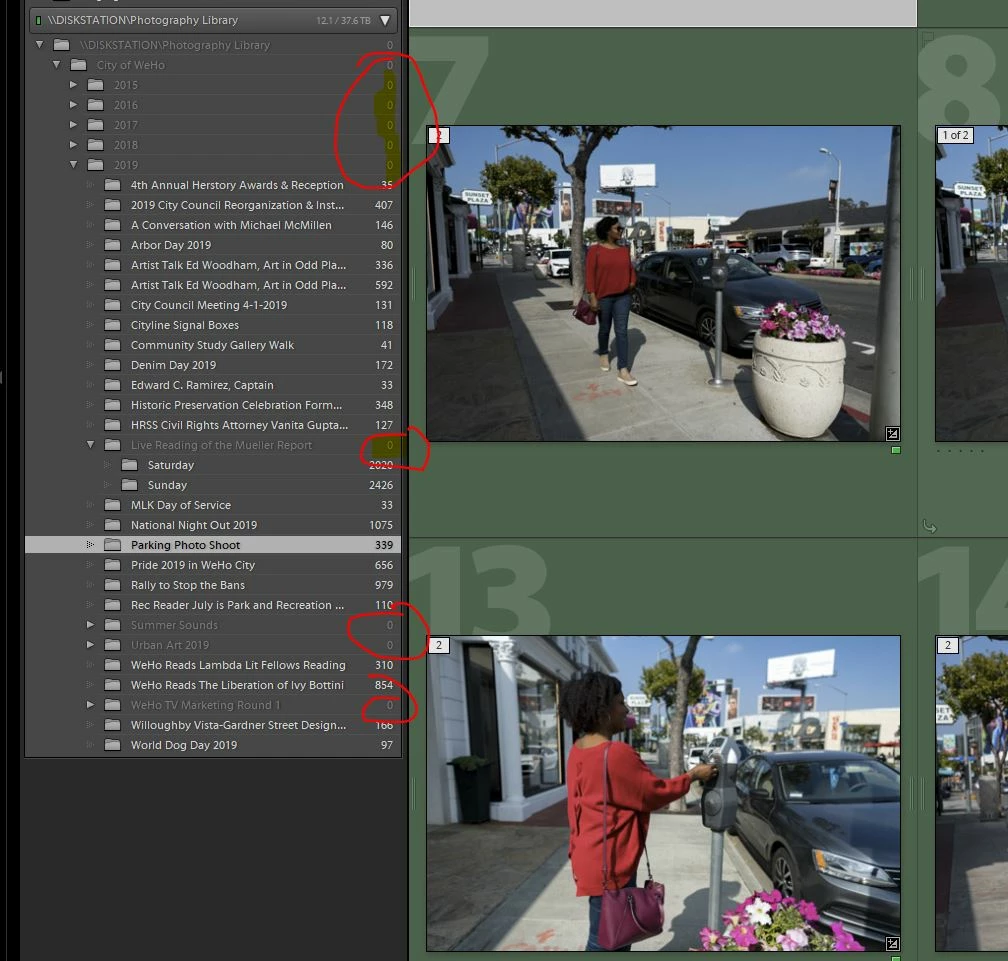
Looking at the screenshots it seems random. For example what is the difference between LA Marathon 2019 with 2193 items and LA Pride 2019 with zero items?

If we can use a process of elimination it will give the Adobe engineers a starting point.


Great observation!

LA Pride 2019 has NO files in the root folder and only has files in the sub folders.


LA Marathon 2019 has files in the root folder and has files in the sub folders.


LA Pride 2019 Folder:

LA Marathon 2019 Folder: