


Ken Nielsen
Legend
January 1, 2024
Answered

Lightroom Classic import creating its own folders and ignoring New Year folder

  • January 1, 2024
  • 1 reply
  • 1330 views

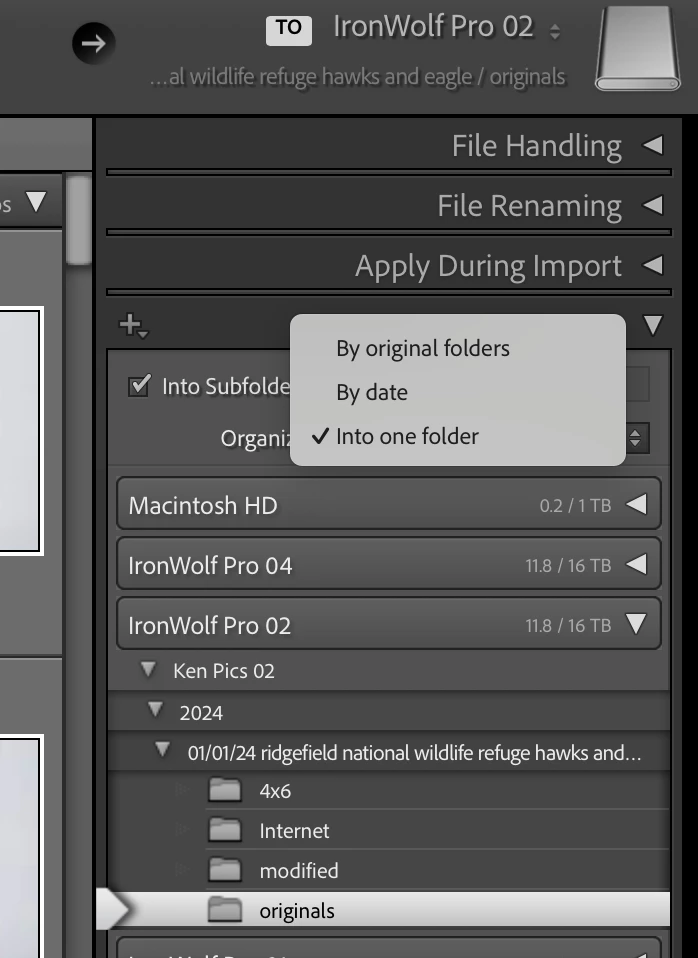
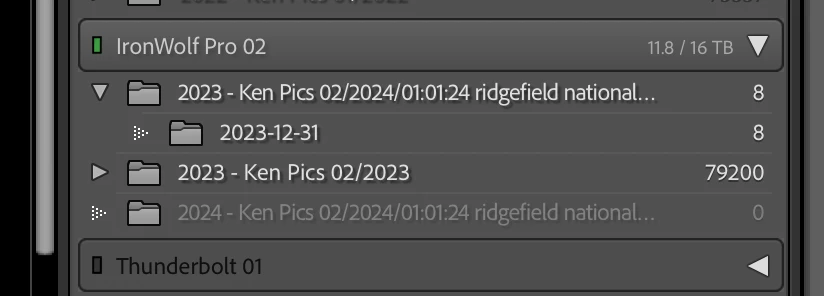
I have been going in circles for days trying to figure out how this got out of sync. For years I have had a top folder by year and then imported into 'Originals' folder inside of each new shoot by date of shoot. But now, Lightroom is ignoring the top folder year and creating its own folder with its own date for last year being oblivious to where I am asking the new shoot to go.... into ready folders on disk. I have to come here and ask for help. I don't even know where to start as it seems I've tried everything and nothing is working. How can I get back to my old organized way of bringing in new files? Example screen shots for what they are worth.
Correct answer JohanElzenga

Right-click on the folder you see and then choose 'Show Parent Folder'. Does that help?


1 reply

Ken Nielsen
Legend
January 1, 2024

I want to add, this is the mess I am in, There is no Year folder at the top, even though there is on disk, Lightroom is just going ahead and importing a day's shoot without making it a subfolder under the year folder like it is on disk and has always shown correctly in the past. Here is all it is doing now, like a mind of its own... not as a subfolder under a new year folder but just as a new import... There should be the year folder above in the heirarchy as it has always shown in the past.


JohanElzenga
Community Expert
JohanElzengaCommunity ExpertCorrect answer
Community Expert
January 1, 2024

Right-click on the folder you see and then choose 'Show Parent Folder'. Does that help?


-- Johan W. Elzenga
Ken Nielsen
Legend
January 1, 2024

Genius! - It's like you've pulled me out of a swamp that was getting deeper and deeper. Yes! It works! Thank you so much Johan and truly Happy New Year!