


Participating Frequently
August 9, 2019
Answered

Lightroom Classic Pictures turn Blue Gray when Printed

  • August 9, 2019
  • 4 replies
  • 3684 views

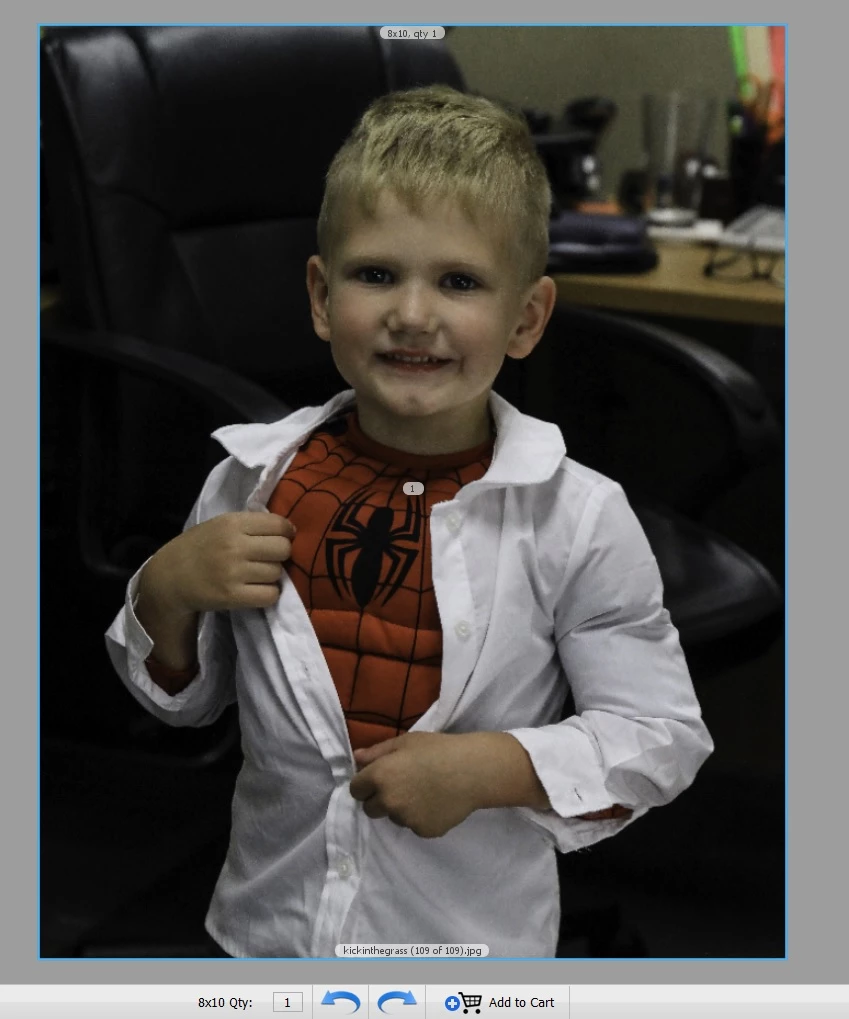
Below are two pictures the first on I edited in Lightroom and saved to my computer

Second one I uploaded to print and it turns blue gray.  THEY ALL TURN BLUE GRAY. For the last year I have to edit hundreds of pictures in lightroom save upload one by one in photoshop find a picture that prints right copy over it with the new one and resave to get it to print correctly
    This topic has been closed for replies.
    Correct answer Todd Shaner

    jennyr30080450  wrote

    Second one I uploaded to print and it turns blue gray.  THEY ALL TURN BLUE GRAY. For the last year I have to edit hundreds of pictures in lightroom save upload one by one in photoshop find a picture that prints right copy over it with the new one and resave to get it to print correctly
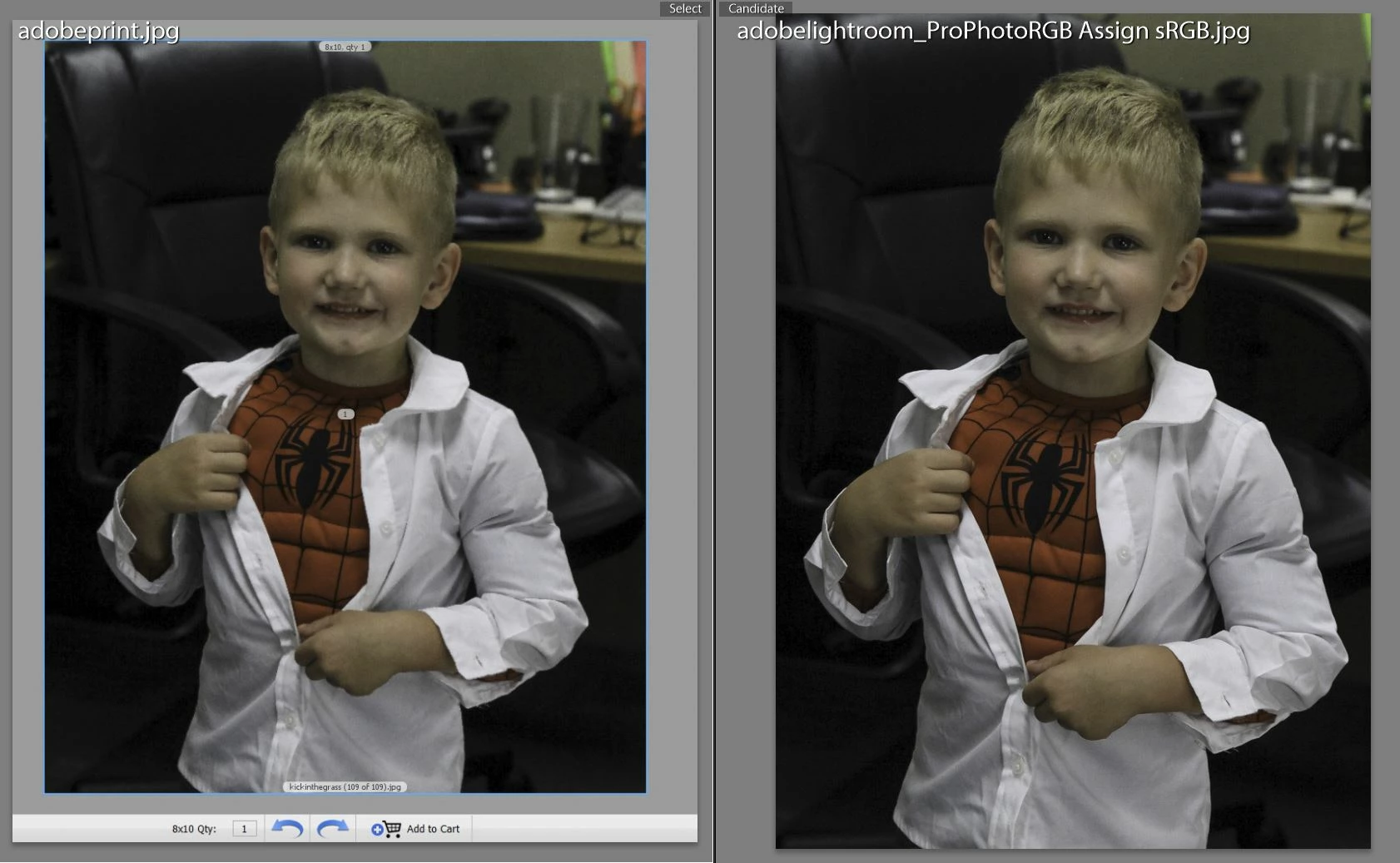
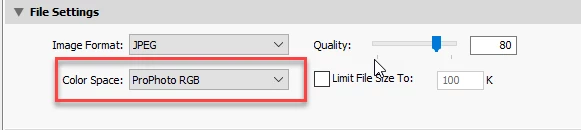
    You are Exporting your files to ProPhotoRGB Color Space as shown below. Change that setting to sRGB, which is what most print services assume is the file's color space. This causes the "blue-gray" desaturated print output that you are getting as shown below.

    In the below comparison I exported the file in LR with ProPhoto RGB Color Space setting, opened the file in PS, and assigned sRGB color profile. They look identical, which is most likely the cause of your print output results.

    4 replies

    Todd Shaner
    Todd ShanerCorrect answer
    Legend
    August 9, 2019

    jennyr30080450  wrote

    Second one I uploaded to print and it turns blue gray.  THEY ALL TURN BLUE GRAY. For the last year I have to edit hundreds of pictures in lightroom save upload one by one in photoshop find a picture that prints right copy over it with the new one and resave to get it to print correctly

    You are Exporting your files to ProPhotoRGB Color Space as shown below. Change that setting to sRGB, which is what most print services assume is the file's color space. This causes the "blue-gray" desaturated print output that you are getting as shown below.

    In the below comparison I exported the file in LR with ProPhoto RGB Color Space setting, opened the file in PS, and assigned sRGB color profile. They look identical, which is most likely the cause of your print output results.

    Participating Frequently
    August 9, 2019

    I believe I am exporting ProPhotoRGB.  I'll look as soon as I get home.  Keep your figures crossed. 

    TheDigitalDog
    Inspiring
    August 9, 2019

    jennyr30080450  wrote

    I believe I am exporting ProPhotoRGB.  I'll look as soon as I get home.  Keep your figures crossed. 

    If your lab were really color managed, that would be OK, they would convert from ProPhoto RGB to their output color space. But they probably not color managed and 'demand' sRGB so your output would look pretty awful. But if you're printing from LR or similar in house, and you setup color management correctly, ProPhoto RGB is fine (and preferable).

    Author “Color Management for Photographers" & "Photoshop CC Color Management/pluralsight"
    GoldingD
    Legend
    August 9, 2019

    Ohh, I probably let my workflow color my inquiry's.

    So, different ways to print at third party print providers. And my workflow is to export to a JPEG, edit the JPEG  for any oddities specific to the planed print, and Up[load that JPEG to the print provider.

    But, thats my workflow.

    Does yours perhaps involve bring up the Print Module, then printing to a file?

    Participating Frequently
    August 9, 2019

    I edit the pictures in Lightroom.  Before I edit them in Lightroom they print perfectly.  After editing them in Lightroom they look great until printed.  They look good on social media, they look good on my web page, they look good emailed.  When sent to print at any printer they turn blue.  Doesn't matter if I try to print them or anyone prints it, they turn gray.

    TheDigitalDog
    Inspiring
    August 9, 2019

    jennyr30080450  wrote

    Doesn't matter if I try to print them or anyone prints it, they turn gray.

    You print them on what? On what OS?

    Have you yourself printed the color reference image?

    Author “Color Management for Photographers" & "Photoshop CC Color Management/pluralsight"
    GoldingD
    Legend
    August 9, 2019

    1, First up, your second screenshot. As you stated, from a print providers web page. Typically those images as displayed have no relation to final product, they are of very low quality, really only meant for identifying the correct image is selected, and the cropping is correct. Just a guide. Useless as to trust in colors, etc. They do not show color corrections, etc.

    2. Now, when you go to COSTCO, and other stores (in person?) what are you providing them with? A JPEG?

    2b. And how, on a memory card? SD card? Flash stick?

    3. And returning to that second screenshot, what was the Print Provider? And did you get a print from them (on this image)

    3b. Ohh, and re-reading one of your reply's.:

    "Yes, it's a screen print to the printing company.  Yes, they actually print blue/gray."

    You accomplish the Printing at the print provider on-line correct? You upload a file, correct? Perhaps a JPEG?. You do not send them a screenshot???? In other words, what do you mean by "screen print"?

    TheDigitalDog
    Inspiring
    August 9, 2019

    What printer and OS?

    Author “Color Management for Photographers" & "Photoshop CC Color Management/pluralsight"
    Participating Frequently
    August 9, 2019

    Miller Printing My canon printer, Costco, and the local print shops.  Ever printer.    I don't know where to look for the OS

    TheDigitalDog
    Inspiring
    August 9, 2019

    You should always test output using good color reference images designed for that task. The color reference images RGB values are such they are set for output and are editing and display agnostic. That way we know it's not a specific image issue.  Test the output this way and examine for the same color issues so we know it's not your image specific issues causing the problems:

    http://www.digitaldog.net/files/2014PrinterTestFileFlat.tif.zip

    Author “Color Management for Photographers" & "Photoshop CC Color Management/pluralsight"