


Participant
February 28, 2020
Question

Lightroom Classic won't open documents in Photoshop - option grayed out in the edit in dialogue

  • February 28, 2020
  • 2 replies
  • 276 views

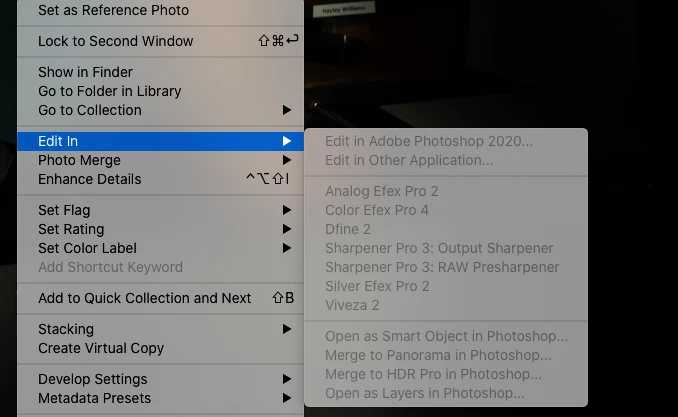
Lightroom won't open Photoshop documents it is all grey in the edit on dialogue area

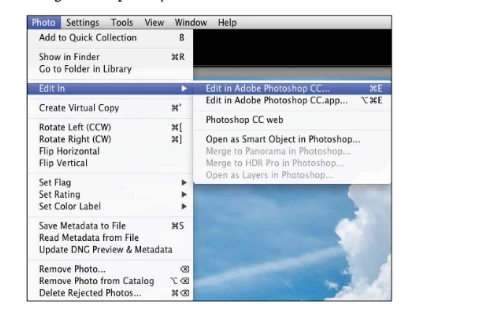
I inserted a photo of how is should look but on my computer it is all grey in the dialogue area?

How can I fix this? 
 

This is how it should open with Black not all grey!


{Thread title edited by moderator}

This topic has been closed for replies.

2 replies

Rob_Cullen
Community Expert
Community Expert
February 29, 2020

I note in your screen-clip that all your 'edit-in' links are greyed. (NIK etc).

So another answer to add to the link given by Nikunj is that your photos are 'missing', or you are working exclusivly with Smart Previews (also the original file is not connected).

Can you post a screen-clip of the Histogram panel in Library view- that might tell us some info about the photo you are trying to send to Ps. And a clip of the photo in the Library Grid.

Like this:

Regards. My System: Windows-11, Lightroom-Classic 15.0, Photoshop 27.0, ACR 18.0, Lightroom 9.0, Lr-iOS 10.4.0, Bridge 16.0 .
nikunj.m
Community Manager
Community Manager
February 28, 2020

Hi there,


We are sorry about the experience with Lightroom Classic while trying to use the Edit in Photoshop feature.


Would you mind sharing the macOS version you are using? Please try to uninstall and re-install Photoshop 2020 through the Creative Cloud desktop app to check if that helps.


You can also check: https://helpx.adobe.com/lightroom-classic/kb/edit-photoshop-command-missing-photoshop.html


Let us know if that helps.

Regards,

Nikunj