



Exit
  • Global community
    • Language:
      • Deutsch
      • English
      • Español
      • Français
      • Português
  • 日本語コミュニティ
  • 한국 커뮤니티
0

Lightroom edits look entirely different on files that have been edited in Photoshop

Community Beginner ,
Jun 12, 2023 Jun 12, 2023

Hi, 


I've been dealing with this issue for as long as I can remember, I've just never asked for help. Stupid really.


Here's an example of my issue, this image was duplicated in Lightroom and the file on the right was then edited in Photoshop (just a simple spot healing job), saved back into Lightroom and then I applied the same preset to both images. As you can see they both look entirely different. 
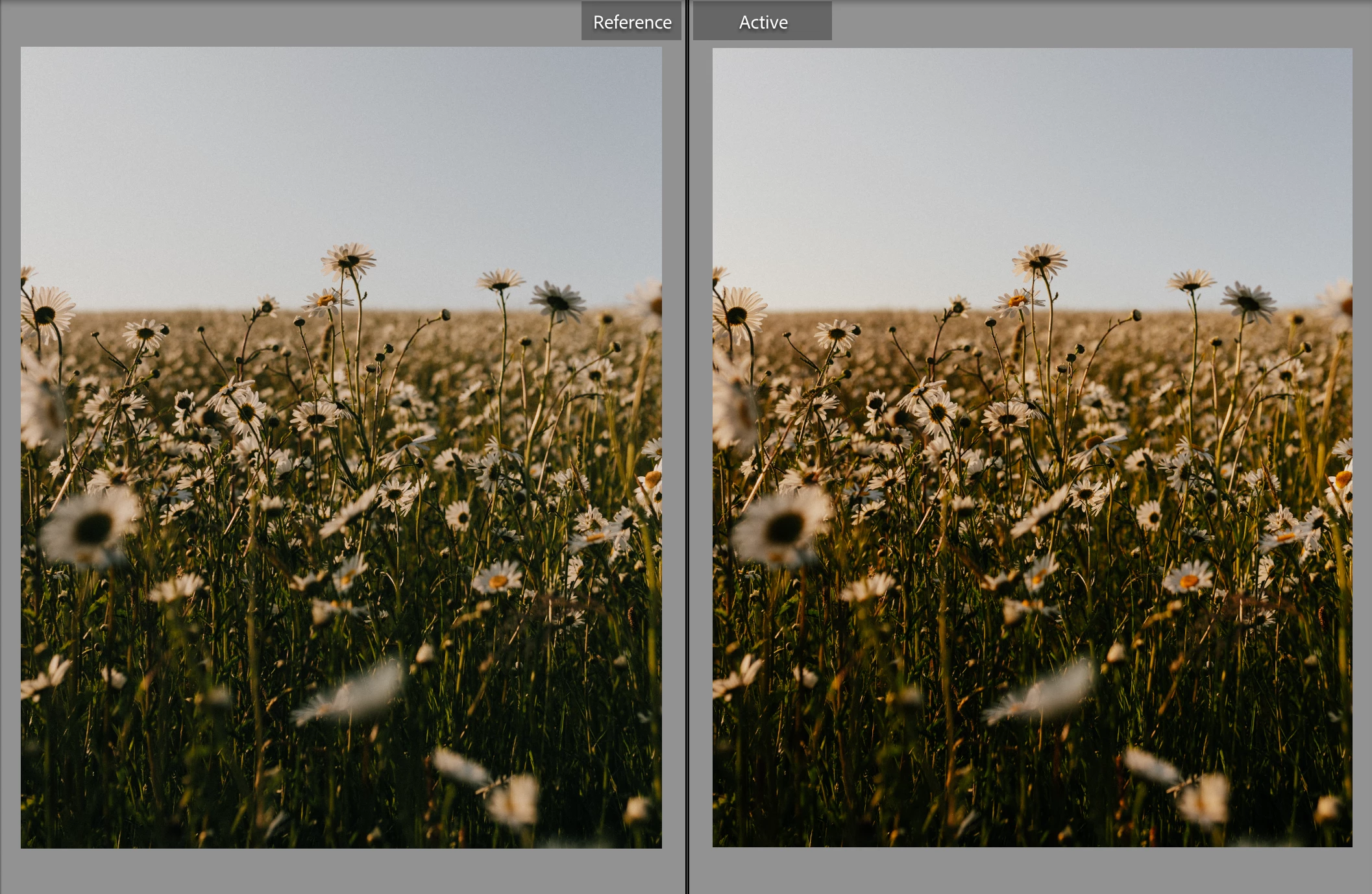
 

Screenshot 2023-06-12 at 13.51.56.png


I find this most frustrating when I'm batch editing photos, a wedding for example, where I am needing to edit some images in Ps but not others. When I come to colour grade once all basic PS edits are done I essentially end up with 2 entirely different edits even though I've used the same preset on the whole album and it's obviously incredibly time consuming having to fine tune the edits on all of the images previously edited in PS.


Could this be down to a Ps colour profile or something? 


Appreciate all the help in advance!

TOPICS
macOS
277
Translate
Report
Community guidelines
Be kind and respectful, give credit to the original source of content, and search for duplicates before posting. Learn more
community guidelines
Community Expert ,
Jun 12, 2023 Jun 12, 2023

If one is a raw file and the other an RGB file (from Photoshop) - then this is in fact entirely normal and expected.


Any numerical adjustment is color space specific. The same numbers will produce different results in different color spaces. The numbers will mean different things.


Raw files in Lightroom are in a custom/special color space with linear tone response curve and ProPhoto primaries. This is Lightroom's internal working color space.


Once you send a file to Photoshop, it's encoded into one of the standard color spaces - sRGB, Adobe RGB or ProPhoto. And that's how it comes back to Lightroom. So now you have two files, in very different color spaces, and the same adjustment will have different effect.

Translate
Report
Community guidelines
Be kind and respectful, give credit to the original source of content, and search for duplicates before posting. Learn more
community guidelines
Community Beginner ,
Jun 12, 2023 Jun 12, 2023

Thanks for your response! 


That makes sense. Would you reccomend a method as to how to combat this when batch editing? 


I feel like lots of photographers batch edit and yet this is something I can't seem to find any info on online, though maybe im looking in the wrong places. 


The obvious thing to do would be to ensure all colour grades and edits in Lr are finalised before doing any edits in Ps but that would then cause a huge issue when client changes are requested or last minute adjustments need to be made in Lightroom as the Lr edits would be saved into the tiff files exported from Ps back into Lr, unless I'm mistaken?

Translate
Report
Community guidelines
Be kind and respectful, give credit to the original source of content, and search for duplicates before posting. Learn more
community guidelines
Community Expert ,
Jun 12, 2023 Jun 12, 2023

The only remedy you have against this is to stay out of photoshop as long as you can (or to edit all images in Photoshop as the first step) or to never use presets late in the editing of an image. You can also keep the photoshop edits in a seperate folder or use filtering when you apply a grade or filter at the end. The tools in Lightroom have gotten really good including content aware healing etc. I rarely need to go into Photoshop. So yeah best is to simply not use Photoshop if you can and segregate out the images you edited in PS if you absolutely have to.


Do note that due to the way presets work, it is not really reliable to apply presets late in editing anyway as you might end up wiping away edits you did before that. Presets do not stack, they delete any edits that were done before if they are also defined in the presets. You can't really grade the same way as you might be used to using layers in Photoshop. So presets are a early in the game thing, not late. You can't really use them to get a consistent look (i.e. like a filter) after you already edited the images.


>The obvious thing to do would be to ensure all colour grades and edits in Lr are finalised before doing any edits in Ps but that would then cause a huge issue when client changes are requested or last minute adjustments need to be made in Lightroom as the Lr edits would be saved into the tiff files exported from Ps back into Lr, unless I'm mistaken?


You can use the edit as smart object trick. This allows you to later change any underlying camera raw edits while in Photoshop by just double clicking the layer. The system is not as integrated that you can change settings in Lightroom and have them carry into the smart object unfortunately.

Translate
Report
Community guidelines
Be kind and respectful, give credit to the original source of content, and search for duplicates before posting. Learn more
community guidelines
Community Expert ,
Jun 12, 2023 Jun 12, 2023
quote

Presets do not stack, they delete any edits that were done before if they are also defined in the presets.


By @Jao vdL


Very important point there.


I solve this by keeping raw files and RGB files completely separate. I push it as far as I can in Lightroom, then move to Photoshop for any final touch-ups, and that's it. Those are my masters. I never take RGB files to Lightroom.


Anyway, just for demonstration and fun, I tried to put the same three adjustment layers on an sRGB file and a ProPhoto file. It's just one Curves, one Levels, and one Hue/Sat, not really dramatic adjustments. See how different the result is:

adjustments1.png


Translate
Report
Community guidelines
Be kind and respectful, give credit to the original source of content, and search for duplicates before posting. Learn more
community guidelines
Community Expert ,
Jun 12, 2023 Jun 12, 2023
LATEST

Yeah that's right. It doesn't even work in Photoshop if your source color space is not identical indeed. 

Translate
Report
Community guidelines
Be kind and respectful, give credit to the original source of content, and search for duplicates before posting. Learn more
community guidelines