New Participant
November 7, 2021
Answered

Lightroom is changing colours automatically in develop

  • November 7, 2021
  • 6 replies
  • 3379 views

Hi I have experianced very annoying issue, i shoot in slog profile raw and images look fine in library when i click on develop, lightroom is changing their colour or applying some preset automaticaly, i have already reinstalled i look for answers everywhere, plese help 

This topic has been closed for replies.
Correct answer Per Berntsen
quote

i shoot in slog profile raw


Camera settings, like S-log (which seems to be a setting designed for video) do not affect raw files.

https://pro.sony/en_BE/technology/s-log

But they are applied to the jpg preview embedded in the raw file. Lightroom doesn't understand camera settings, and ignores them, unless they are written in XMP, which an increasing numbers of cameras do.


My guess is that you have chosen Embedded & Sidecar under Build Previews in LR's import dialog, so you're seeing the embedded preview in Library. The develop module renders its own preview from the raw file.

The raw file contains all the data from the sensor, and you can edit it to look like the S-log jpg if you like.

There might also be a camera matching profile that renders the raw file the way you want.

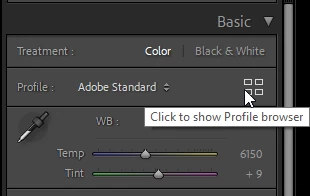
You can see available profiles in the Profile browser in the Basic panel in Develop.

You can create a preset containing a camera matching profile to be applied automatically on import in Preferences > Presets.

See https://helpx.adobe.com/lightroom-classic/help/raw-defaults.html

Also consider setting Build Previews to any other option than Embedded & Sidecar in the Import dialog.


6 replies

Per Berntsen
Per BerntsenCorrect answer
Community Expert
November 7, 2021
quote

i shoot in slog profile raw


Camera settings, like S-log (which seems to be a setting designed for video) do not affect raw files.

https://pro.sony/en_BE/technology/s-log

But they are applied to the jpg preview embedded in the raw file. Lightroom doesn't understand camera settings, and ignores them, unless they are written in XMP, which an increasing numbers of cameras do.


My guess is that you have chosen Embedded & Sidecar under Build Previews in LR's import dialog, so you're seeing the embedded preview in Library. The develop module renders its own preview from the raw file.

The raw file contains all the data from the sensor, and you can edit it to look like the S-log jpg if you like.

There might also be a camera matching profile that renders the raw file the way you want.

You can see available profiles in the Profile browser in the Basic panel in Develop.

You can create a preset containing a camera matching profile to be applied automatically on import in Preferences > Presets.

See https://helpx.adobe.com/lightroom-classic/help/raw-defaults.html

Also consider setting Build Previews to any other option than Embedded & Sidecar in the Import dialog.



elie_dinur
Participating Frequently
November 24, 2021

Try a linear profile from here:

https://goodlight.us/linear-profiles.html

S-log is almost linear but not quite.

KR Seals
Community Expert
November 7, 2021

@defaultiyjheqqiagkv I spent some time researching the Sony Slog profile. From what I can tell, that profile results in a very flat image with the intention of further processing/color grading. I suspect that LrC is displaying the image correctly in Library Loupe View, and also correctly in the Develop module once a regular profile is applied.

It seems that Slog is more generally used in video than stills.

Ken Seals - Nikon Z 9, Z 8, 14mm-800mm. Computer Win 11 Pro, I7-14700K, 64GB, RTX3070TI. Travel machine: 2021 MacBook Pro M1 MAX 64GB. All Adobe apps.
New Participant
November 7, 2021

thank you @KR Seals for your time that is correct it has flat colours to be able to enhance the way you like not the way LrC likes while in develop mode I have to bring down contrast and sautration to be able to have flat image so it is not just way of displaying as it should be flat with 0 values 

GoldingD
Brainiac
November 7, 2021

1. What Profile was applied in the develop module?


2. Is your monitor profile corrupt?

https://www.lightroomqueen.com/how-do-i-change-my-monitor-profile-to-check-whether-its-corrupted/


New Participant
November 7, 2021

i dont think anything is wronge with monitor as yesterday I edited Log pictures without any issue 😞 

KR Seals
Community Expert
November 7, 2021

@defaultiyjheqqiagkv Something appears to be wrong with the preview in Loupe View in the Library module. If you look at the histograms in both modules, they are the same. Based on the histogram, the Develop version of the image looks correct to me.

What happens if in the menu bar, you go to Library -> Previews -> Build standard previews?


Ken Seals - Nikon Z 9, Z 8, 14mm-800mm. Computer Win 11 Pro, I7-14700K, 64GB, RTX3070TI. Travel machine: 2021 MacBook Pro M1 MAX 64GB. All Adobe apps.
New Participant
November 7, 2021

nothing basically happens everything seems to be the same 😞 

New Participant
November 7, 2021

the first picture is a screenshot from the library and the second is just by clicking develop 

Participating Frequently
November 7, 2021

I also experience this and would like to know what's going on.

Brainiac
November 7, 2021

Show us an example, same photo in Library and develop. Include screen captures by using the "Insert Photos" icon. Do not attach files.


What does the History panel say in the Develop Module?

