


New Participant
May 28, 2024
Question

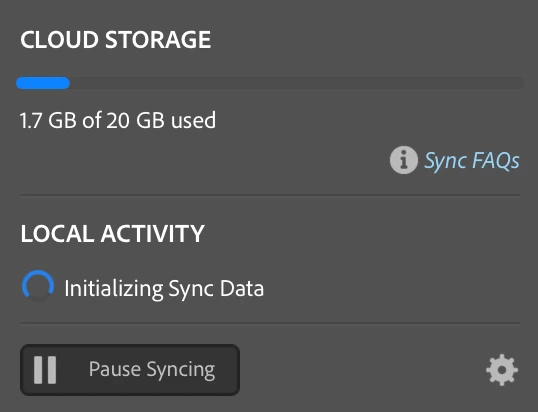
Lightroom Sync stuck on Initializing Sync Data

  • May 28, 2024
  • 10 replies
  • 4180 views

Since updating to the new 13.3 Version of lighroom classic and 7.3 of lightroom my sync status appears to be stuck, stating 'Initializing Sync Data'. It has been stuck like this for the past 24hr's, although I have not left Lightroom running all that time, but it has been running for the past 4hrs with nil change. I did update my Lightroom Catalogue and have around 10k files in the cloud (mostly smart previews). 


Is it just a waiting game or is there likely an error preventing further progress. 


Any help would be appreciated.
10 replies

New Participant
September 24, 2024

Here is what worked for us multiple times.

Go to your catalog file, you can find it at Catalog Settings > Show (see screenshot) locate file and make a copy of it (see screenshot), mine is called "Upgraded Catalog May 21st 2024.lrcat" go to old catalog file and rename it, the NEW catalog file has to have the old name, double click on the new catalog file with the old name.


We have done this multiple times, and has worked for us.


Good luck.


Known Participant
September 25, 2024

you do realise that what you are doing is changing NOTHING AT ALL? A digital copy is exact same file down to the last byte. 

Da, Moroshka!
New Participant
September 27, 2024

Well, I did not know that, but you are welcome to "help" me figure this out. But, what ever I did fixed got it unstuck from 8k to 6k photos, came back with the intention to report back the results. 


Last time this happened, I did this or something similar and it jump start the syncing again, I'm not saying is the correct way to do it, I am sharing my findings. 

New Participant
July 18, 2024

I had this same issue for weeks after updating to 13.3 and tried multiple long and unproductive screen sharing sessions with Adobe support to no avail. But I ultimately figured it out, and I hope this can help others with the same problem.


In my case, I noticed that Adobe Creative Cloud app was also showing Libraries Syncing forever but no green check mark (Done) appeared next to it. What ended up working was "resetting the Creative Cloud app".

Make sure the Creative Cloud app is in the foreground, then press:

Win: Ctrl + Alt + R
Mac: Cmd + Opt + R


After a few seconds, Creative Cloud sync showed a green check mark (like in the image attached). And once I reopened Lightroom Classic it finally synced, and has worked perfectly ever since!

Canyon Raft Company
New Participant
July 23, 2024

Ok everyone, after much frustration with Adobe I decided to dedicate a lot of time to trying to sort this out. I know a lot of people depend on this program for their buisness so I hope this works for everyone having this issue. OPEN LIGHTROOM LAST


FIRST

you need to go to lightroom.adobe.com and delete all the photos that are in the cloud. make sure you delete them out of the delete foder two


SECOND

go into your files on your computer, and move your catalog files into your choice of device to keep a backup of it, then get rid of any data files asscosiated with that catalog.


THIRD

open the Creative Cloud app and hit Cmd+Opt+R (mac) /  Ctrl+Alt+R (win)


FOURTH

Create a new catalog in lightroom and that should do it. if it get stuck on initializing, reset the Creative Cloud App again.


thank you to everyone for the peices of info that allowed me to sort this out.


Adobe... cant express my disapointment since moving this app to the cloud. Do better, we pay too much to not be able to conduct our buisnesses.

Participating Frequently
August 16, 2024

I assume you imported your old catalog into the new, is that correct?  I tried that, and I still have the issue.  

Participating Frequently
June 23, 2024

After going back to the last version of lightroom classic and the last catalog version so I could actually use the program, I trird the update again along with the upgraded catalog and the same problem with initializing sync occured, but I noticed a second issue:  the new catalog is missing my last approx 200 photos that have been edited and synced to my mobile device.  This is clearly not working. You might want to check to see if you've lost any images. 

Participating Frequently
June 14, 2024

I've had the same issue.  Stuck on Initializing Sync Data since 6/2.  I did the 13.3.1 update tonight and when I relaunched it immediately started syncing.  :). 

Known Participant
June 14, 2024

Unfortunately I'm on 13.3.1 already. Possibly I need to wait for the next update 😞

New Participant
June 11, 2024

Same thing here.. Really frustrating:(


Sameer K
Community Manager
Community Manager
June 12, 2024

Hey @Sam Pelling, @danal15741990, @DaMoroshka!, @MontyPhotos, @leicaboss, @Murat31985462vso6 & @EveryBitBeautiful!

I'll need more info to help you figure this out. Before troubleshooting, please update Lightroom Classic to the latest version (v13.3.1) via the Creative Cloud desktop app.


Where do you keep your Lightroom catalog? On an internal or external drive? Do you have a recent catalog backup? 


This might make me sound like a broken record - Initializing Sync can be kick-started when you restart Lightroom Classic maybe a couple of times.


If that isn't working for you, please share the system info of Lightroom from Help > System info > Copy and paste into a text document > Upload as an attachment here.


Thanks!

Sameer K

Participating Frequently
June 13, 2024
I will get back to you on this, but it may be a few days before I really have time to deal with it.

Get Outlook for iOS<>
Participating Frequently
June 1, 2024

Same problem here...stuck on initializing sync data

New Participant
June 1, 2024

Same problem here, honestly this is pretty disappointing

New Participant
June 1, 2024

I'm having the same issue with the 13.3 version on a Mac computer. Sync was working properly before I updated to the latest version, and there seems to be no solution at this point. I hope someone at Adobe reads this and give us some a solution! I use the sync function frequently!


Known Participant
May 30, 2024

same thing here, nothing but trouble after the last update, it was migrating sync data for a long time, then got stuck with syncing 15 new images forever (had to go to web page, find "sync errors" album and delete the errors manually), now it is stuck at "initializing sync data"... I was kind of hoping the new release would fix sync issue but it just added more trouble. Are they testing their system at all before update? 

Da, Moroshka!
danal15741990
New Participant
May 30, 2024

Prior to a live the chat yesterday with an adobe expert, I was experincing a sync issue after the same updates (13.3 Version of lighroom classic and 7.3). Mine was stuck "Migrating Sync Data" Kevin from adobe spent a considerable amount of time to rectify. The last thing he did was create a new test catalogue Ircat. resulting in the same issue you are experincing. My LRC was open a running all night long and has still yet to Initialize. Hopwefully adobe will correct the issue! Maybe a mac os conflict?

HELP