


Inspiring
January 9, 2020
Question

Lightroom warns that files have different names when relocating Missing Files

  • January 9, 2020
  • 2 replies
  • 975 views

I had previously moved a couple of catalogs and their images onto my NAS in order to temporarily free up some space on my computer. I moved the main folders that contained the catalogs and the images all together. Today, I just needed to access those catalogs again so I moved the folders all back to where they originally were. 

Now when I open the catalogs I get asked to upgrade so I do but then all my images show up as missing. And when I try to relink a file I get the following warning (see images below)
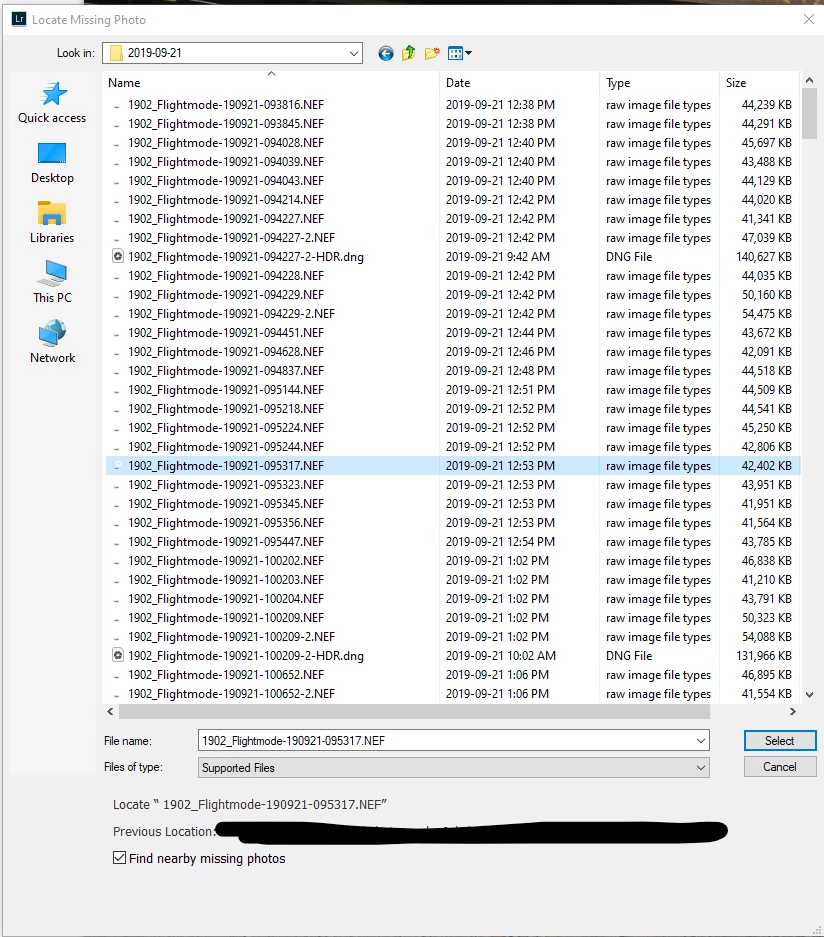
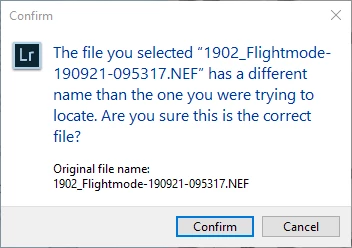
Do you have any ideas as to what is causing this? The file names look identical to me. Thank you.

This topic has been closed for replies.

2 replies

27shutterclicks
Inspiring
February 23, 2021

I am getting the same error, except my filenames are entirely indentical - no extra spaces anywhere. The only exception possibly is that they include accents in French. Could it be an encoding issue? All file naming was done via Lightroom, on different computers, one Macbook and one PC. Nothing was changed or renamed outside Lightroom.

Inspiring
November 29, 2023

Same problem here. i just had a long support chat session with an Adobe technician connected to my computer. He could not solve the issue after 1 hour and is going to follow up by email. Same thing as explained here. Files same names , ALR Classic does not recognize them. I can synch or update folder , does not matter. Also when I try to direct the file in LR to the file in the folder I get an error. I have my Database and files in an external DAS (USB3). Only some folders are affected not all of them.

Brainiac
November 29, 2023

Although it may be the same problem, you would be wise to start a new thread, and explain the problem in detail; instead of attaching your statement to an old thread.

Brainiac
January 9, 2020

The file name you selected is different from the original file name as you can see in the top screen capture, it says Locate and then a double quote and then a blank (or possibly several blanks)

Inspiring
January 9, 2020

Good catch. I didn't notice that. But the filenames never had spaces in front of them when I lasta worked on the catalog. Any idea what would have caused that across the entire catalog? Like it seems that it's somehow damaged.

Brainiac
January 9, 2020

I am stumped, I have no idea how spaces could accidentally get added or removed in normal activity. You'd almost have to be trying to add spaces to get it to happen.


I also don't have a good idea how to globally fix this. I suppose there are utility programs out there that can bulk changed the names of the files to have spaces in front of them, but I wonder if there are some drawbacks to doing this that I can't think of at the moment.