


Participating Frequently
December 12, 2018
Question

LR 8.1 Update Ruins EOS R White balance!

  • December 12, 2018
  • 15 replies
  • 11557 views

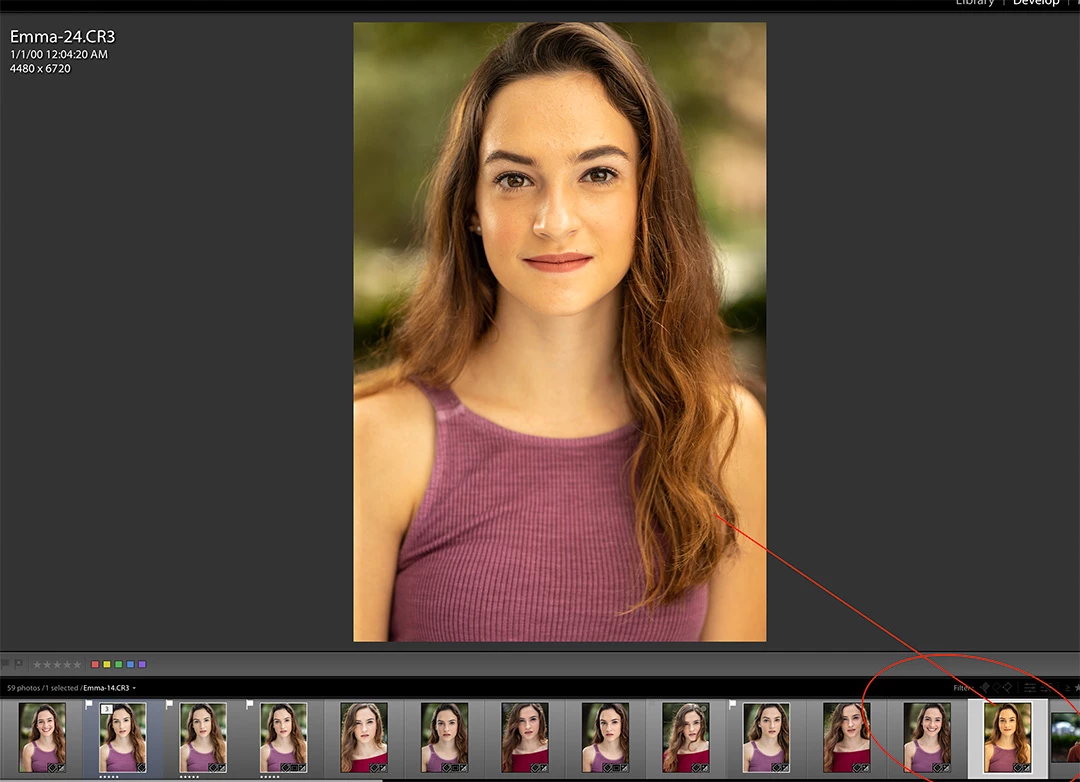
Just update to LR Classic CC 8.1 and Camera Raw 11.1.  Now anytime I mouse over or click on an existing image in a folder that is a .CR3 file from my EOS R, the white balance goes all out of whack.  I actually can no longer work on these files, for fear that every one will get messed up.  You can see below the two circled images have the exact same settings, but when i clicked on the one on the right it went all warm and yellow.  It seems temp increased on me...but i dont know what it was before and I don't know if anything else changed.  .CR2 files are fine.  FWIW most of their temps are in the 4800 range, not 6400.

Profile is Adobe Color, but it doesn't matter if I change it, and I don't believe it changed, but it's the same for .CR2 files and they don't change.

The white balance is just not accurate, and I don't know how to fix this.  Please help.
This topic has been closed for replies.

15 replies

GoldingD
Legend
December 12, 2018

Looks like in v8, an issue existed with the profiles, any image edited previously will have that profile, any image just now edited in the new LR will have a new v2 profile, need to reapply the profile as in Adobe Standard to fix??, then continue.

that from the Fuji X-T3 solution, does this apply to yours as well?

pMarcigAuthor
Participating Frequently
December 12, 2018

No unfortunately.  Images look great initially. I'm guessing they "look" like they did in 8.0, but slider settings and profile have changed (why i have no idea, and that's the problem).  When i click on the picture it assumes the new properties and goes out of whack.  If i change it to Adobe Standard v2 from Color it just becomes a more muted version of the bad color.  I have to change WB to as shot and adjust all over again. 

GoldingD
Legend
December 12, 2018

Hmm, went to look for a link to share, a link to X-T3 issues, found it, and appears a fix exists, involves profiles??

I do not know if something can be harvested from this for your Canon

White Balance profiles incorrect for Fujifilm X-T3

GoldingD
Legend
December 12, 2018

Owners of the Fujifilm X-T3 have a similar problem, that camera was first supported in LR 8, ACR 11, DNG converter 11.

once you select any setting other than as shot for WB, nice colorl cast.

known problem for the X-T3 that Adobe did not fix.

workaround is to use sliders to adjust WB, or the eye dropper, to avoid selecting daylight, cloudy, etc.

pMarcigAuthor
Participating Frequently
December 12, 2018

Yeah, i had no issue in 8.0 just 8.1.   As you can see the color was correct, till I simply clicked on it, or even just mouse-over it.  Also the profile is now Adobe Color, and I'm pretty sure it's always been Standard.

pMarcigAuthor
Participating Frequently
December 12, 2018

ALSO, it only appears to be changing images that I had previously edited.  Imported images that I had not yet made any changes to are not affected. 

pMarcigAuthor
Participating Frequently
December 12, 2018

It has something to do with the color profiles.  I have no idea what they were at, but i think it was Adobe Standard.  Many are now Adobe Color.  The problem is, when i change it to Adobe Standard (v2), it's still not the same as when I last finished editing it.  So I have three different color versions...my orginal edits, pre-update, the new whacked version, and a less whacked version if I change the profile.  I really don't want to go back through hundreds of files updating my white balance on every photo again.  :-(