


wizanm
Participating Frequently
November 20, 2018
Answered

LrHttp.postMultipart Bug (attempt to perform arithmetic on field 'fileSize)

  • November 20, 2018
  • 2 replies
  • 1578 views

Hello,

When I add the code (mimeChunks[ #mimeChunks + 1 ] = { name = '0', fileName = filename , filePath = filepath  }) for LrHttp.postMultipart , 

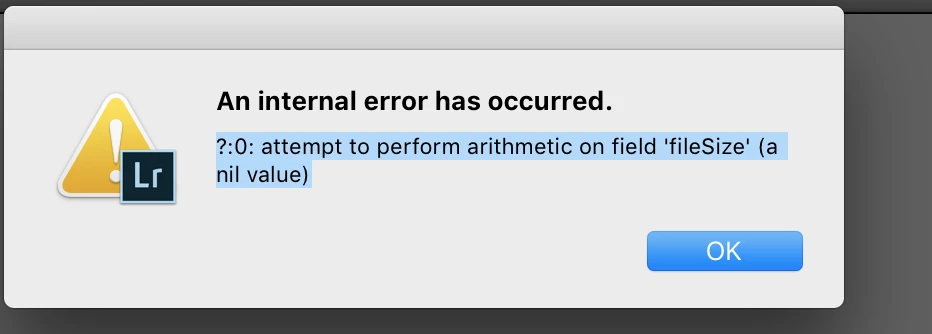
Lightroom throws  "?:0: attempt to perform arithmetic on field 'fileSize' (a nil value)" error.

I cannot make a post multipart request.

Is there any idea or clue?

Thanks in advance..
This topic has been closed for replies.
Correct answer johnrellis

You could enable LR stack tracebacks and perhaps see where in LR that error is originating from: Lightroom -traceback debugging tip

2 replies

wizanm
wizanmAuthor
Participating Frequently
November 20, 2018

johnrellis

Thank you so much for your prompt reply. I've got the traceback logs.

It seems like the bug is coming from the Adobe Side. Do I have a chance to do anything?

The log :

2018-11-21 09:09:05.144 Adobe Lightroom Classic[16249:2625307]

?:0: attempt to perform arithmetic on field 'fileSize' (a nil value)

    0:          [unnamed]                      - 1611948003:953+150

    1:          [unnamed]                      - tail

    2: upvalue  ?                              - TestApi.lua:458

    3:          [unnamed]                      - 2144215698:63+9

    4:          [unnamed]                      - 179812414:2279+12

---------------------------------

2018-11-21 09:09:05.144 Adobe Lightroom Classic[16249:2625307] Oops! An untagged string (?:0: attempt to perform arithmetic on field 'fileSize' (a nil value)) got thrown far enough that we display it to the user. This shouldn't happen.

sessionReadyCallback: 3

<140735765160832> <DynamicLink> <5> Attempting to launch dynamiclinkmanager

<140735765160832> <DynamicLink> <5> /Applications/Adobe Lightroom Classic CC/Adobe Lightroom Classic CC.app/Contents/Helpers/DynamicLinkSupport/support/common/dynamiclink/dynamiclinkmanager.app

johnrellis
Brainiac
November 20, 2018

I'm guessing that somewhere in the call to LrHttp.postMultipart(), it's trying to get the size of the file provided by "filePath", by calling LrFileUtils.fileAttributes(), which returns the empty table (which is only supposed to happen when it can't access the file).  But that's just a guess.  I don't know why fileAttributes() would return the empty table if the file exists and is readable. 

I don't have any other suggestions at this point...

wizanm
wizanmAuthor
Participating Frequently
November 21, 2018

johnrellis

Thanks for your great support. I  have created my export code from scratch and it works properly now.

johnrellis
Brainiac
November 20, 2018

Just a guess: Perhaps the file "filepath" isn't readable. You could verify it's readable by doing LrFileUtils.isReadable (filepath) and LrFileUtils.fileAttributes (filepath).  Note the latter returns a table with key "fileSize", and that key will be nil if the file doesn't exist or isn't accessible.

wizanm
wizanmAuthor
Participating Frequently
November 20, 2018

Hi johnrellis

Thanks for your answer.

LrFileUtils.isReadable (filepath)  = true

and I can read the fileAttributes without any issue.

johnrellis
johnrellisCorrect answer
Brainiac
November 20, 2018

You could enable LR stack tracebacks and perhaps see where in LR that error is originating from: Lightroom -traceback debugging tip