@GCP_1 wrote:
Zipped back up is 3.8 GB. I have deleted as much as i can but LR is taking up more that half of my 1 TB solid state drve on my machine.
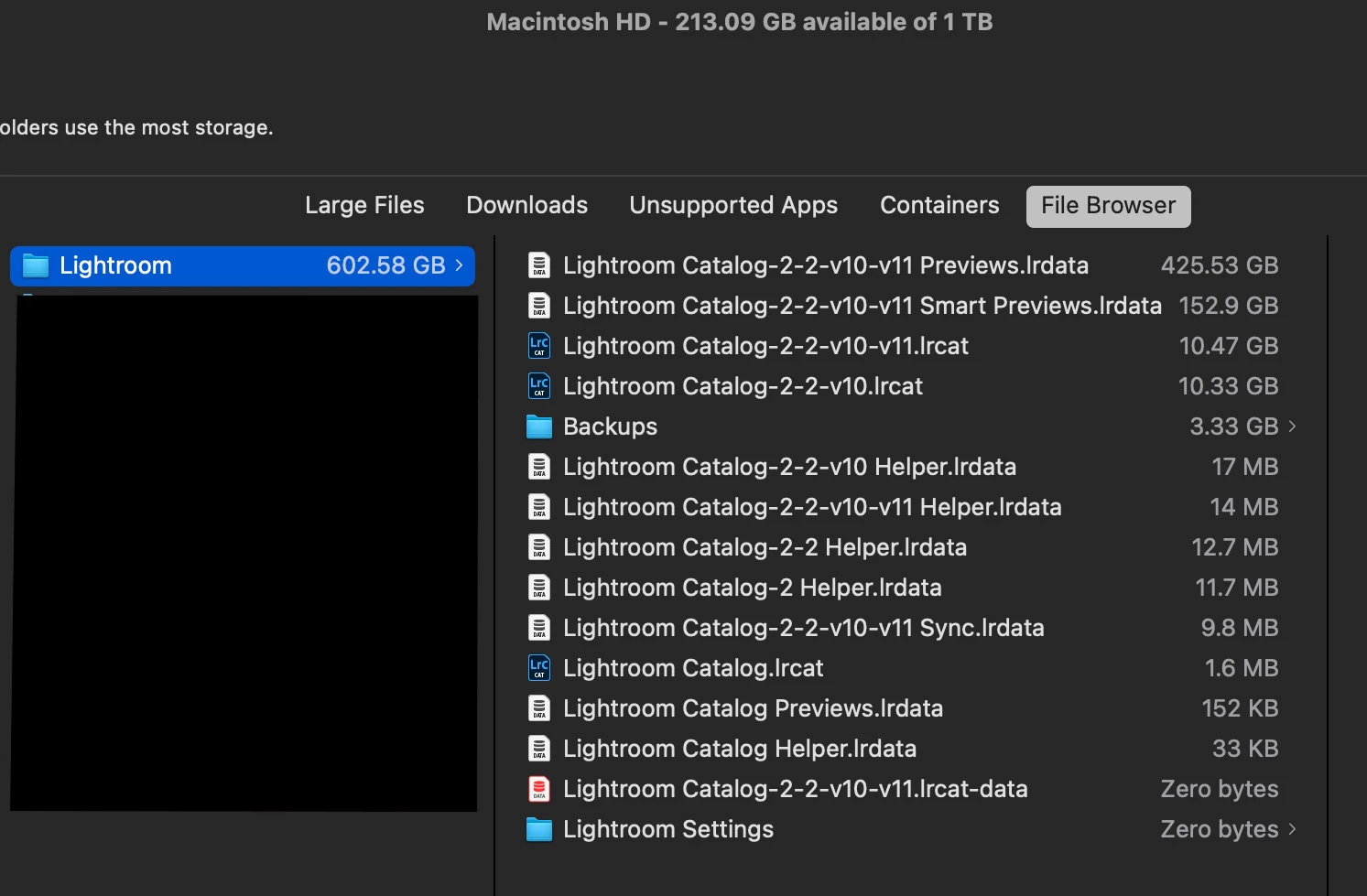
Actually, you have not deleted as much as you can. There is a lot in your picture that could be deleted. The files you must keep are:
- The catalog, which contains all of your edits and metadata, file name ending in .lrcatalog
- The associated files ending in .lrdata, …sync.lrdata, …Helper.lrdata
The total size of the Lightroom Classic 11 versions of those essential files is only about 11GB.
But the files causing the most trouble, the largest files, are also the most expendable files that you can delete if you want to:
- The Previews file, file name ending in …Previews.lrdata
- The Smart Previews file, file name ending in …Smart Previews.lrdata
The total size of the Lightroom Classic 11 versions of those expendable files is over 575GB.
Should you delete the Previews file? It contains the thumbnail, full size, and 1:1 previews you see in all modules except Develop. Is this expendable? Yes, because it’s not the actual edits, just a cache of previews of each image’s current edits. If you throw it out, Lightroom Classic will simply recreate the previews as you browse folders and collections. Why should you keep it? Previewing files might be faster if Lightroom Classic can simply put the cached previews on the screen instead of having you wait while it builds new ones. Deleting the Previews file recovers all of the space it takes up, at first.…be aware that as you go back to browsing more photos, more previews will naturally accumulate again. Still, I throw out the …Previews.lrdata file every once in a while, just because I don’t want it to be that big. For a Previews file as large as yours, I'd throw it out. It’s probably storing tens of thousands of previews for folders you don’t visit often.
Should you delete the Smart Previews file? That depends. Are you using them? Sometimes I build Smart Previews for 300 images from a shoot so I can edit them on my laptop when the external storage containing the original files is disconnected, but then I forget about them and they just take up space. In that case I should select those 300 files and disable their Smart Previews to recover the space. If you know you aren’t taking advantage of any Smart Previews right now, you could toss out the whole …Smart Previews.lrdata file. If you are still using some of them, just delete unneeded Smart Previews on an image by image basis inside Lightroom Classic.
Original photo files are not included in the files discussed above, which are all files belonging to Lightroom Classic only.
Also, be sure you have run an optimization of the 10.47GB catalog, in case that compacts it somewhat.



 AdChoices