


Participant
January 22, 2022
Answered

Mask controls are partially hidden on screen

  • January 22, 2022
  • 4 replies
  • 269 views

When I create a mask, the controls for working on it are partially hidden on the screen. I can't see the end of them. I work on a 13" MacPro and also on an ultrawide monitor, in both the problem occurs.
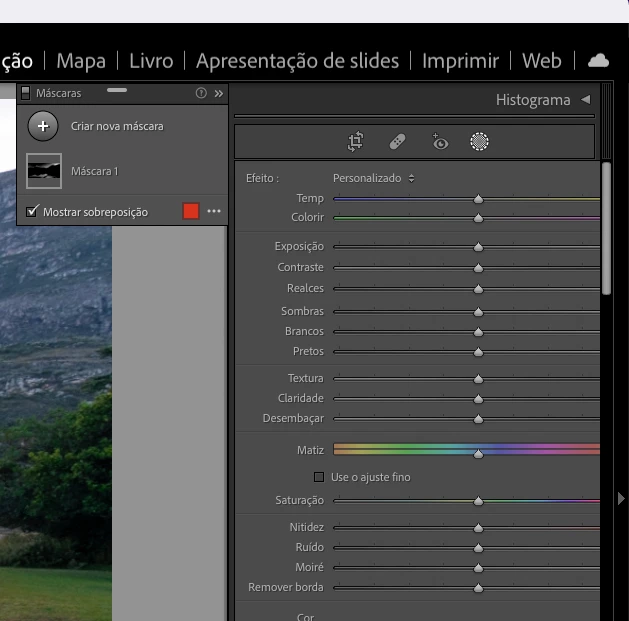
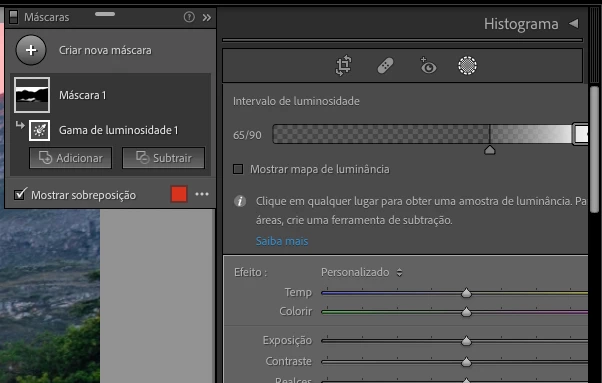


This topic has been closed for replies.
Correct answer johnrellis

LR has sometimes had issues in the past with sliders getting truncated on the right when LR is running in a language other than English.  So to narrow down this problem, temporarily change the language to English by changing Preferences > General > Language to English.  Do the sliders still get truncated?

4 replies

johnrellis
Legend
January 25, 2022

Unfortunately, I can't reproduce this on my Macbook Pro 15".  Adobe is much more likely to pay attention if a bug report has simple steps for reproducing it.  Next steps to reproduce it on other computers:


1. Do the menu command Help > System Info (Ajuda > Informações do sistema) and copy paste its entire contents to here.


2. What is the setting of Preferences > Interface > Font Size (Preferências > Interface > Tamanho da fonte)?


3. In the submenu Window > Screen Mode (Janela > Modo de tela), which menu item is checked?


johnrellis
johnrellisCorrect answer
Legend
January 23, 2022

LR has sometimes had issues in the past with sliders getting truncated on the right when LR is running in a language other than English.  So to narrow down this problem, temporarily change the language to English by changing Preferences > General > Language to English.  Do the sliders still get truncated?

johnrellis
Legend
January 23, 2022

Also, what is the setting for Preferences > Interface > Font Size? Try changing it from small to large, or vice versa. Does that fix the issue?

GoldingD
Legend
January 22, 2022

A possibility, corrupt preference file.


see:

https://helpx.adobe.com/lightroom-classic/help/setting-preferences-lightroom.html


The preference file can get corrupted leading to buggy behavior. A corrupt preference file will survive uninstalls, updates, and upgrades. By renaming or moving or deleting the preference file you create a situation where LrC will recreate a fresh new one upon startup of LrC. Be aware various settings will revert to defaults.