


Participant
August 25, 2023
Question

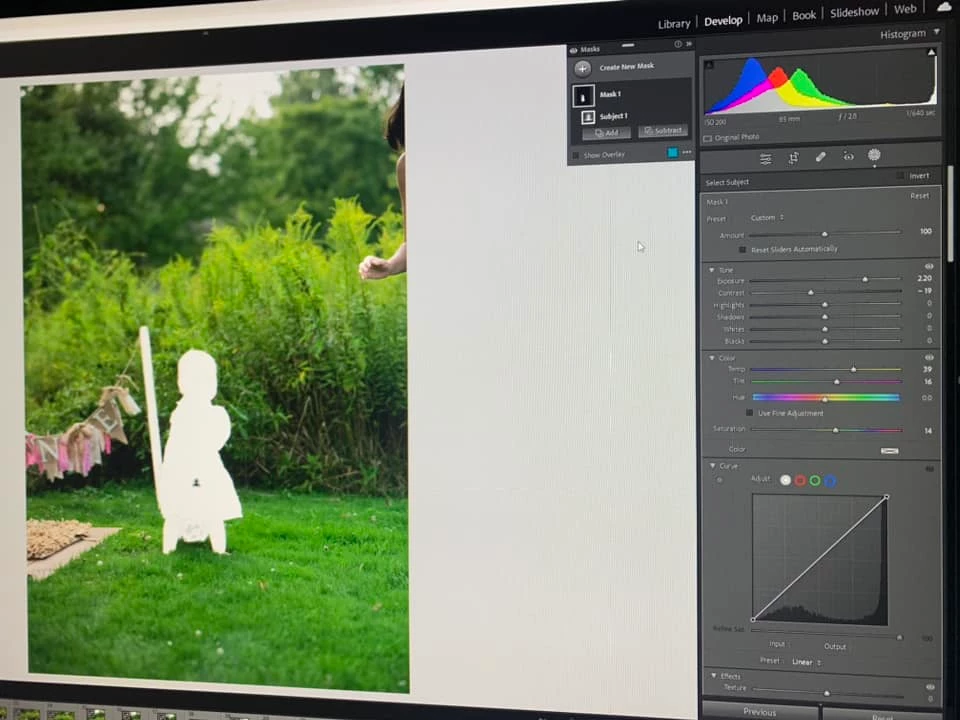
Mask is giving me a white out and mask is on blue. Turning exposure slider down still leaves a film

  • August 25, 2023
  • 1 reply
  • 588 views

If anybody can help me understand why this is happening in masking tool I’ll be so grateful !! The masking tool is totally masking the masked area solid white . Even when I pull exposure down I get a filmy white look. It was fine all morning and then this started . Did I hit something to cause this? Now I’m at a standstill . I’ve been using Lr for several years and this has never happened . Thank you in advance . happens on RAW unedited and edited images. 
This topic has been closed for replies.

1 reply

Community Expert
August 25, 2023

(edit: I've just realised mask overlay is turned off in your screenshot, so please disregard the following paragraphs but I'll leave them in place) - your Exposure adjustment is quite large but the image does not look right even so. This is either a display glitch (which is often graphics-acceleration related) or else some sort of unintended adjustment. I notice your panel is not set to automatically reset all the adjustments for each new mask, so it's perhaps some unusual prior adjustment that is persisting.

...

Besides turning mask overlay on and off (O key shortcut) - and only when off, do you see the adjustments themselves - there are different options for masking overlay, selected e.g. from three-dot menu in the Masks panel:


the default being Color Overlay (in which case the current overlay colour, for example in my case red, shows as a square alongside). If set to Color Overlay shift+O cycles through the standard choices of colour. Other mask overlay options include showing the selected picture area on white, or on black, or on a B&W rendition of the photo, or even showing the mask selection only (as a black and white image, with nothing visible of the photo itself).


Also, if you go to Color Overlay Settings in that same menu, there is an option as to whether masking overlays should indicate the selected parts of the photo, or should indicate everyrhing else except the selected parts of the photo.


So between these controls you can show masking however you like. Some of these options have got key shortcuts associated and so are quite possible to change accidentally.

Participant
August 25, 2023

Thanks for looking at this. I had to have Adobe IT remotely access my computer. He reset the settings to the application and now it works. Said he never saw this and that it was just a bug in the system.