


New Participant
January 24, 2017
Answered

Minimize, Restore Down/Maximum and Close Button are not visible

  • January 24, 2017
  • 2 replies
  • 4900 views

I have LR 6.8 standalone on a Windows 10 64 bit computer. The Minimize, Restore Down/Maximum and Close Button buttons on the upper right of the program do not show.  I have to go to the task bar to minimize or close the program.  Also, I have two monitors and I cannot drag it from monitor 1 to monitor 2.  I have uninstalled LR and reinstalled it which didn't fix the problem

These buttons are standard buttons for all window programs, they work for all of my other programs.  I had this problem with an earlier update. They mysteriously came back.  Every update since then I have had the same problem as the one I'm having now.
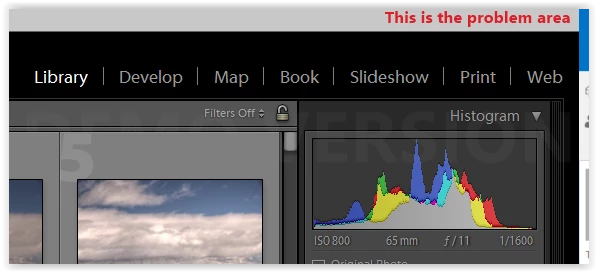
This is what is missing


Thank you,

John Baesemann

    Correct answer dj_paige

    Shift-F once or twice

    2 replies

    Inspiring
    July 8, 2025

    I cannot minimize or resize screen


    Conrad_C
    Community Expert
    July 8, 2025

    It sounds like Lightroom Classic might be in a full screen mode. Lightroom Classic supports both macOS Full Screen mode, and its own full screen mode that existed earlier. 


    First, see if it’s in macOS Full Screen mode. Move the pointer to the top of the screen to reveal the menu bar. If that also reveals the application window title bar with the three buttons, then click the green button to restore the window., as shown in the demo below. This is the same way Full Screen Mode works in most other Mac applications.


    If you try that and it doesn’t reveal the three buttons, that means Lightroom Classic is in its own full screen mode. In this case, when the menu bar is made visible, this time click the Window menu and then the Screen Mode submenu. If the command selected on the Screen Mode submenu is Full Screen or Full Screen with Menu Bar, choose Normal, as shown in the demo below. On the Screen Mode submenu, you can also see that another way to get out of Lightroom Classic Full Screen mode is to press the keyboard shortcut shown for Next Screen Mode, which is Shift + F .


    dj_paigeCorrect answer
    Brainiac
    January 24, 2017

    Shift-F once or twice

    carmon27
    New Participant
    February 7, 2019

    It no longer works.  Got a new solution?  Tia!

    johnrellis
    Brainiac
    February 8, 2019

    Works for me. On older version of Lightroom, I think just the plain old F key was used.

    Hint, hint, always state your version NUMBER of Lightroom.


    Alternatively, do the menu command Window > Screen Mode > Normal.