


Inspiring
July 25, 2022
Question

Move and copy are grayed out, only add is available

  • July 25, 2022
  • 2 replies
  • 1757 views

I am trying to import pictures from one external drive to the main external drive where I store pictures. The copy and move options are grayed out. Both LR and the macOS 
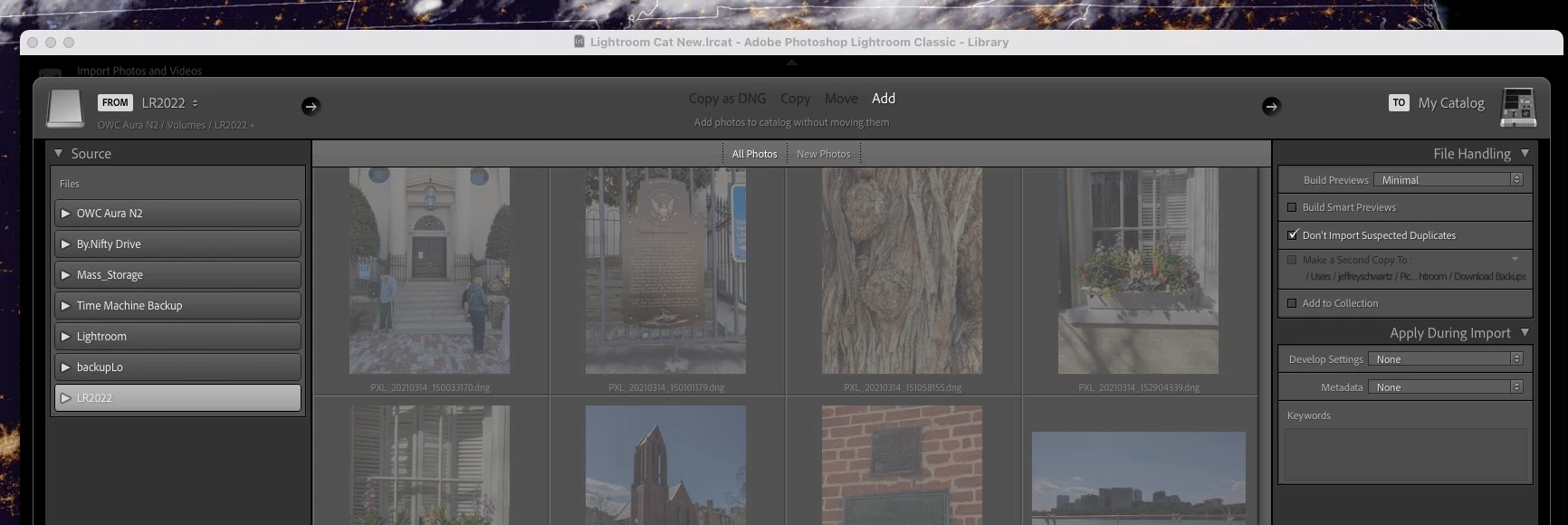


The only reason that I can think of is that the drive I'm trying to copy the files to has ~20GB of free space while the drive that I'm trying to copy the files from has about ~50GB of files but the import will only copy ~8GB of files.

 

This topic has been closed for replies.

2 replies

JohanElzenga
Community Expert
Community Expert
July 25, 2022

I believe both @Rob_Cullen and @ManiacJoe are missing the point, because your screenshot shows a lots of images already in the catalog. That has nothing to do with the problem, however. The problem seems to be lack of access to the desired destination drive.


There may be a permissions problem. Apple changed the security requirements in MacOS Monterey. Go to MacOS 'System Settings - Security & Privacy' and add Lightroom Classic and Photoshop to "Full Disk Access". Click on the lock icon to unlock the settings, then click on the plus icon to add Lightroom Classic and/or Photoshop if it isn't already listed. If it is listed, then just enable the checkbox. See also Quick Tips: How to give Full Disk Access to Lightroom Classic on macOS


-- Johan W. Elzenga
Rob_Cullen
Community Expert
Community Expert
July 25, 2022

Greyed out thumbnails might suggest that these photos are already in the catalog, result being that you cannot use the Import dialog for these photos a second time.


If you want them on a different drive you would drag & drop them in the Folder panel of Lr-Classic. See this blog article-

MOVING PHOTOS- 2 Methods


Also I would consider your 'Free space' to be very low for LrC purposes!


Regards. My System: Windows-11, Lightroom-Classic 15.0, Photoshop 27.0, ACR 18.0, Lightroom 9.0, Lr-iOS 10.4.0, Bridge 16.0 .
Inspiring
July 25, 2022

Thanks, I know that there are a lot of photos that are already imported and are grayed out. There are actually over 5k that is already in the catalog which is why I'm trying to copy/move them to the other drive so I si not have to try and manually delete the duplicate files. If I just do an add there's no way that I know of too easily find the duplicates. 

ManiacJoe
Inspiring
July 25, 2022

Moving files to a new drive and importing images are two very different tasks that serve two very different purposes. To move the already imported files to a new drive, see option 2 in the link from Rob's message above.