Inspiring
November 23, 2022
Answered

Moving files - taking forever to complete

  • November 23, 2022
  • 1 reply
  • 701 views

Hello - I am using Classic 12.0.1 on an M1 MacBook Pro (with external monitors)...have been using LR for 8+ years.


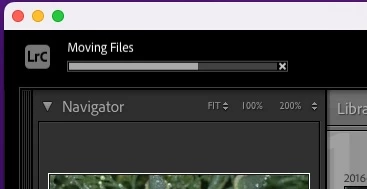
I keep my photos on an external SSD and have replaced it with a larger one. Yesterday I started the process of moving my files tofrom the 2TB SSD to the new 4TB SSD by first creating a folder on the 4TB drive in Finder, then in the Library module "adding" that folder, and then ddragging folders from the 2TB to the 4TB. At first things were working as expected, but last night I selected a few folders (each of which have subfolders, etc.) on the 2TB drive and dragged them to the 4TB drive, and while they do seem to have moved, I am concerned that the "Moving files" thermometer bar in the upper left corner of PR has not completed...and it has now been over 12 hours.


If it matters, at this point about 18K of the 36K total files have been ported to the 4TB; the rest still sit on the 2TB.


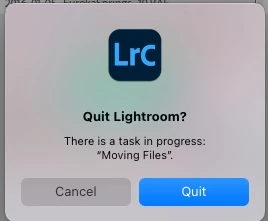
I do not want to quit LR (it gives the warning "there is a task in process: "Moving Files")


So, is it safe to quit LR and continue the move later? Will that corrupt some metadata or something?


TIA for any guidance
This topic has been closed for replies.
Correct answer Jao vdL

Check if the files and folders are visible in the original location in the finder or whether they have moved over. There used to be a very nasty bug in Classic many versions ago that would end up deleting the files in both locations if you moved them inside Classic which is why so many people advocate for copying in Finder and then reconnecting the images before deleting them in the original location. Safer but more steps.

1 reply

Sean McCormack
Community Expert
November 23, 2022

For future reference, it's easier to copy the contents of the drive over in the OS, and then manually right click on folders and choose Update Folder Location. It's even easier if the images are one parent folder that can be made visible using right click on a current parent folder and choosing 'Show Parent Folder'. That way you only need to update one folder to transfer. 


Sean McCormack. Author of 'Essential Development 3'. Magazine Writer. Former Official Fuji X-Photographer.
f8leeAuthor
Inspiring
November 23, 2022

Thanks very much - I guess I picked the wrong YouTube video to follow...I will do just what you said for the balance of my folders.


But do you think I will suffer any consequences from the apparently frozen thermometer bar indicating something is not yet complete?

Jao vdLCorrect answer
Community Expert
November 23, 2022

Check if the files and folders are visible in the original location in the finder or whether they have moved over. There used to be a very nasty bug in Classic many versions ago that would end up deleting the files in both locations if you moved them inside Classic which is why so many people advocate for copying in Finder and then reconnecting the images before deleting them in the original location. Safer but more steps.